MK-101 w/JCS Stand Revision 04/05, Effective Date August 19, 2005
Page 35
MAINTENANCE AND TROUBLESHOOTING
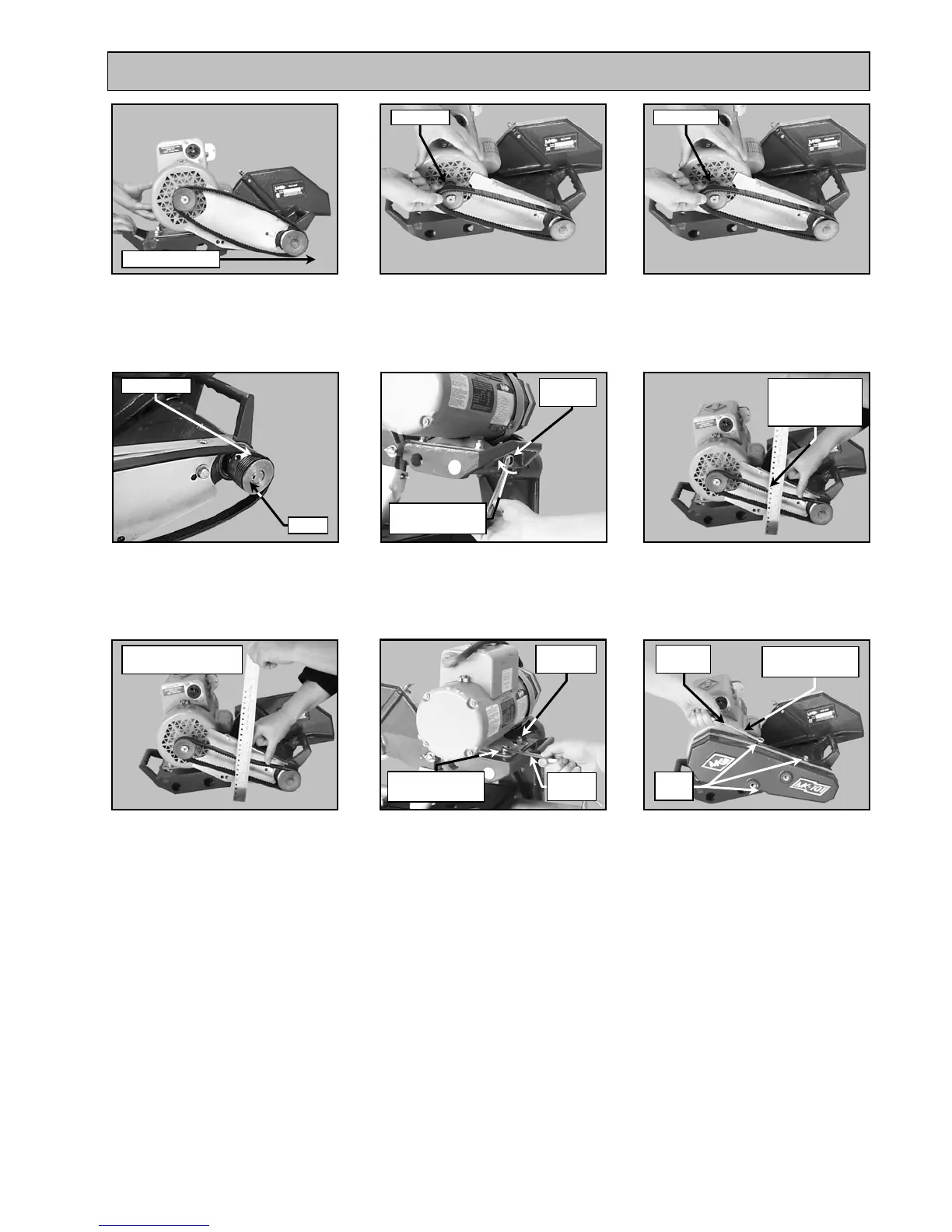
Check Tension
1/2-way
between pulleys
Three
Bolts
7/16-inch
Wrench
(K)
Remove the V-belt
(M)
Verify the V-belt is seated in the
grooves of both pulleys
(J)
Push the motor toward the
front of the Cutting Head to
loosen the V-belt
(L)
Install the new V-belt
(MK Diamond Part No. 158194)
(N)
Tighten the Motor Adjustment
Strap to remove slack
(O)
Check V-belt tension
(proper tension 1/8-inch)
(P)
Repeat steps N and O until
proper V-belt tension
is achieved
(Q)
Tighten the motor
mounting bolts
(R)
Install the Belt Guard
Continue Adjustment
Until Correc
Direction of push
Old V-
el
ew V-
el
Belt Seated
Pulley
Rotate clockwise
to tighten
9/16-inch
Wrench
Retaining
Bolts
Rotate clockwise
to tighten
Rotate clockwise
to tighten
1/2-inch
Wrench


 To Next Page