EasyManua.ls Logo

MKS 275 series - User Manual

MKS 275 series
55 pages
Print Icon
To Next Page IconTo Next Page
Loading...
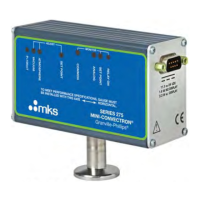
Series 275
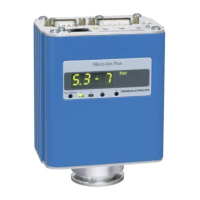
Mini-Convectron
®
Module with RS-485
and
Dual Process Relays
Instruction Manual
Instruction manual part number 275547
Revision C December 2021

Other manuals for MKS 275 series

Questions and Answers

  • K
    kimberly26Aug 6, 2025
    Why is the MKS Industrial Equipment pressure readout different from other gauges?
    • L
      Linda BentleyAug 7, 2025
      If the pressure readout from your MKS Industrial Equipment Mini-Convectron is significantly different from other gauges, first, determine the actual gas type in the chamber and calibrate the Mini-Convectron Module accordingly. Unexpected gas sources can also be caused by the process within the chamber or outgassing of the product in the process chamber.
  • L
    Laurie StoneAug 13, 2025
    What to do if MKS Industrial Equipment pressure readout cannot be calibrated?
    • G
      gjonesAug 13, 2025
      If the pressure readout from your MKS Industrial Equipment cannot be calibrated, it might be due to the gauge tube being contaminated with material from the vacuum chamber. In this case, clean or replace the gauge tube. Also, if the gold plating on the sensor wire has been attacked by a gas, the gauge tube must be replaced.
  • A
    Antonio CookAug 25, 2025
    What to do if MKS Industrial Equipment Bridge analog output voltage is out of range?
    • R
      Rodney HillAug 25, 2025
      If the analog output voltage of your MKS Industrial Equipment Bridge reads less than +0.22 Vdc or greater than +10 Vdc, it could be due to gauge tube failure. In this case, check the gauge tube. It can also be due to bridge amplifier failure, in which case you should replace the Module.
  • S
    Sara SextonAug 30, 2025
    How to troubleshoot MKS Industrial Equipment unit that will not power-up?
    • C
      Christopher WilliamsAug 30, 2025
      To troubleshoot why your MKS Industrial Equipment unit will not power up, check for +11 Vdc to +26.5 Vdc power across pins 2 and 3 of the DeviceNet connector.
  • C
    Cindy JordanSep 10, 2025
    Why is the pressure reading on my MKS Industrial Equipment grossly in error?
    • C
      Cynthia Ellis MDSep 12, 2025
      If the pressure reading from your MKS Industrial Equipment is grossly in error, it could be due to several factors. The controller might be out of calibration. Other possible causes include an unknown gas type, the gauge not being mounted horizontally, a damaged or dirty sensor, or extremes of temperature or mechanical vibration.

Summary

Safety

1.1 Safety Introduction

Introduces important safety instructions, notes, and symbols.

1.2 Grounding Requirements

Details requirements for gauge and system grounding for safe operation.

1.3 High Voltage

Discusses potential hazards of high voltage in vacuum systems.

1.4 Over-Pressure Conditions

Advises on installing devices to limit pressure and avoid over-pressurization.

1.5 System and Environment

Covers warnings related to explosive environments and automatic operation.

1.6 Responsibility

Outlines customer responsibilities for installation, operation, and service.

1.7 Damage Requiring Service

Lists conditions requiring professional servicing for the product.

1.8 Service Guidelines

Provides guidelines for contacting technical support and returning products for service.

1.9 Warranty Information

Details the product's warranty period and terms.

1.10 FCC Verification

States compliance with FCC rules regarding radio frequency interference.

Introduction

2.1 Introduction

Describes the Mini-Convectron module and its features for vacuum measurement.

2.2 Gauge Tube Construction

Explains the materials and design of the Convectron gauge tube.

2.3 Specifications

Lists the technical specifications of the Mini-Convectron module.

2.4 Receiving Inspection

Outlines procedures for inspecting received shipments.

2.5 International Shipments

Details procedures for handling international shipments and claims.

2.6 Damaged Material

Instructs on handling damaged materials and contacting customer service.

Installation

3.1 Important Precautions for Mini-Convectron Installation

Lists critical precautions for installing the Mini-Convectron module.

3.2 Install Pressure Relief Devices

Advises on installing pressure relief devices before module installation.

3.3 Installation Procedure

Outlines the steps involved in the module installation process.

3.4 Locate and Orient the Module

Explains how to properly position the module for accurate measurements.

3.4.1 Locate the Module

Details optimal locations for the module to ensure accurate readings.

3.4.2 Orient the Module

Details the correct orientation of the module for optimal performance.

3.5 Attach the Module to the Vacuum Chamber

Provides instructions on physically connecting the module to the vacuum chamber.

3.5.1 Gauge Mounts

Describes various fitting types for mounting the gauge.

3.6 I;O Connector Wiring

Guides on how to wire the I/O connector for the module.

3.7 Grounding

Explains the necessary grounding procedures for the module and system.

3.8 RS-485 Network Wiring

Details how to connect multiple controllers in an RS-485 network.

3.8.1 Configure the setpoint relays for the application

Guides on setting up process control relays for specific applications.

Operation

4.1 Power Requirement

Specifies the voltage and power requirements for the module.

4.2 Front Panel Features

Describes the indicators and controls on the module's front panel.

4.3 Digital Communications

Outlines default settings for digital communication interfaces.

4.4 Syntax;Address Overview

Explains the command structure and addressing for RS-485 communication.

4.4.1 RS-485 Address Switch Settings

Details how to configure RS-485 base module address settings.

4.4.2 Baud Rate, Stop Bit and Parity

Explains how to set baud rate, stop bit, and parity for communication.

4.4.3 RS-485 Command Set

Lists and explains commands for controlling and querying the module.

4.4.4 Command - Response Timing

Details the timing aspects of command and response exchanges.

4.4.5 Input Voltage Error

Explains error messages for input voltage outside specifications.

4.4.6 RX, TX Timing

Provides timing data for data transmission and reception.

Calibration

5.1 Calibration

Covers procedures for calibrating the Convectron gauge.

5.1.1 Vacuum Adjust

Details the steps for performing vacuum calibration.

5.1.2 Atmosphere Adjust

Explains how to calibrate the gauge at atmospheric pressure.

5.2 Use with Gases Other Than N2 and Air

Guides on using the gauge for gases other than N2 and air with safety precautions.

Maintenance

6.1 General Information

Provides general information on service and contacting MKS.

6.1.1 Damage Requiring Service

Lists conditions that require professional service for the module.

6.2 Troubleshooting

Offers guidance for diagnosing and resolving common issues.

6.2.1 Precautions

Outlines safety precautions to follow during troubleshooting.

6.3 Symptoms and Possible Causes

Lists common symptoms and their potential causes for troubleshooting.

6.4 Convectron Gauge Removal and Replacement

Provides detailed steps for removing and replacing the Convectron gauge.

6.5 Convectron Gauge Test

Explains how to perform tests on the Convectron gauge for troubleshooting.

MKS 275 series Specifications

General IconGeneral
DisplayLCD
Power24 VDC
Protection ClassIP20
CommunicationRS-485
Output Voltage Range0 to 10 VDC

Related product manuals