EasyManua.ls Logo

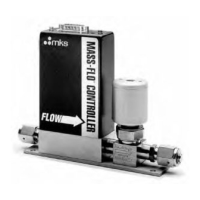
MKS Mass-Flo 2179A - User Manual

MKS Mass-Flo 2179A
88 pages
Print Icon
To Next Page IconTo Next Page
Loading...
116527-P1
Rev E, 3/99
Instruction Manual
MKS Type 1179A and 2179A
Mass-Flo
®
Controller
and
Type 179A Mass-Flo Meter
Six Shattuck Road
Andover, MA 01810-2449
(800) 227-8766 or (978) 975-2350
Fax: (978) 975-0093
E-mail: mks@mksinst.com
Web site: http://www.mksinst.com

Table of Contents

Questions and Answers

  • M
    Michael BrownAug 9, 2025
    What to do if MKS Mass-Flo 2179A show no output at zero?
    • A
      Anthony GomezAug 9, 2025
      If your MKS Measuring Instruments unit shows no output or overrange at zero after warming up, first check the cable type. If the cable is correct, ensure the valve override function is disconnected. If the issue persists, it may indicate an electronics malfunction, requiring the unit to be returned for service.
  • H
    Heather FieldsAug 15, 2025
    Why is my MKS Mass-Flo 2179A Measuring Instruments oscillating?
    • R
      Robert McgeeAug 15, 2025
      If your MKS Measuring Instruments exhibit oscillation, it might be due to a controller gain setting that's too high. Try reducing the gain by turning it counter-clockwise. Also, verify that the upstream pressure regulator meets the manufacturer's specifications and that the upstream pressure isn't excessively high. If it is, reduce the upstream pressure.
  • J
    jenniferblackAug 20, 2025
    What to do if MKS Mass-Flo 2179A Measuring Instruments unit does not achieve full flow?
    • R
      Robert KimAug 20, 2025
      If your MKS Measuring Instruments unit does not achieve full flow, the upstream pressure might be too low. Try increasing the upstream pressure. Alternatively, excessive valve preload could be the cause.
  • G
    Grant TuckerAug 27, 2025
    Why does my MKS Mass-Flo 2179A unit indicate a negative flow?
    • N
      Nancy WhiteAug 27, 2025
      If your MKS Measuring Instruments unit indicates a negative flow, it is likely that the unit was installed backwards in the gas stream. Reinstall the unit in the proper flow direction.
  • B
    Brian CombsSep 2, 2025
    What to do if MKS Mass-Flo 2179A Measuring Instruments controller does not function?
    • M
      Mary MendozaSep 2, 2025
      If the controller of your MKS Measuring Instruments does not function, this could be due to an electronics malfunction, requiring the unit to be returned for service. Another possibility is a valve sticking.

Summary

Mass Flow Controller Safety Information

Safety Procedures and Precautions

Do Not Substitute Parts or Modify Instrument

Prohibits unauthorized parts replacement or modifications to the instrument.

Service by Qualified Personnel Only

States that component replacement and internal adjustments must be done by qualified personnel.

Use Caution When Operating with Hazardous Materials

Advises caution when using hazardous materials and ensuring compatibility.

Purge the Instrument

Instructs to purge the unit with clean, dry gas after installation or before removal.

Do Not Operate in an Explosive Environment

Warns against operating the instrument in explosive environments unless certified.

Operate at Safe Inlet Pressures

Advises operating the unit within its rated maximum pressure limits.

Chapter One: General Information

Design Features

Details the advanced flow sensor, control valve, and optimized bypass of the 1179 flow controller.

Chapter Two: Installation

Chapter Three: Overview

Type 2179 MFC with a Positive Shutoff Valve

Describes the Type 2179's positive shutoff valve and its specifications.

Electrical Connections

Details electrical connection options for the 1179 flow controller.

The Gas Correction Factor (GCF)

Explains the Gas Correction Factor (GCF) and its use in flow rate calculations.

How To Calculate the GCF for Pure Gases

Provides the equation for calculating Gas Correction Factor for pure gases.

How To Calculate the GCF for Gas Mixtures

Details the equation for calculating GCF for gas mixtures.

Chapter Four: Operation

How To Start Up the MFC;MFM

Guides the user through the initial startup procedure for the MFC/MFM.

How To Zero the Flow Controller

Explains the procedure for setting the zero point of the flow controller.

How To Adjust the Controller Gain (MFC only)

Instructs on adjusting controller gain to reduce signal oscillation.

How To Override the Valve (MFC only)

Explains how to use the valve override feature to open or close the valve.

Chapter Six: Maintenance

Zero Adjustment

Advises checking and resetting the zero setting periodically for accuracy.

Chapter Seven: Troubleshooting

Troubleshooting Chart

Presents a chart of symptoms, possible causes, and remedies for troubleshooting.

How To Adjust the Valve Preload (MFC only)

Details the procedure for adjusting the valve preload for MFCs.

Appendix A: Product Specifications

Appendix C: Gas Correction Factors

Appendix D: MFC Sizing Guidelines

MKS Mass-Flo 2179A Specifications

General IconGeneral
Operating PressureUp to 150 PSIG (10.3 barg)
Operating Temperature50 °C
Output Signal0-5 VDC
Process Connection1/4"
Wetted Materials316L stainless steel
Electrical Connections9-Pin D-Sub Connector
Weight1.1 kg (2.4 lbs)
Repeatability±0.25% of Full Scale

Related product manuals