18 | PSR1A/PSR4A POWER SUPPLY AND PRESSURE/FLOW READOUT
MKS P/N 20068380-001 Rev A
5 Operation
5.1 Buttons
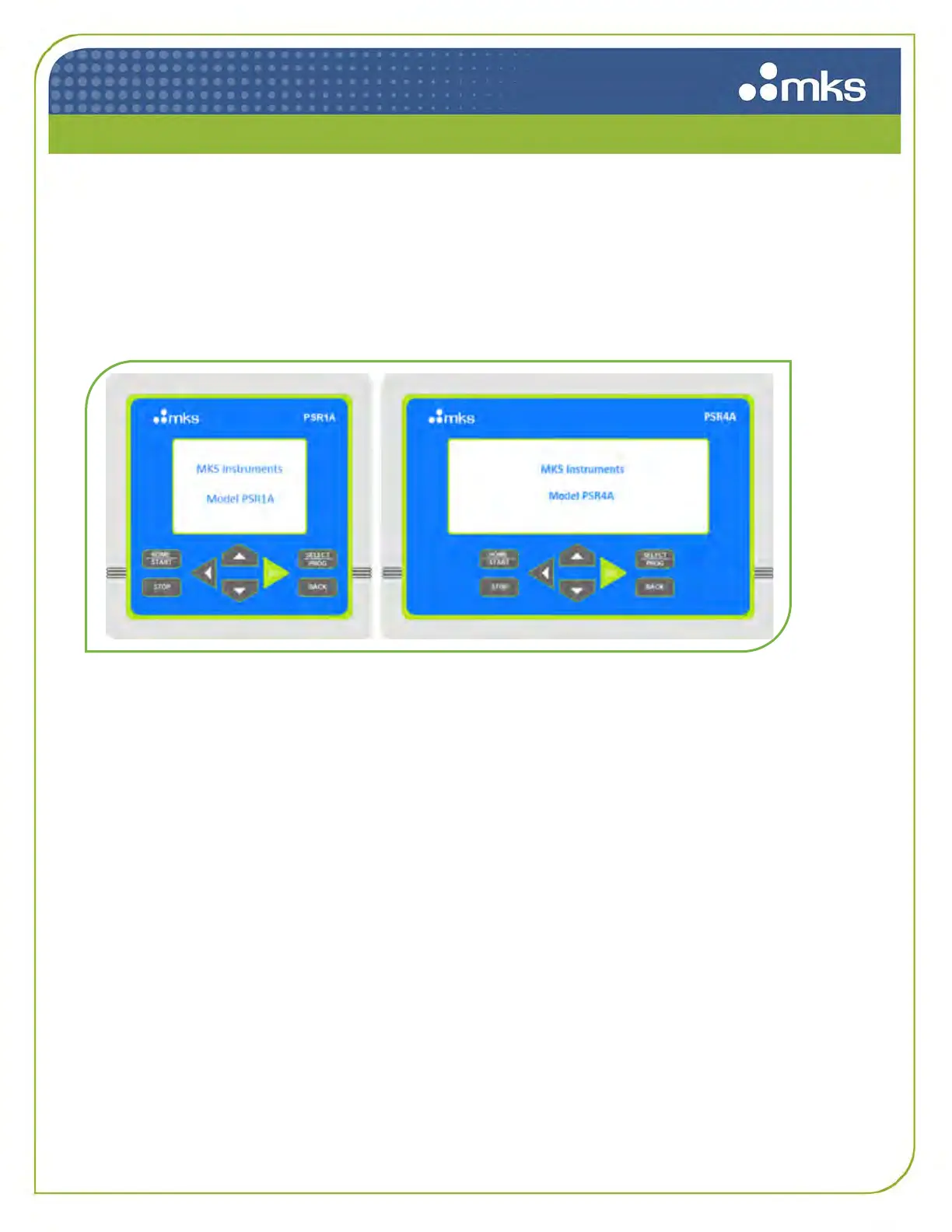
The front panel of the PSR1A/PSR4A has four buttons in a central cluster and two buttons on either
side of the cluster, as shown below.
Figure 6: Front Panel Buttons
The central cluster consists of a green SET button, and three directional arrow buttons, UP, DOWN,
and BACK. The left two buttons are HOME | START and STOP, and the right two buttons are SELECT
| PROG and BACK.
5.1.1 Center Cluster Buttons
The arrow directional buttons UP and DOWN are used to scroll up or down in a menu to display or
choose a function. The BACK button is used to return to the previous screen. The SET button is used
to change a setting.
5.1.2 Left Side Buttons
The HOME | START button can be used to return to the home screen, or to start logging in future
releases. The STOP button would be used to stop logging data.
5.1.3 Right Side Buttons
The SELECT | PROG button can be used to change a selected setting, or to start programming in
future releases. The BACK button is used to return to the previous screen.



 To Next Page