20
Formatting
File Download/Upload
19
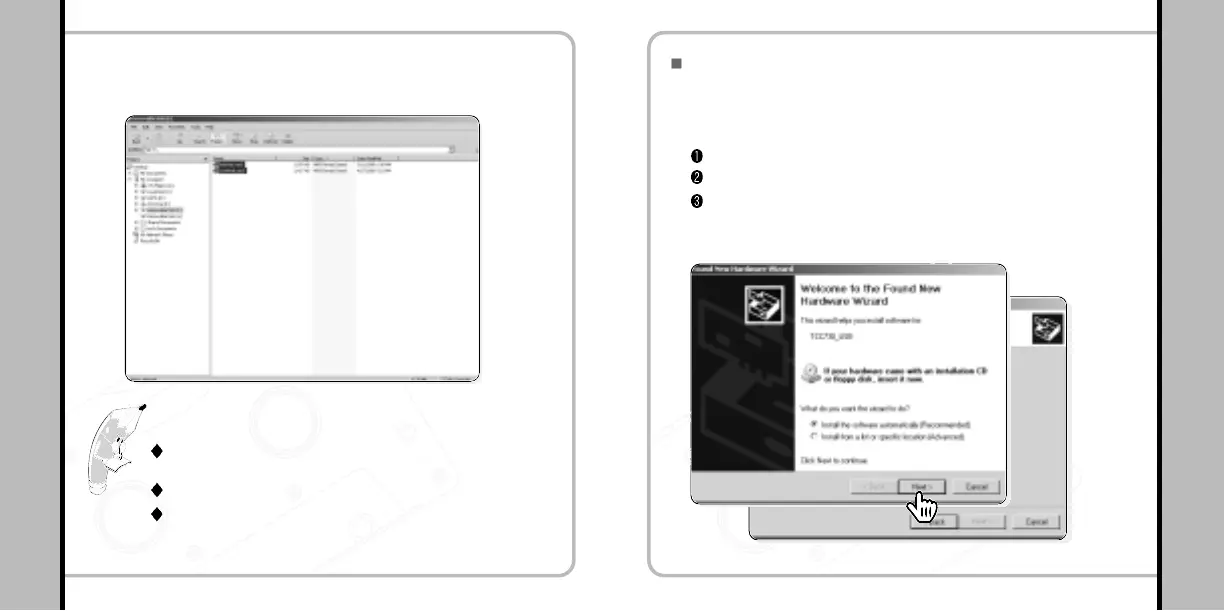
File saving has been completed in the player as
shown below.
3
Please Note!
By taking following the steps shown above, files can be saved from the
player to the PC.
Mouse Drag & Drop is enabled to upload/download the files.
Don’t delete or modify config.sys file (hidden) in the memory as the file is
a system file of the player.
Completion of Installation (For Windows XP)
Connect the player to the PC in its Recovery Mode.
The following wizard will appear. Please follow the
instructions.
1
To enable Recovery Mode;
Turn the power on
Press VOL+ and FF buttons simultaneously for more than 2 seconds.
if the orange colored LED blinks, the player is in Recovery Mode.
Click!
Click!
Click!
Click!
Click!
Click!
Click!
Click!
Click!
Click!
Click!
Click!
Click!
Click!
Click!
Click!
Click!
Click!
Click!
Click!
Click!
Click!
Click!
Click!
Click!
Click!
Click!
Click!
Click!
Click!
Click!
Click!
Click!
Click!


 To Next Page