Recording FM Radio
45
Recording FM Radio
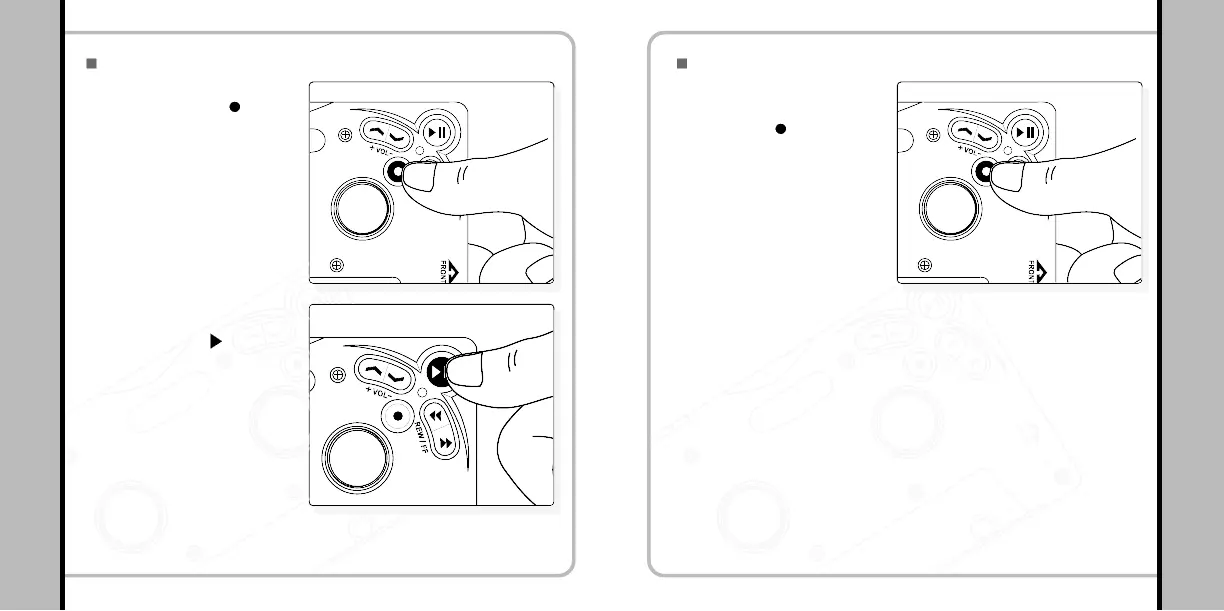
Press the REC ( ) button
while listening to the radio.
(Orange LED turns on)
1
Press PLAY ( II)) after
recording the sound
source.
2
- Press the button again to start the
recording the orange LED will blink.
- The FM sound resource you’re
currently listening to will be
recorded as a MP3 file.
- Then the recording stops creating
a file.
- Files will be saved as E001,
E002,… in sequence. When the
memory gets full of files, it stops
automatically.
46
Setting Ranged Repeat
A – B BOOKMARKING FEATURE
When you press the
REC/A-B ( ) button once
shortly while a file is
playing in MUSIC mode,
the range ‘A’ is set with
the orange LED blinking
once.
1
After 3 seconds or longer, press the REC button again to
set the range ‘B’ with the orange LED blinking once, and
the player will repeat the range A-B. If ‘B’ is not set, the
end of the music will be set as B position by default.
2
Pressing the REC/A-B button in ranged repeat play will
release the REPEAT MODE.
3


 To Next Page