38
Voice Recording & Music Recording
Selecting Next & Previous Music
37
Selecting Next/Previous Music
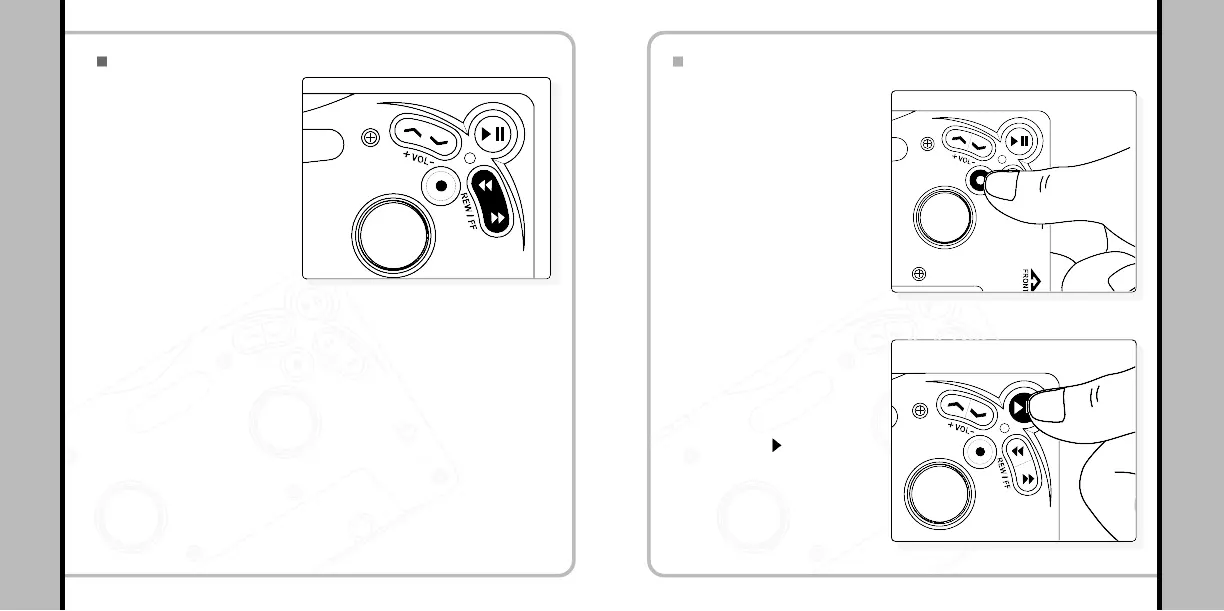
- Press and hold the FF/REW
button for a longer period to
search a certain part of the
music while it is playing.
- release the button to continue
play
- Press REW/FF button while the track is in playing to play the next track.
- Press REW button within five seconds from start of a track to play the previous
track from the beginning.
Searching a certain part
of a file
1
Searching a file in the play mode
2
- Press REW/FF button once shortly in pause status to search the file you
need by moving to the next/previous track.
Searching a file in pause mode
3
Starting voice recording
1
Voice Recording
By turning the power on, press
and hold REC/A-B button until
an orange LED turns on, and
press the button once more to
start the voice recording. Then
the orange LED will blink.
Voice recording stop
2
Press PLAY ( II) button to stop
the voice recording creating a
new voice file. (V001, V002,
V003…)


 To Next Page