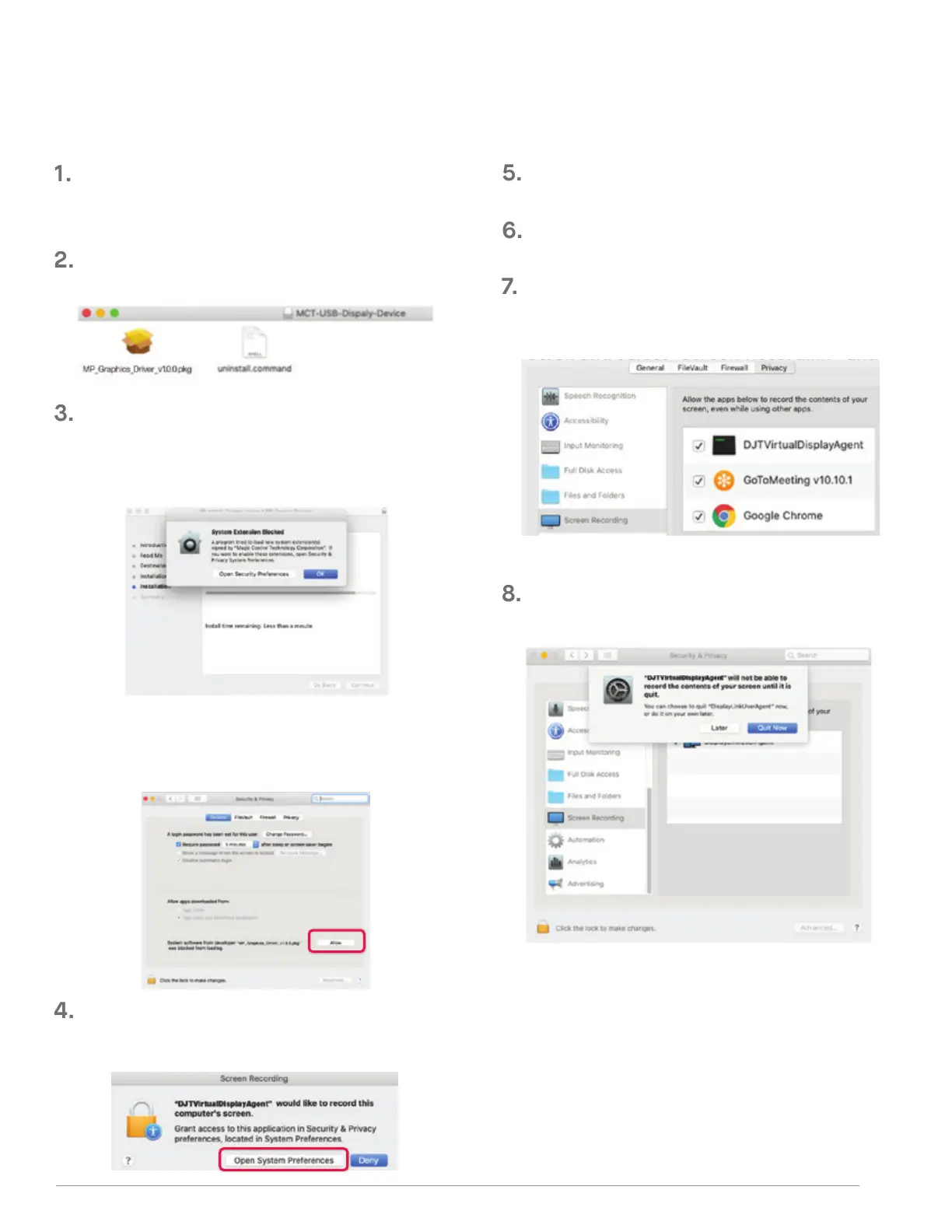
Click “MP_Graphics_Driver_v1.0.0.pkg”, please follow
the instructions to install the device driver.
(After System Reboot) Connect Mobile Pixels device to Mac
computer, a screen recording prompt should pop up
“Click Open System Preferences”
Go to System Preferences > Security & Privacy > Privacy
Click on the Lock to make changes
Scroll and select “Screen Recording” and check
“DJTVirtualDisplayAgent”
Click on the Lock to save changes Click “Quit Now”
The system should pop‐up a screen “System Extension
Blocked” after installation asks the user to enable these
extensions forthe first time .Click “Open Security
Preference” go to setting and restart the laptop.
Please download the Mac driver from the link below.
Run the .pkg file to load the drivers to the mac folder
WWW.MOBILEPIXELS.US/PAGES/DOWNLOAD-DRIVERS
Important: This warning is not always shown. Even if it
is not shown, for new installations the user must
“Allow” to install the Mobile Pixels driver.
. MAC INSTALLATION GUIDE
Do not plug the Mobile Pixels Device into your mac before executing the driver installation
3



 To Next Page