3
Monitor Installation
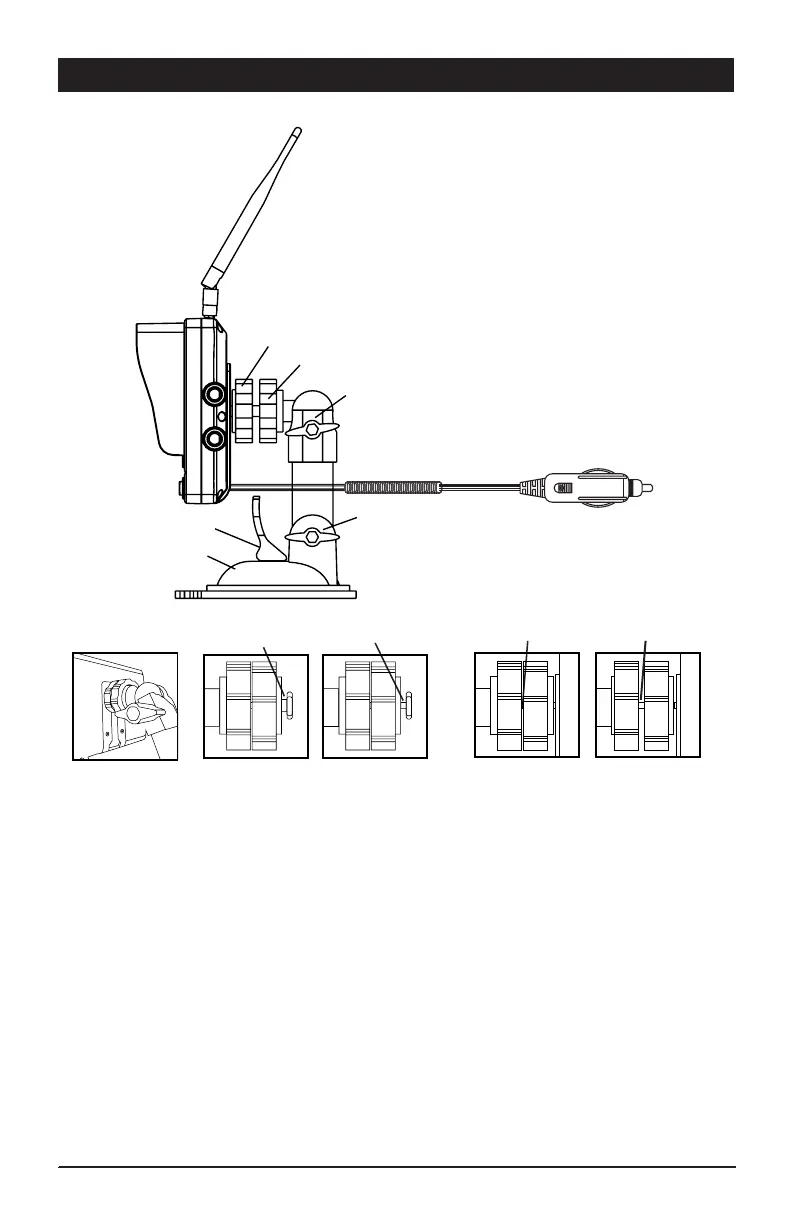
1. Loosen the mounting thumb wheel on the suction cup mounting base, so the
mounting nut attached to the monitor mounting thumb wheel can slide completely into
the monitor’s base mounting slot (Figure A).
Note: Make sure the nut is aligned correctly to allow the narrow side of the nut to slide
all the way into the small channel of the monitor’s base mounting slot. (Figure B)
2. Tighten the mounting thumb wheel against the monitor. Lock the mounting thumb
wheel in place by tightening the locking thumb wheel.
(Figure C)
3 Position the suction cup mount onto desired flat smooth surface location and secure
into place using the pull lever. Make sure to remove protective packing plastic sheet
from bottom of suction cup.
4. Adjust the monitor to desired viewing position by loosening the upper tilt / swivel and
lower tilt adjustments. Tighten to hold in desired viewing position.
5. Install the antenna onto the monitor.
Figure A
Figure B
Figure C
Correct
Correct
Incorrect
Incorrect
Mounting Thumb Wheel
Antenna
Locking Thumb Wheel
Lower Tilt
Upper Tilt / Swivel
Pull Lever
Suction Cup
Mounting Base
Vehicle Power Adapter


 To Next Page