4
MobileVision Factory Pre Wired Installation
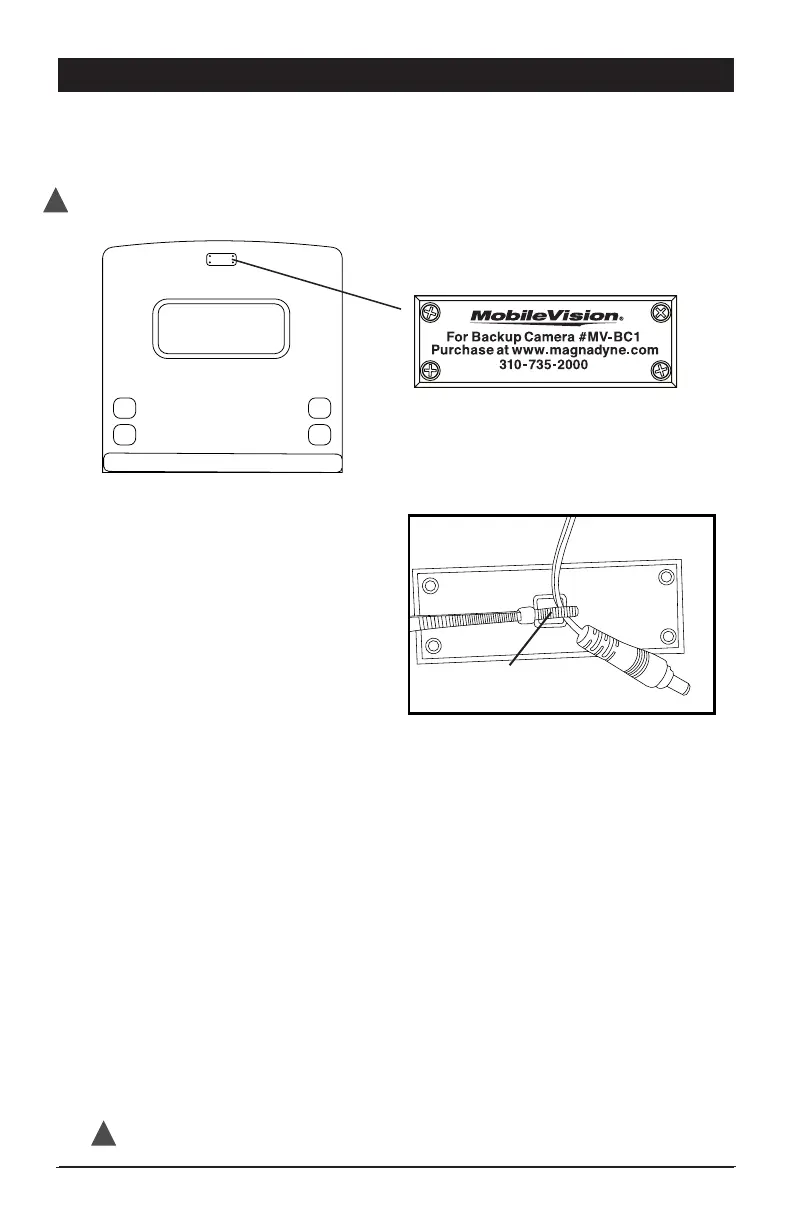
If your vehicle is Pre Wired and ready for the MV-BC1 Camera / Monitor System the
back of your vehicle will have a MobileVision Pre Wired plate in this general location
and the plate will look like the below illustration.
1) Pre Wired Camera Power
Lead:
• Remove 4 screws from plate.
Store the screws as you will
use these to attach the camera
in step 2 .
• Wire tied to the back of the
plate is the camera power cord.
Carefully cut the wire tie to release
the power lead. Use caution not to
damage power lead. Plastic cover
may be discarded.
2) Mounting the Camera to the Vehicle:
• Make sure vehicles power lead passes through the gasket’s large center hole.
Use precaution to prevent lead from falling into vehicle.
• Connect the camera and vehicle power leads. Make sure the connectors are
securely twist-locked together.
• Push the connected power leads back through the 3/4” hole in the middle of
the gasket and into vehicle.
• Without removing camera adjustment screws from bracket, align the camera
and bracket with the gasket and pre-drilled holes in the vehicle. Using the
4 screws removed in Step 1, attach and secure the camera, bracket and gasket
into position using a screw driver inserted between the camera and the bracket
wall. Make sure antenna mounting screw is facing up. (Figure A)
• Adjust viewing angle of camera by loosening camera adjustment screws
and then tighten.
• Mount the antenna on camera.
carefully cut wire tie
to release power cord
DISCONNECT VEHICLE POWER BEFORE STARTING INSTALLATION
!
Test System Operation before adding any additional sealant to permanently mount camera.
!


 To Next Page