6
Non-MobileVision Factory Pre Wired Installation
If your vehicle is equipped with another manufacturers camera pre wired kit other than
MobileVision, install the MV-BC1 Camera / Monitor System using the following steps.
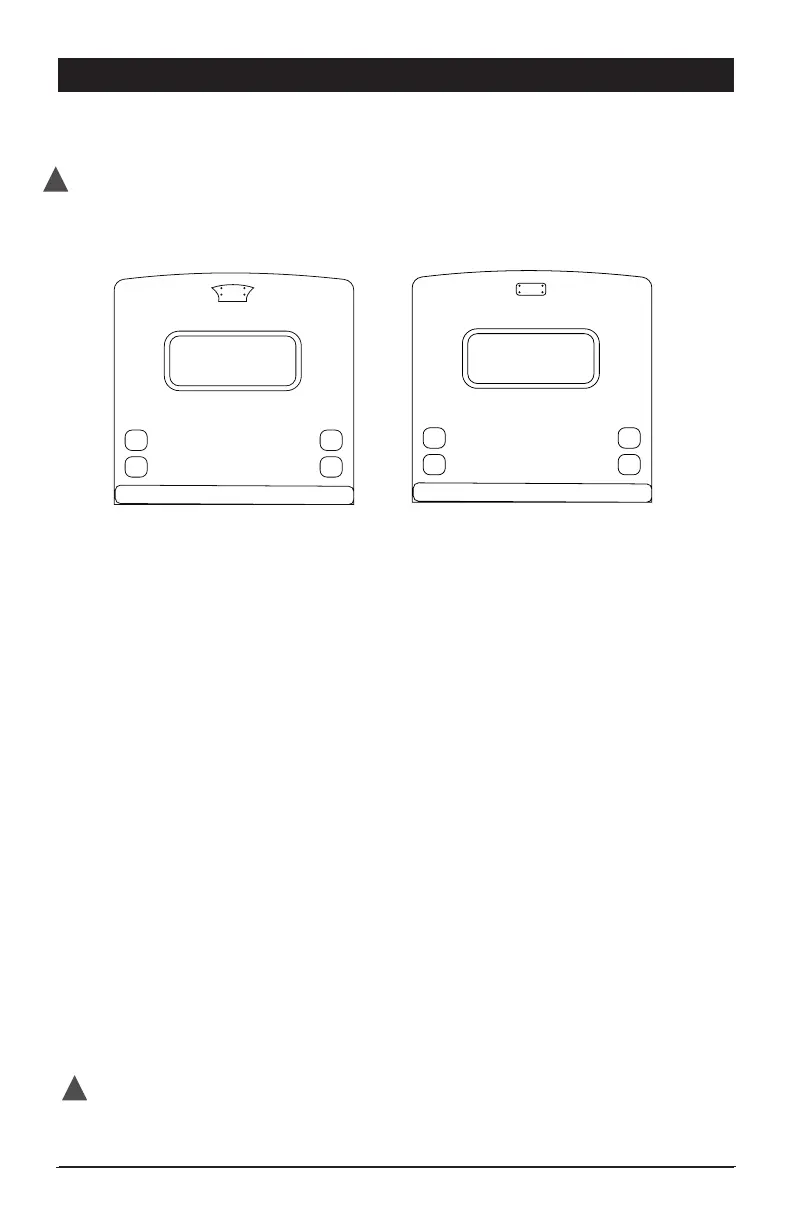
A. B.
How to Identify if your vehicle has a camera pre wired kit and ready for MV-BC1 installation.
Option A - Installation
If your vehicle has a pre wired install cover plate with the above illustrated shape
follow these steps to install the camera.
• Unscrew the plate from the back of the vehicle and remove the plate and gasket.
Store the screws as you will use these to attach the camera and gasket.
• Unattach power lead from pre wired plate or locate in the area.
• Make sure vehicles power lead passes through the gasket’s large center hole.
Use precaution to prevent lead from falling into vehicle.
• Use supplied adapter power harness to connect camera and vehicle power
leads. (Figure A) Make sure the connectors are securely twist-locked together.
• Push the connected power leads back through the 3/4” hole in the middle of
the gasket and into the vehicle.
• Without removing camera adjustment screws from bracket, align the camera and
bracket with the gasket and pre-drilled holes in the vehicle. Using the 4 screws
removed in Step 1, attach and secure the camera, bracket and gasket into
position using a screw driver inserted between the camera and the bracket wall.
Make sure antenna mounting screw is facing up. (Figure A)
• Adjust viewing angle of camera by loosening camera adjustment screws
and then tighten.
• Mount the antenna on camera.
Test System Operation before adding any additional sealant to permanently mount camera.
!
DISCONNECT VEHICLE POWER BEFORE STARTING INSTALLATION
!


 To Next Page