12
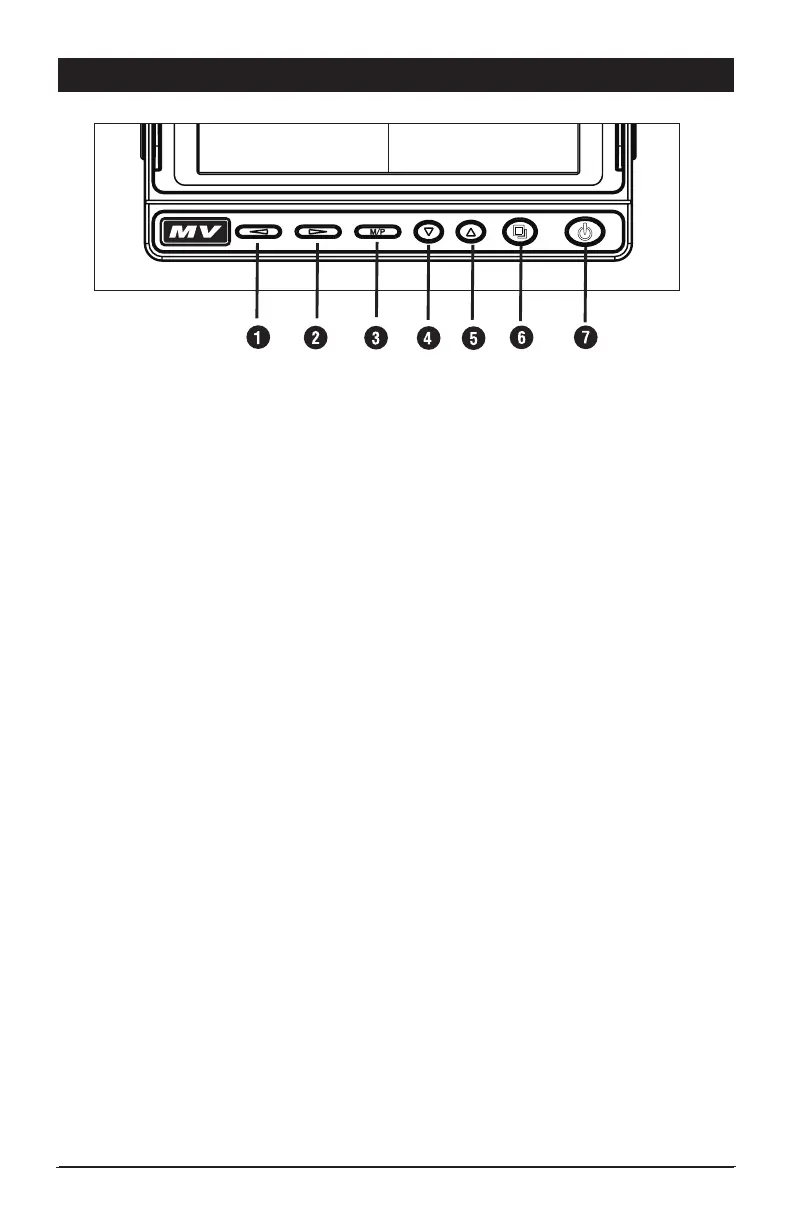
Button Operations
1) Multifunction Button
- Volume Down in camera view.
- Left selection for menu settings.
2) Multifunction Button
- Volume Up in camera view.
- Right selection for menu settings
3) Multifunction Button
Push to open menu, push again to close menu. Push and hold for 3 seconds
to enter camera pairing mode.
4) Multifunction Button
- Down selection control when in Menu view.
- Down camera selection and split camera screen control in camera view.
5) Multifunction Button
- Up selection when in Menu view.
- Up camera selection and split camera screen control in camera view.
6) Multifunction Button
- Split screen selection in camera view. Press and release to change multiple
camera views.
- Select button while in menu settings mode.
7) Power On / Standby Button
- In standby mode, the button is illuminated red. The screen is off. The screen
will view a camera when a trigger input is active. When the trigger is removed,
the screen will return to off.
- In power ON mode, the button is not illuminated and the screen will display
the #1 camera by default.



 To Next Page