101/160
Network and Power Connection, Additional Cables
© MOBOTIX AG • Security-Vision-Systems • Made in Germany
www.mobotix.com • sales@mobotix.com
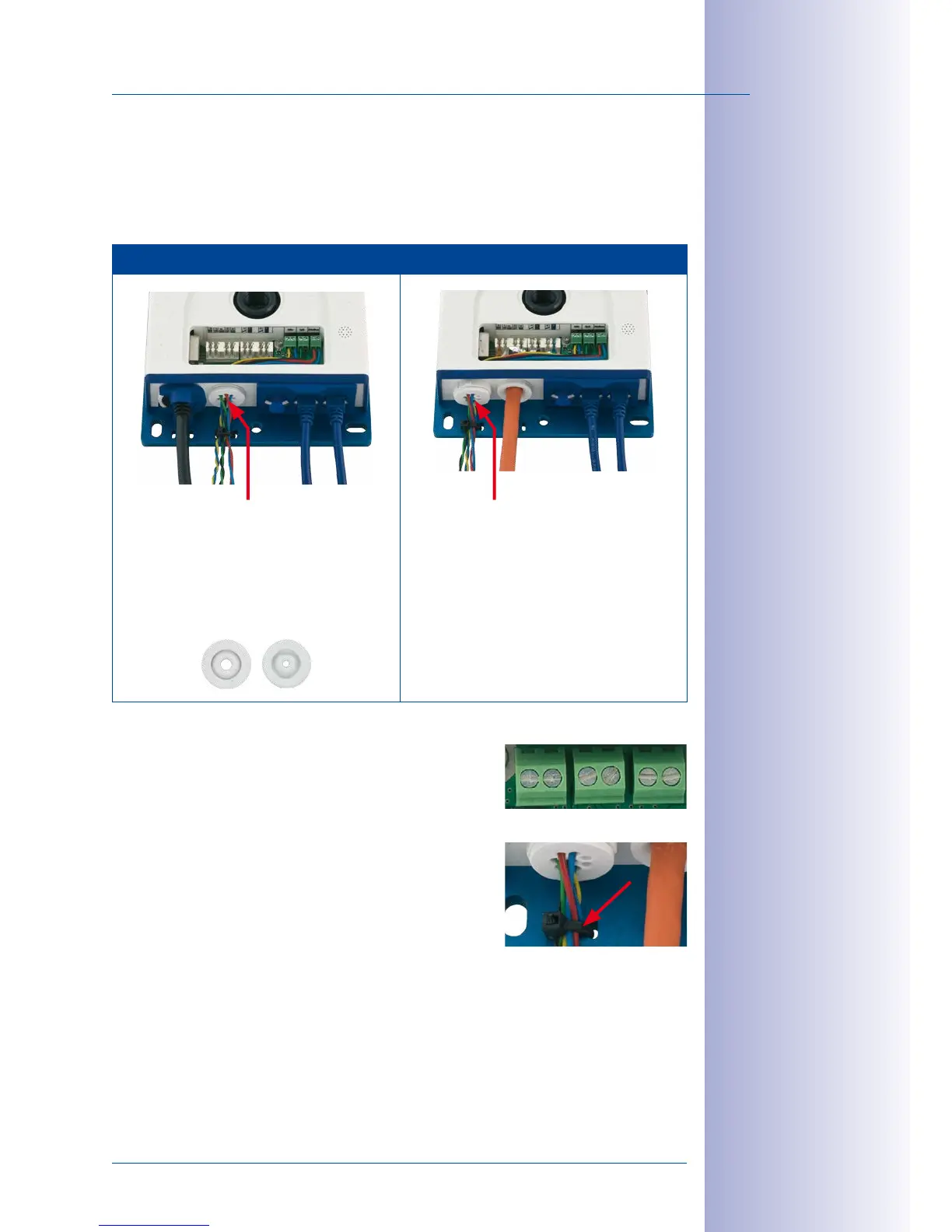
2.5.3 Connecting Additional Cables
Additional cables can be fed through the free opening in the housing, depending on the
Ethernet connector used (patch cable or installation cable). If an installation cable is used,
additional cables should be installed after the installation cable has been fitted.
Ethernet via Patch Cable Ethernet via Installation Cable
Additional cables
(MxBus, microphone, speaker)
1. Replace any single wire plugs with
appropriate cable plugs (M.4/5) for
additional cables.
(MxBus, microphone, speaker)
1. Remove the bayonet catch and the
patch cable and push the single wire
plug or appropriate cable plug (M.4/5)
in so that the edges protrude inside. The
bayonet catch will no longer be used.
2. Push the single wire plug with the individual wires through or push the cable with
sheathing through the cable plug.
3.
Connect the wires to the corresponding screw terminals
with the help of the screwdriver supplied.
4. Fix single wires or cables to the base plate using one
of the cable ties supplied.
5. Connect wires to the corresponding devices (MxBus
module, microphone, speaker).
Mic Speaker MxBus



 To Next Page