96/160
S15 Camera Manual: Installation
© MOBOTIX AG • Security-Vision-Systems • Made in Germany
www.mobotix.com • sales@mobotix.com
2.4 Installing the S15M FlexMount
2.4.1 Connecting Network Cables and Additional S15M Cables
As the S15M is mounted in the intended position with the front panel behind, the housing
cover cannot be removed after mounting. All the cables to be connected there (Ethernet
installation cable, MxBus, microphone, speaker) are then no longer accessible and the
connector for the network patch cable can only be accessed with diculty. The triple lock
for connecting the MiniUSB cable can no longer be opened either. This is why you should
connect the camera network cables, a MiniUSB cable, if required, and additional cables
(MxBus, microphone, speaker)
before mounting the camera
as described in
Section 2.5,
«Network And Power Connection, Additional Cables»
.
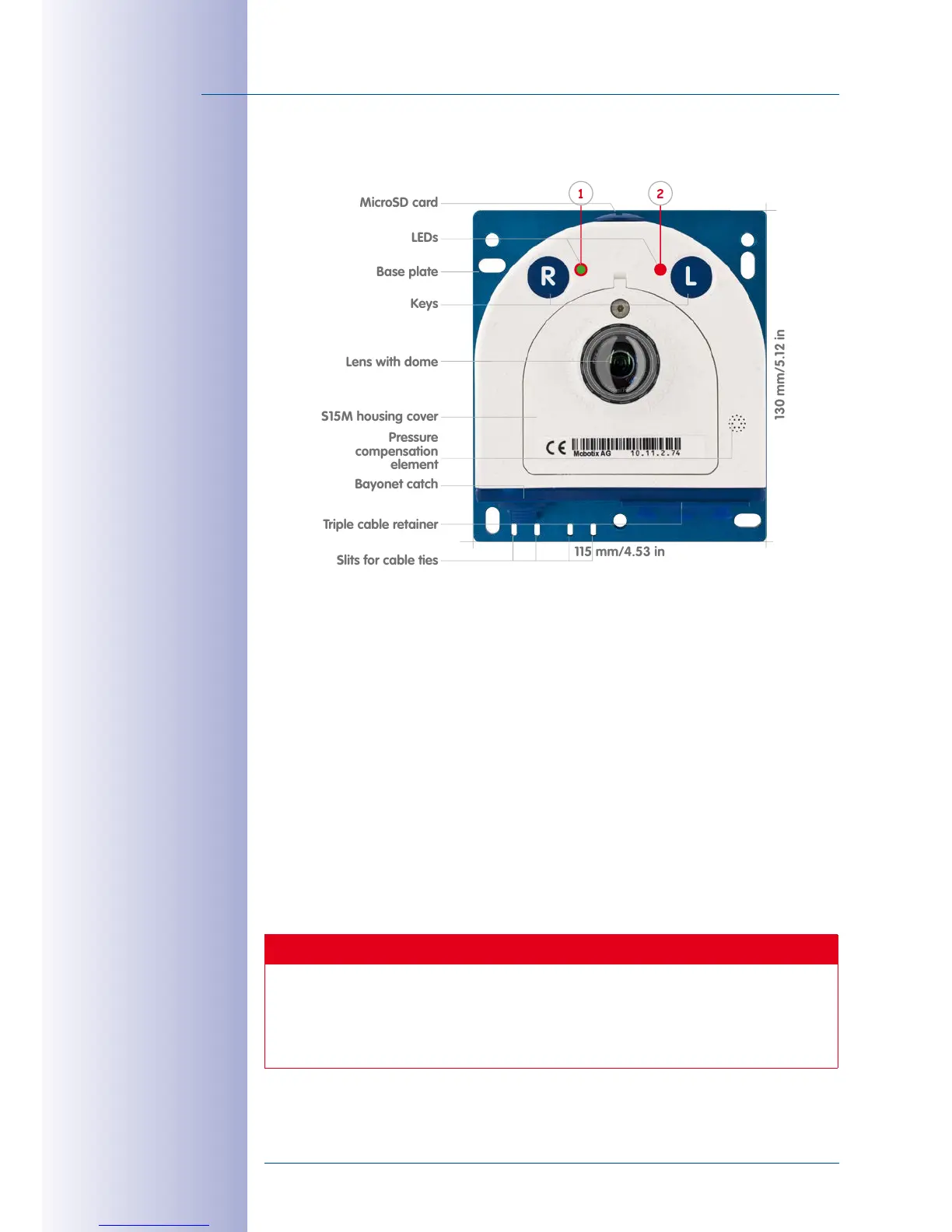
2.4.2 Attaching the S15M Camera Housing
Use the drilling template supplied (at the end of this manual) to mark the position of
the drilling holes for the camera. Make sure that it is not scaled down when printing or
copying the drilling template.
Caution
Make sure the camera is mounted on an even surface. If this is not the case, there
is a risk that the housing plate will move and the housing will begin to leak.
The torque for the
housing cover screws
is 0.4Nm.



 To Next Page