34
Press button for one time:
Under Standby Mode,
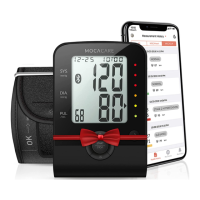
1. Press button for one time to wake up the device
and starting Bluetoothfunction (Bluetooth Symbol
ashing).
2. While transmitting the reading to your Bluetooth-
enabled Device, MOCACuff Bluetooth Symbol will
remain steady on the screen.
3. MOCACuff can only pair up with one Bluetooth-enabled device at
a time. To transmit measuring results to other Bluetooth-enabled
device, please retry as mention above.
Date/Time Synchronization
1. The BPM’s Date/Time Setting can be synchronized by
Bluetooth-enabled device (e.g. smart phone) which has
downloaded and installed MOCACARE application software.
2. When Bluetooth connection is established, the Bluetooth-
enabled device can send commend with the date/time
information to BPM and the BPM’s date/time will be updated.
NOTE
• Without any operation in 1 minute, the device shuts o automatically
and Bluetooth Transmission OFF.
• Standby Mode: Segments appeared but not under BPM measuring or
data transmitting.
• Sleeping Mode: Clear all LCD segments.


 To Next Page