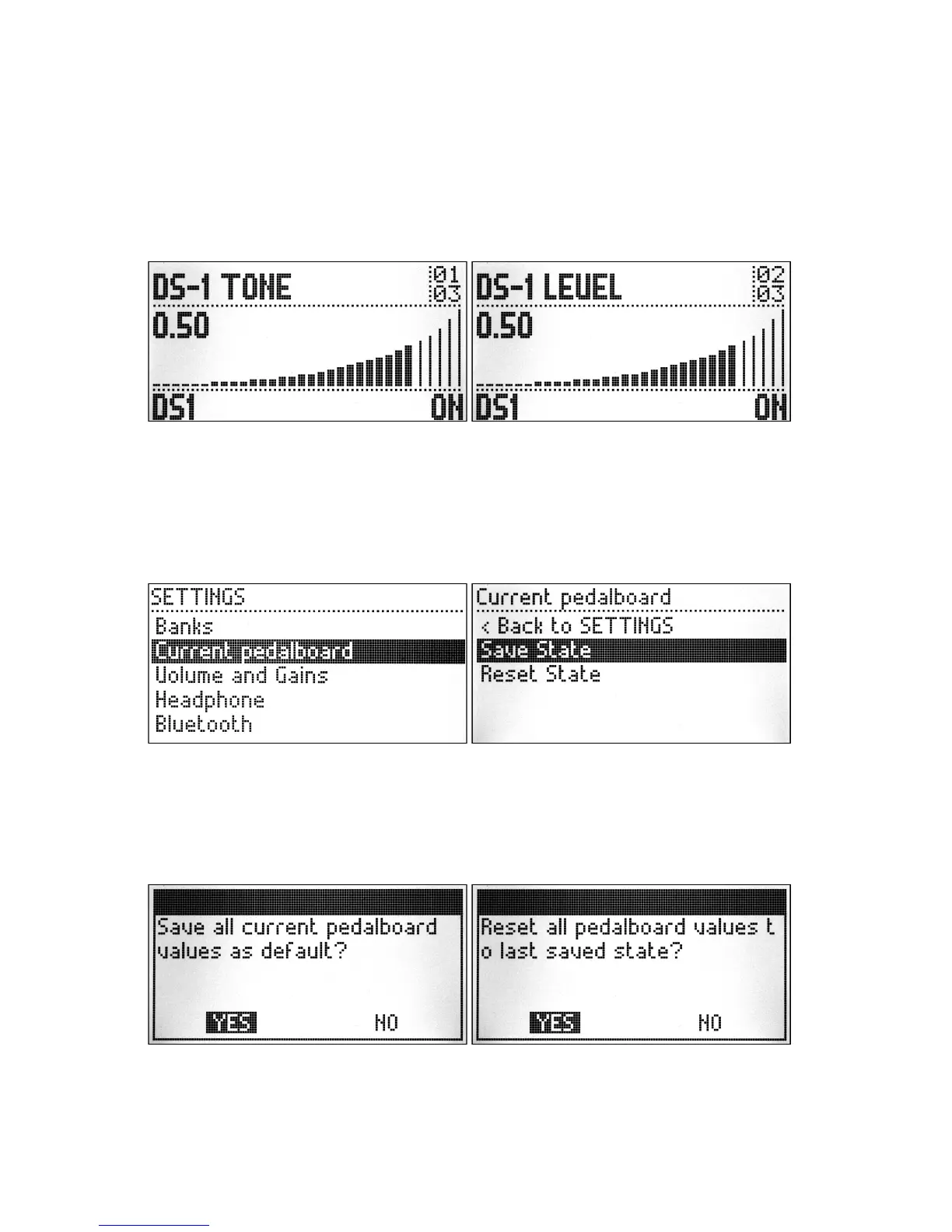
These parameters you see on the displays were considered important to be accessible to
the user when the pedalboard is loaded. To adjust the value of each parameter you just
need to turn the knob until the desired value is reached. More than one parameter can be
assigned to the same knob, to cycle between them, short press the knob. On the top-right
corner of each display you can see the index of the parameter being adjusted and the
amount of assigned parameters on this display.
After you have changed the values you might want to save or reset them. The reset will
restore the last saved values for all assigned parameters, while the save option will save the
current parameters values to the current pedalboard. To access these options, press and
hold the left knob for one second to open the SETTINGS menu, then turn the knob moving
the selection until Current pedalboard option and short press the knob to select it.
Inside the Current pedalboard option there are two options: Save State and Reset State.
Turn the knob to select the desired option, and short press the knob. Finally, confirm the
action by selecting YES in the pop up dialog, and short pressing the knob. To exit this menu
press and hold the left knob for one second.
10


 To Next Page