A single click on the pedalboard image or name will load it to the assembler. To delete a
pedalboard click on its trash icon on the right of the pedalboard name.
Organizing in banks
In order to make it easy to access your pedalboards while the MOD Duo is disconnected
from your PC, Mac or tablet, you can organize your pedalboards in banks. To access the
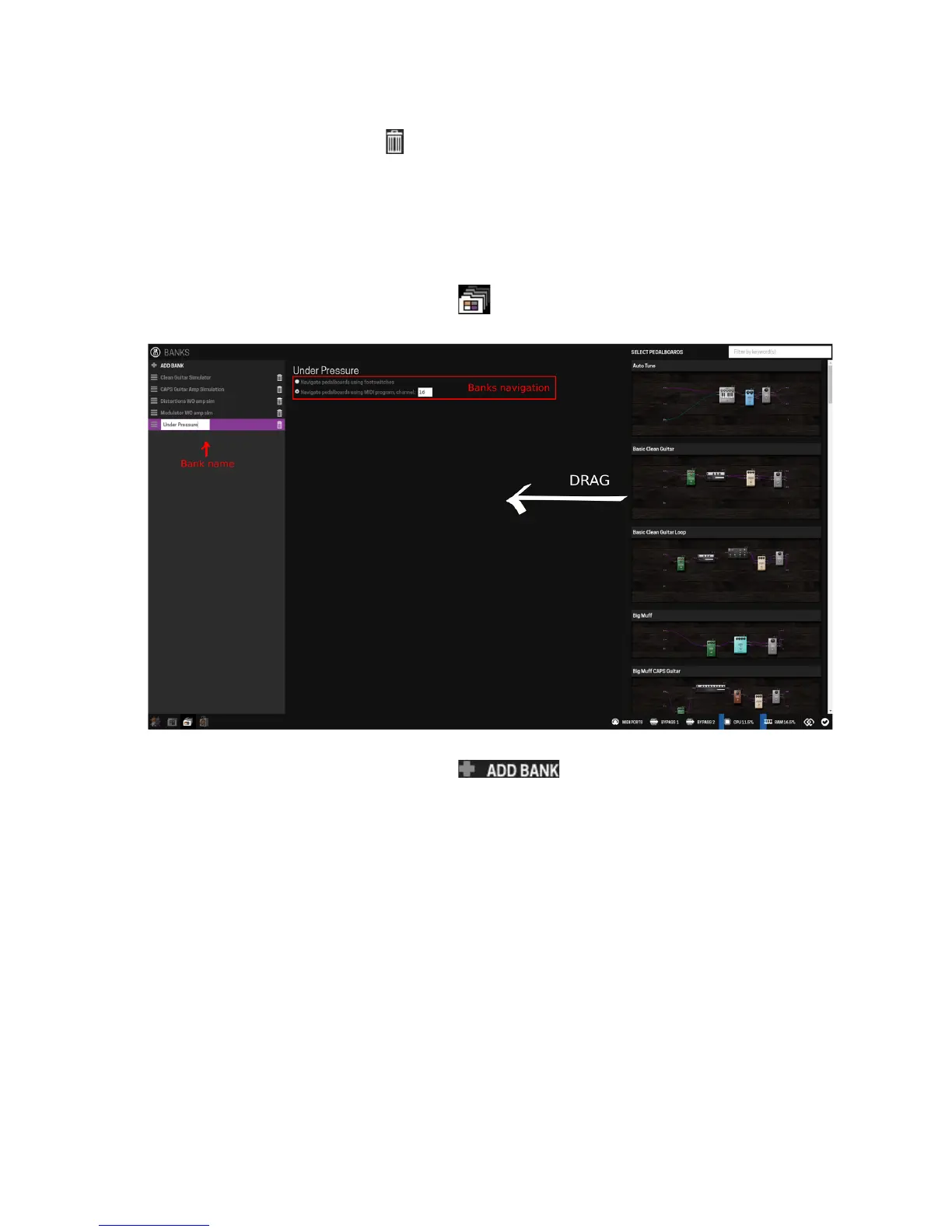
banks configuration click on the banks icon in the mode selection bar.
In the banks configuration mode, use the button to create a new bank and
name it as you like. At this point your bank is empty and ready to receive your pedalboards.
To add pedalboards to your bank drag them from the right lateral panel into the center of the
screen. You can add as many pedalboards as you want. It is also possible to add multiple
instances of the same pedalboard to your bank.
In the top-center of the screen, under the bank name, you can choose how you want to
navigate between the pedalboards of this bank when the MOD Duo is not connected to the
PC, Mac or tablet. There are two options: using the MOD Duo footswitches or using MIDI
program change messages.
Installing new plugins
By default the MOD Duo comes with many plugins installed, but you can install even more.
The plugins available for download on the MOD Duo are created either by the MOD team, or
by independent developers. To learn more about plugins please check the Advanced
Information chapter.
20


 To Next Page