Creating a pedalboard
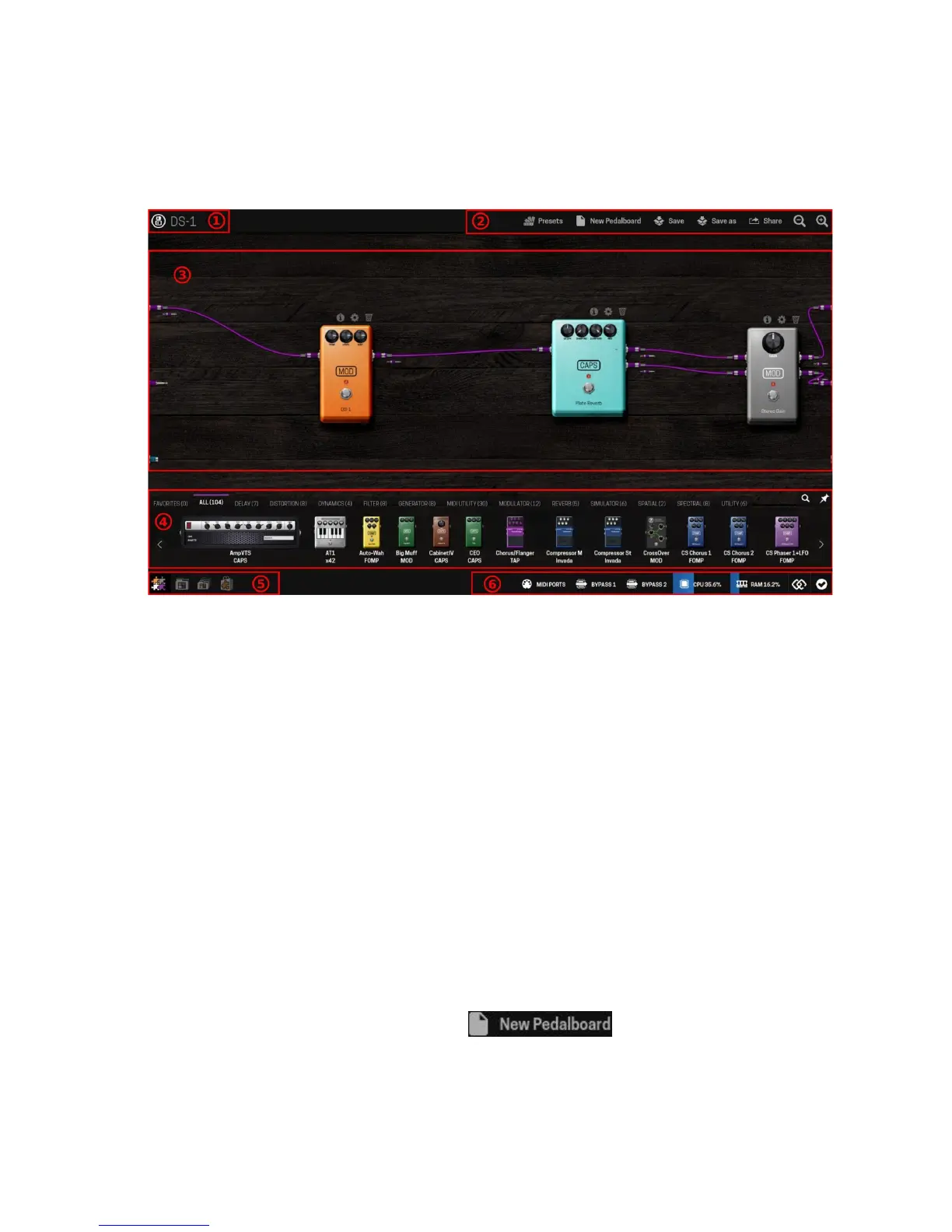
Once you have accessed the GUI you should see a screen like this:
The numbered areas on the interface are:
1. Pedalboard name
2. Pedalboard actions bar
3. Pedalboard assembler
4. Plugins bar
5. Mode selector (Assembler, Pedalboards, Banks and Store)
6. Status bar (Device actions and information)
On the left edge of the assembler area there are 3 connectors: 2 audio inputs and 1 MIDI
input. On the right edge there are another 3 connectors: 2 audio outputs and 1 MIDI output.
All those connectors represent the real inputs and outputs of your MOD Duo. Be aware that
on the interface the signal flows from left to right. Purple cables transport audio signals, cyan
cables transport MIDI signals and orange cables transport CV signals.
New pedalboard
To create a new pedalboard click on the button in the pedalboard
actions bar. This action will load the default pedalboard, which is a stereo gain connecting
the audio inputs to the outputs.
13


 To Next Page