9.1 Date
To set the date and time, please proceed as
follows:
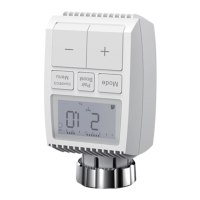
•Long press the menu button for 5 seconds, it
will enter the setting interface.
•Select “Date/Time” option via ‘+/-’ button, and
press menu button to enter the Date/Time setting
interface.
•Select the desired year/month/day/hour/minute
using the “+/-” button and confirm with
Press the menu button for 5 seconds, enter
Setting/Date Week programming stage/Open
window/Comfortable temp/ECO temp/Offset/
Holiday setting.
App operation: Click the settings icon ( ) in the
App control panel.
9. Setting
20
•Press the boost button to activate the boost
function.
•The remaining time for the function will be counted
down in seconds(‘299’to‘000’).
•After these 5 minutes have elapsed, the actuator
changes to the mode which was previously active
(auto/manual) with the previously set temperature.
•The function can be deactivated at any time by
pressing the boost button again.
App operation: Click the Boost icon( ) in the App
control panel to cancel the boost function.


 To Next Page