Need help?
Do you have a question about the MOFI NETWORK MOFI4500-4GXELTE-SIM and is the answer not in the manual?
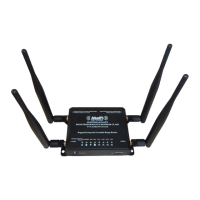
General description of the MOFI4500-4GXELTE-SIM router's capabilities and purpose.
Key functionalities and specifications of the wireless router, including connectivity and security.
Details the router's front panel components and LED indicators for status monitoring.
Describes the router's back panel ports, including Ethernet, power, and reset connectors.
Outlines the initial workflow for router setup, including planning and connection steps.
Step-by-step guide for physically installing the router and establishing an internet connection.
Explains how to configure different WAN connection protocols like DHCP, PPPoE, and Static IP.
How to configure SSID, security, and passwords for the Wi-Fi network.
Instructions on how to configure port forwarding to allow external access to internal services.
Guide on using Wi-Fi Protected Setup and setting up a USB printer for network sharing.
Configuring dual WAN for enhanced stability and speed through connection redundancy.
How to configure the router to act as a modem, passing the public IP directly to one device.
Steps for updating the router's firmware to the latest version.
Enabling and using MOFI's remote management service for online control and monitoring.
Basic steps and procedures for resolving common router issues and connectivity problems.
Information regarding FCC and European regulations applicable to the device.
 General
| Brand | MOFI NETWORK |
|---|---|
| Model | MOFI4500-4GXELTE-SIM |
| Category | Wireless Router |
| Language | English |

 To Next Page