Admin Manual
MWP1100A
17
3. Message
Can write messages, manage messages and manage spams
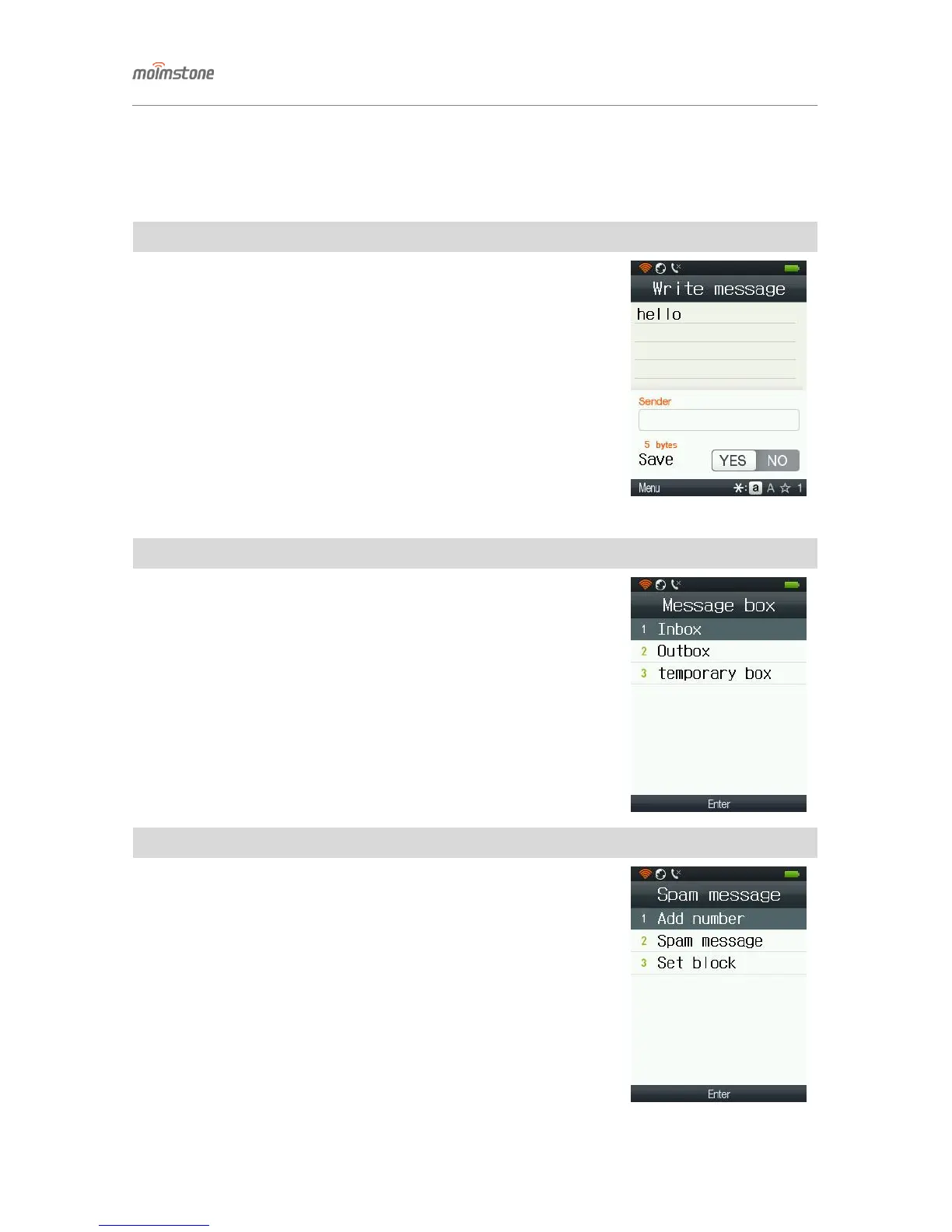
◁ Write message
□ Setting procedures
[Menu] ▶ 3. Message ▶ 1. Write message
- Enter message [OK] Enter the contact number (each number can be
as long as 32) Press [OK] to send the message.
- Press [Menu] from the message-writing screen, and can use [temporary saving].
- Press [Menu] from the received number screen, and can use [search by name],
[search by phone numbe], [search phone call logs], and [temporary saving].
- Can send a message to up to 10 phone numbes at once.
◁ Message box
□ Setting procedures
[Menu] ▶ 3. Message ▶ 2. Message box ▶ Message box Select
- Select message logs in the message box and press [OK] to see details.
- Can check [Reply], [Forward], [Save number], [Delete] and [Delete all]
after pressing [Menu] (Each message box has different menus).
◁ Spam message
□ Setting procedures
[Menu] ▶ 3. Message ▶ 3. Spam message
① Add spam number: up to 5 spam numbers can be saved.
② Press [Menu], and you can enter numbers by using
[search by name], [search by phone number], and [search phone logs].
③ Spam message: can check received spam messages.
④ Set block: select blocking as spam.


 To Next Page