Admin Manual
MWP1100A
26
7. Setting
Can set Wi-Fi, phone lock, manual upgrade, and initialization of the set values.
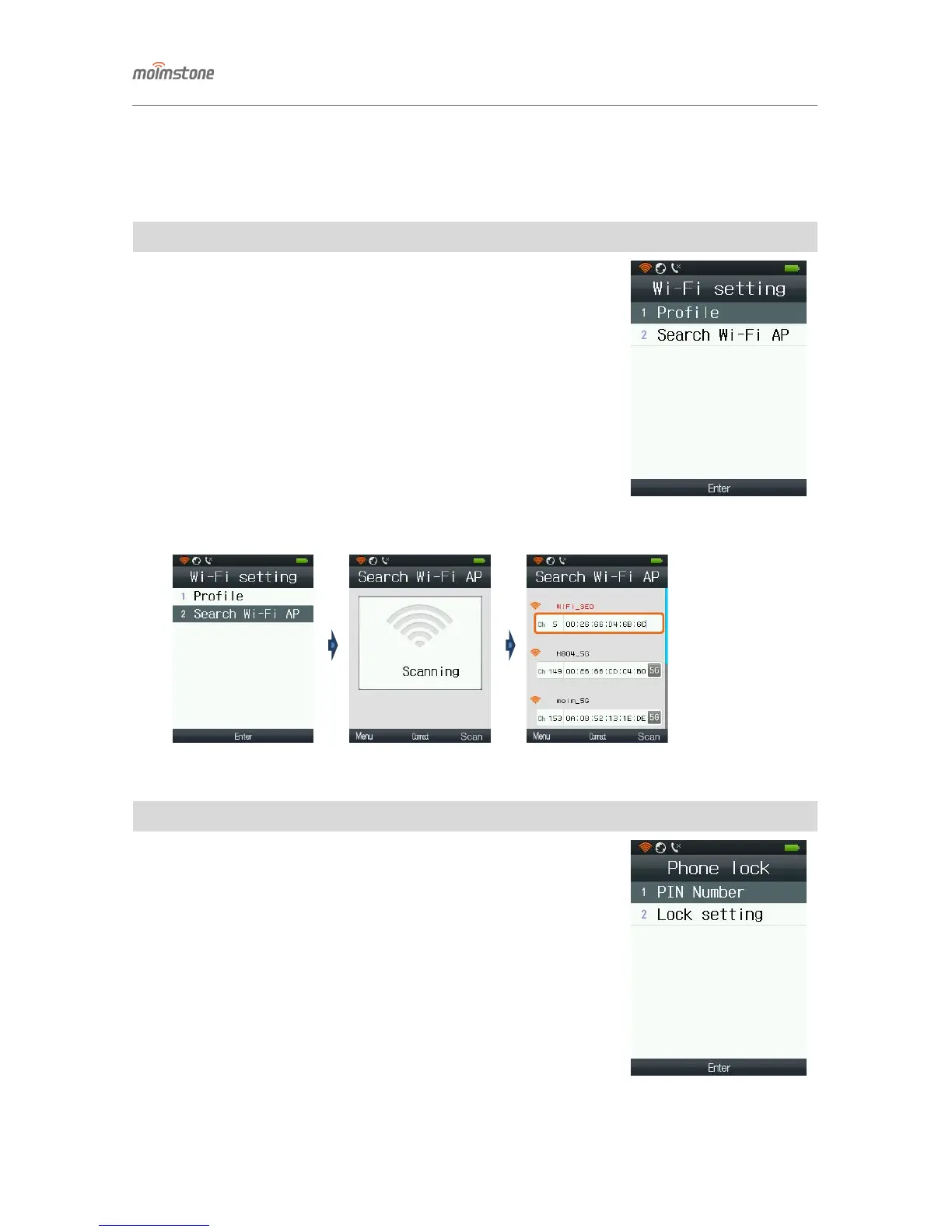
◁ Wi-Fi setting
□ Setting procedures
[Menu] ▶ 7. Setting ▶ 1. Wi-Fi setting
① Profile: add profiles by pressing [Menu] over a Wi-Fi AP
- If necessary, can modify the profile information by pressing [Edit].
② Wi-Fi search: search wireless LAN APs.
- Can re-connect to an Wi-Fi AP or connect to a new one with Wi-Fi search.
◁ Phone lock
□ Setting procedures
[Menu] ▶ 7. Setting ▶ 2. Phone lock
① Phone PIN number: set password for using the phone.
- The default PIN number is ‘0000’.
- Current password New password Re-enter the new password
Press [Save]
② Lock setting: enable/disable phone lock.
- It’s a security feature so that others cannot use the phone.
- Set lock Enter PIN Select Enable/Disable Press [OK].
- Press down [#] for a long time and do the setting.


 To Next Page