Admin Manual
MWP1100A
52
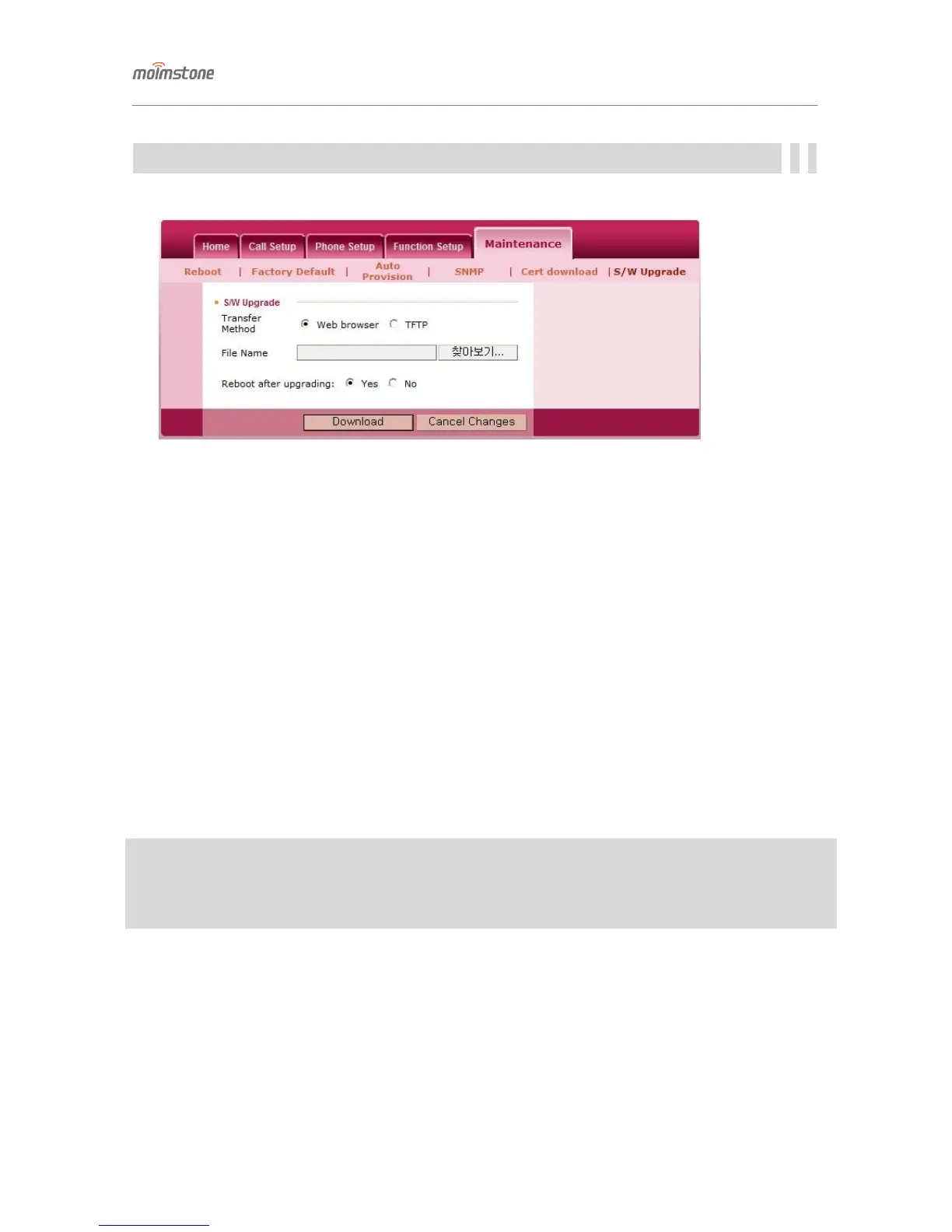
S/W Upgrade
Upgrade the OS of the phone.
▣ S/W Upgrade
♦ When upgrade is done via the Web browser
- File name : Select PC.
- Folder path and file name : Set the path to the OS on PC.
- Reboot after upgrading : Decide whether to do rebooting after the OS upgrade.
♦ When upgrade is done via TFTP
- File name : Select TFTP.
- Folder path and file name : Set the path to the OS on the TFTP server.
- Server address/Port number : Ente the TFTP address and port number where the OS is saved.
- Reboot after upgrading : Decide whether to do rebooting after the OS upgrade.
※Note
- If the phone is not rebooted after the upgrade is finished, the state before the upgrade remains. So it’s
recommended to initialize and reboot the phone.


 To Next Page