APPLICATION SPECIFICATION
REVISION: ECR/ECN INFORMATION: SHEET No.
EC No:
ABC2001-9999
1
DATE:
2008/16/03
TITLE:
MX150 Application Guide
28 of 62
DOCUMENT NUMBER: CREATED / REVISED BY: CHECKED BY: APPROVED BY:
Brian Zelinski Steve Verzyl Scott Marceau
TEMPLATE FILENAME: APPLICATION_SPEC[SIZE_A](V.1).DOC
Section 5: Service Instructions
E. Terminal removal (continued)
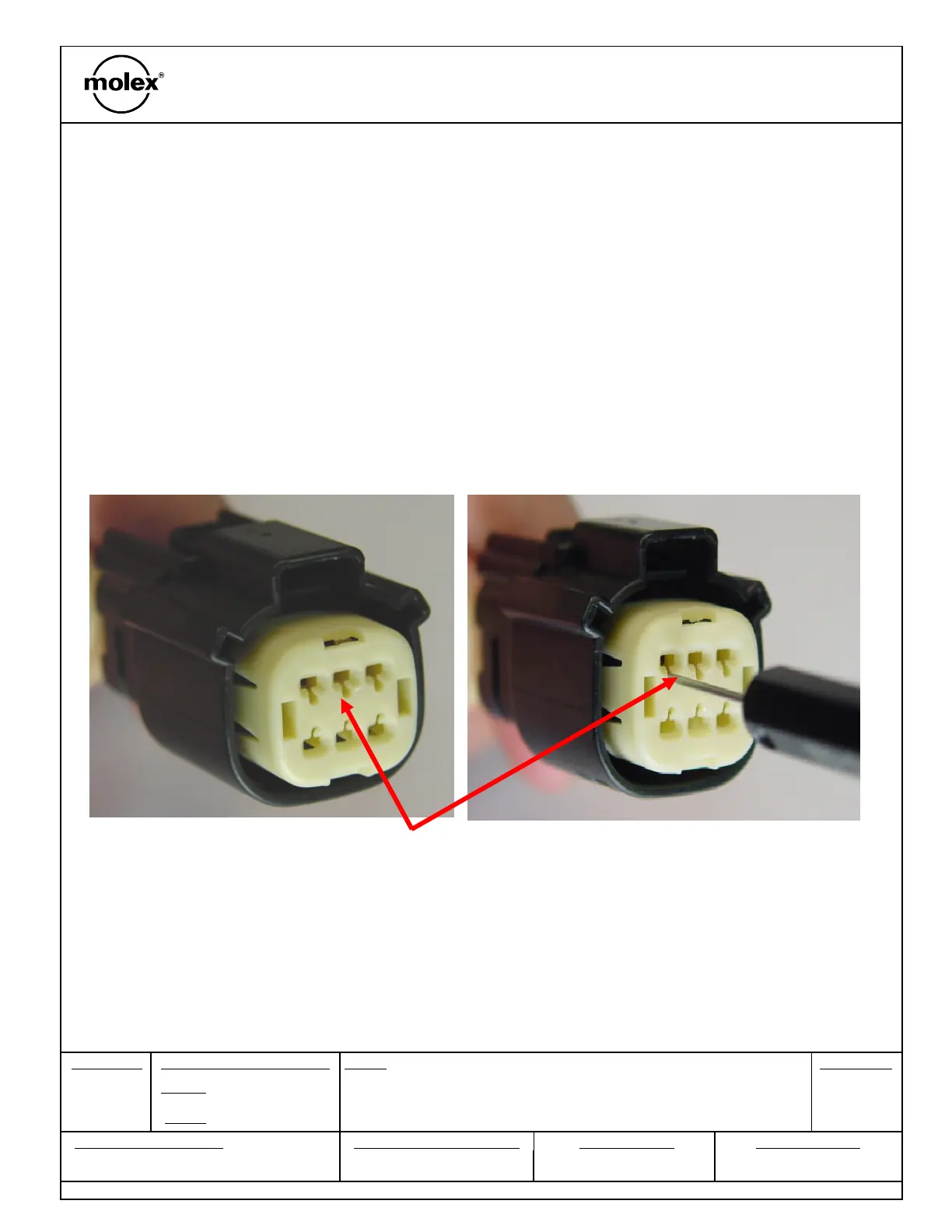
Step 3: Once the Lock finger is disengaged, gently pull on the wire to release the terminal.
If the terminal resists, the service tool may not be fully engaged. Push the service tool straight into
the service opening to ensure that it has fully disengaged the locking finger.
Do not insert the service tool into the terminal opening!
Do not use excessive force, excessive force can damage the lock finger!
Do not insert the service tool at an angle, this may cause damage to the
terminal!
Do not apply any lateral force, this may damage the terminal or lock finger!
Service tool must be 90° to the connector face!


 To Next Page