Meter instructions
Batteries: 4 x 1.5 V, R14
Storing temperature: -10º C - +60º C
Operating temperature: 0º C - +50º C
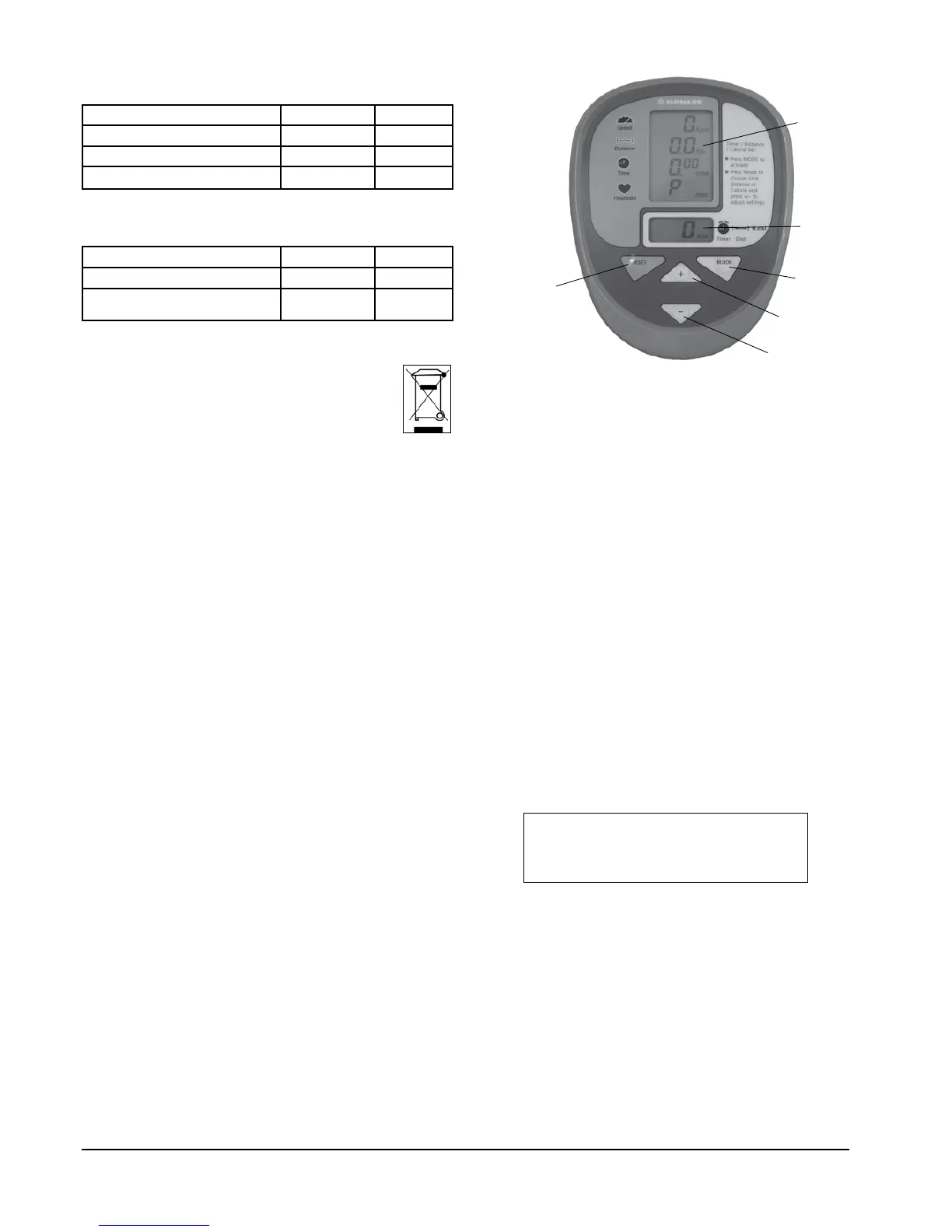
Main display
Press any key or move the pedal gives a signal to the
meter that activates all functions.
This display shows Speed, Distance, Time and
Heartrate.
As soon as the subject begins pedalling activates the
meter and all readings on the display. Time count
starts when pedalling begins and Time count stops
if pedalling is stopped. Time is only displayed in
minutes.
A ”P” in the Heartrate display indicate that the
meter has not detected any heartrate signals. The
signals comes from a wireless heartrate transmitter/
chestbelt which can be bought as an accessory (Art.
No: 9339-98). The electrodes on the transmitter shall
be moistened a little before it is put on the chest.
Moistening the electrodes makes the pulse signal good
already from start. The chestbelt/transmitter is to be
placed just below the chest muscles.
Reset key
Press RESET key to zero Speed and Distance in the
main display. An automatic reset is also made after an
automatic turn off of the computer.
Turn off
After two minutes the computer will turn off
automatically if there is no speed or HR-signal
detected. At an automatic turn off all parameters are
set to zero.
Fig: Display
1) Main display
2) Lower display
3) MODE-key
4) (+) -key
5) (-) -key
6) RESET-key
Timer setting: 1 - 99 minutes
Distance setting: 0.1 - 99.9 km
Calories:
Only if chestbelt is used
0-999 kcal
Lower display
Speed: 0 – 99 km/h
Distance: 0 - 99.9 km
Time: 0 - 99 minutes
Heartrate: 50-240 bpm
Main display
Lower display
The count down function in the lower display window
can be set in time or distance - minutes or kilometres.
Press MODE key to activate. Display will then start
flashing. While flashing press MODE again and it will
change between time and distance. As long as it is
flashing the figures can be changed. Use the buttons
(+) or (-) to increase or decrease value. At setting
value flashes for 15 seconds. To change setting again
activate by press the MODE key. When pedalling
starts the count down begins. When reaching zero a
beeper sounds.
The calorie consumption shows in the lower display.
Press MODE to change view between time, distance
and calories.
Km/Miles
For setting of km or miles press MODE until ”km”
start flashing. Use the buttons (+) or (-) to change to
miles.
Maintenance
Do not expose the meter to direct sunlight or extremely
high temperature. Do not use any dissolvents when
cleaning. Use only dry cloth.
NOTE!
To show KCAL in the display you must
use chestbelt.


 To Next Page