29
ZKT42 Trim Kit
3/4" Custom Panels
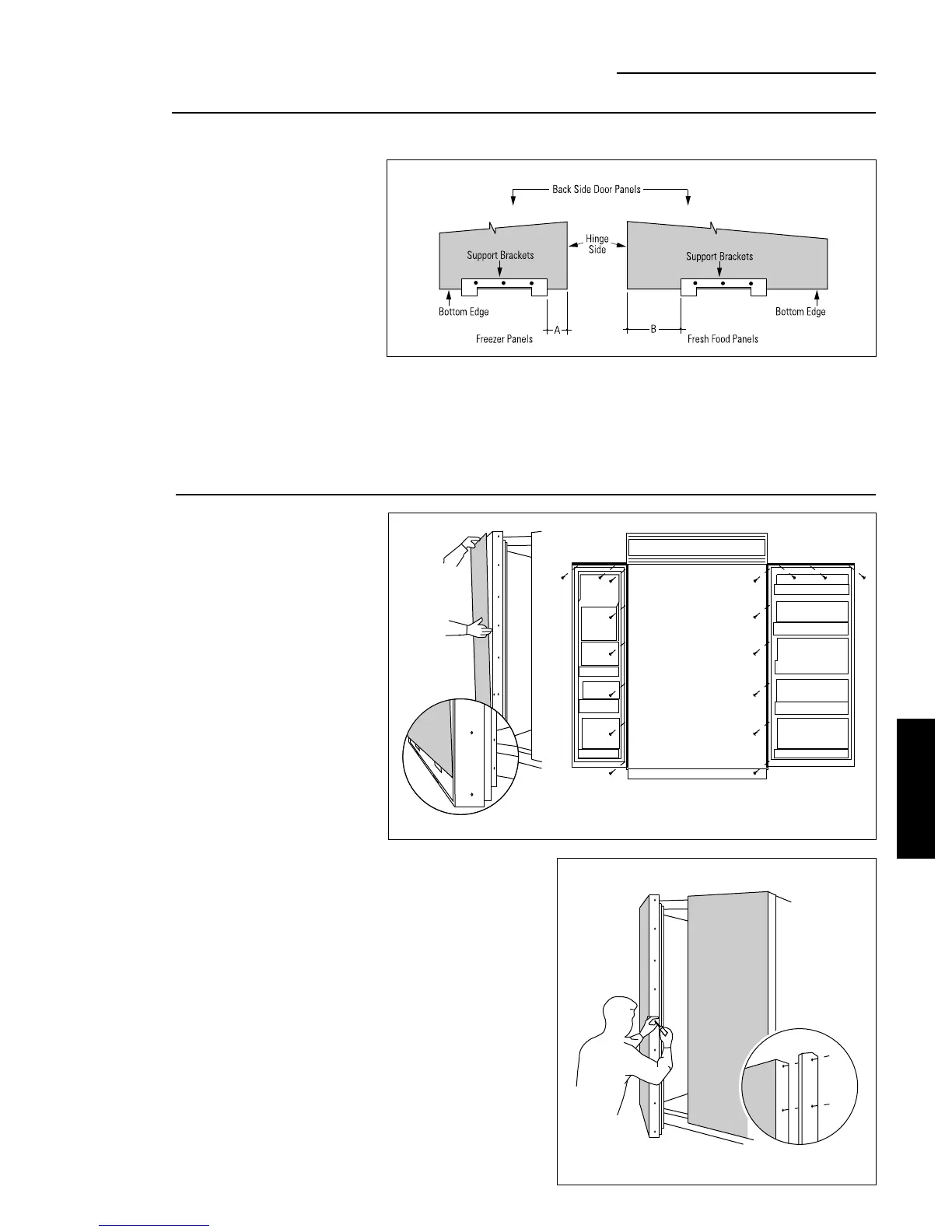
ZKT42 – Install 18 screws
Option 1 Installation
Step 3
Apply panel
support brackets
• Position support bracket on freezer panel,
dimension A, from the hinge side edge.
• Position support bracket on fresh food panel,
dimension B, from the hinge side edge.
Dimension A
ZKT42–6-3/4"
Dimension B
ZKT42–7-7/8"
Step 4
Install panels
• Place the 3/4" panel on the bottom trim with support
bracket tabs inserted into slots. Push the panel back
against the steel door, making sure panel is flush to
hinge side trim.
• Carefully drill starter holes in panel using a small
drill bit.
• Attach the panel to the top and hinge side by installing
screws from the back of the trim through the wood
panel.
• Follow the same procedure to install fresh food door
panel.
• Re-install door handles with original screws.
• Re-install endcaps, top and bottom.
• Secure support brackets to the bottom of the panels
with #4 screws provided. Align the brackets flush with
the bottom of the panels, with tabs protruding below.
• Bracket location measured from the hinge side, is the
same for panels with custom handles or standard
handles.
ZKT42 INSTALLATION
INSTRUCTIONS








 To Next Page