Need help?
Do you have a question about the Mooer SkyVerb and is the answer not in the manual?
Use correct 9V DC center-minus adapter; turn off power before connecting/disconnecting.
Avoid dropping, excessive force, or abrasive cleaners; use a soft dry cloth.
Avoid direct sunlight, heat, dust, humidity, magnetic fields, and operate away from radios/TVs.
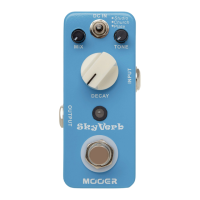
Warm, natural indoor reverb with decay control for varying room sizes.
Empty, smooth natural reflex reverberation for a spacious sound.
Simulates steel/gold tinsel vibration for a man-made mixed sound.
True bypass footswitch to toggle effect on/off; LED shows status.
1/4" mono audio jacks for guitar input and signal output.
MIX, TONE, DECAY knobs and Mode Switch for effect adjustment.
32-bit DSP, 3 reverb modes, full metal shell, true bypass, compact design.
Input/Output impedance, power requirements (9V DC), current draw, dimensions, and weight.
 General
| Brand | Mooer |
|---|---|
| Model | SkyVerb |
| Category | Music Pedal |
| Language | English |

 To Next Page