Pre Start Inspection and Operation
3.26
Operating Instructions for a Hydraulic Attachment
1. Move the engine throttle to the full speed setting.
2. Raise the attachment off the ground and position it for use.
Make sure that you are standing on the operator’s platform and holding the Operator
Presence control in the operating position.
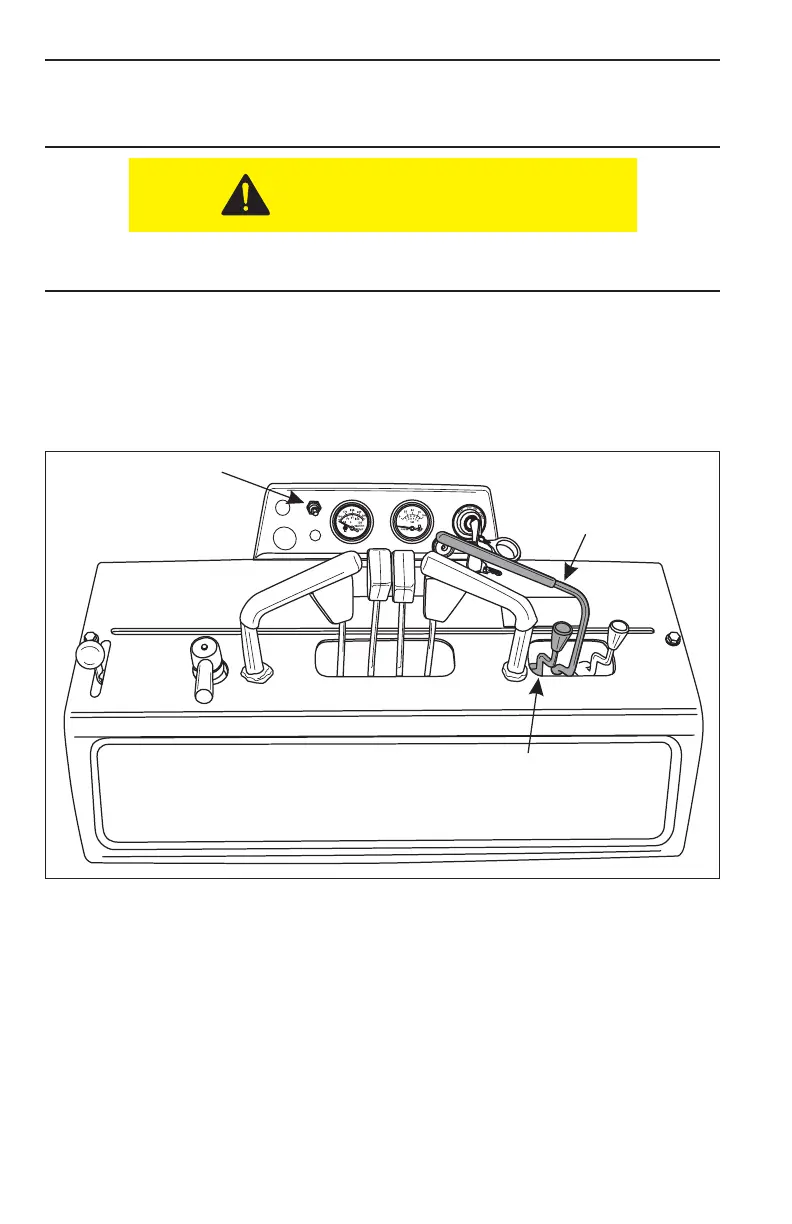
3. With your right hand, squeeze the OPERATOR PRESENCE control lever (Item 1,
Figure 3–38) towards the hand hold to activate the attachment in the FORWARD
motion.
NOTE: The OPERATOR PRESENCE lever is spring loaded and when released,
will automatically move from the FORWARD motion position to NEUTRAL,
stopping the attachments motion. The engine will continue to run.
Figure 3-38 Auxiliary Attachment Controls
4. Lower the attachment to begin work. If you want to reverse the operation of
the attachment, move the auxiliary control lever (Item 1, Figure 3–38) to the
REVERSE position. The control lever will remain in the REVERSE position detent
until it is moved to the NEUTRAL position.
5. The Boxer has a second AUXILIARY attachment control (Item 2, Figure 3–38).
This control should be used with attachments that have a hydraulic cylinder. This
control will lock hydraulic pressure in the cylinder, keeping the cylinder in the
desired position.
1
2


 To Next Page