8
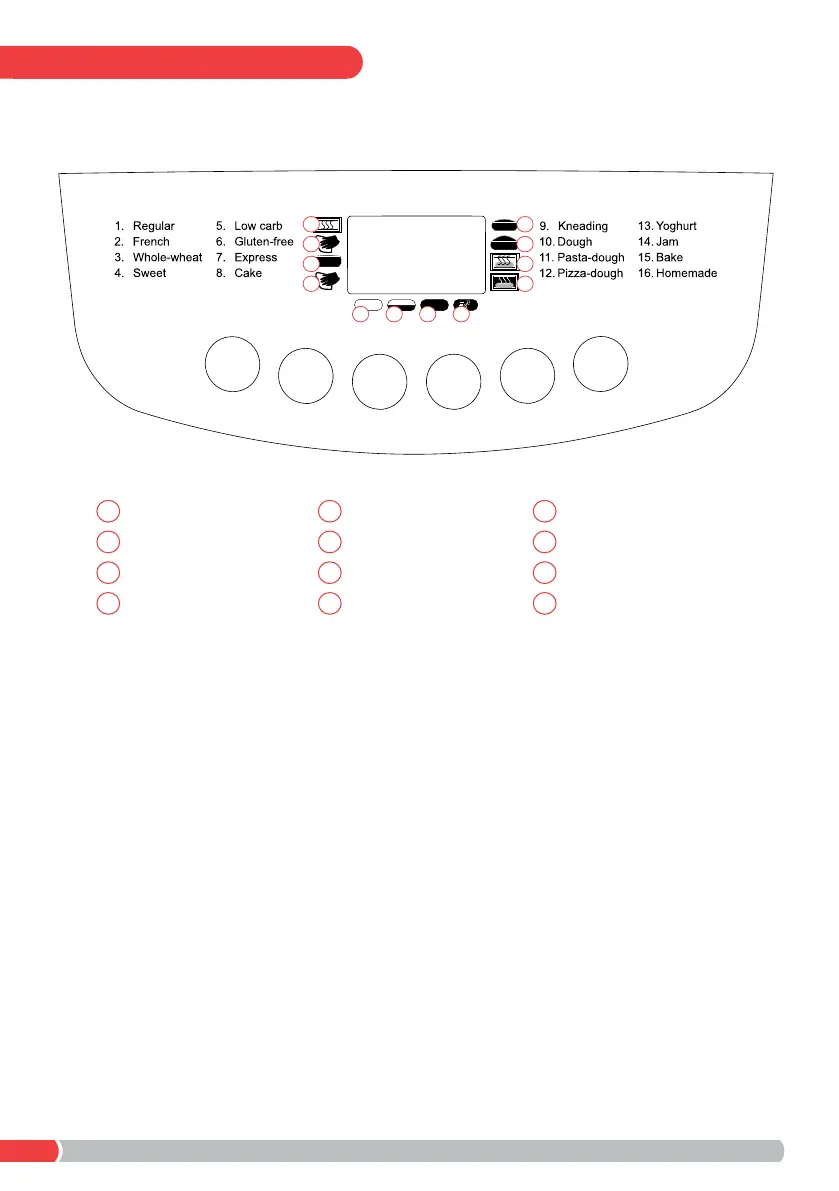
CONTROL PANEL
Menu - Select the desired baking program. The program number and
corresponding baking time will appear on the display.
Size - Select the gross loaf weight (900g, 1.15kg, 1.35kg) by pressing the
button until the indicator on the display appears beneath the desired weight.
Note: Loaf size cannot be adjusted for programs 9, 10, 11, 12, 13, 14 & 15.
Time - & Time + - Press to set time-delayed baking as desired. The total set
time will appear on the display.
Crust - Select the degree of browning {Light (e) > Medium (f) > Dark (g) > Rapid
(h)} by pressing the button until the indicator on the display appears above the
desired crust icon.
Start/Stop - Press to Start/Stop a program or delete a set timer. To nish
operation and delete the setting, hold for 3 seconds until a long beep is heard.
Note: Do not press the Start/Stop button to check bread.
900g
1.15kg 1.35kg
Menu
Crust
Time - Time +
Size
Start/Stop
a
Preheat
a
Light crust colour
e
Rise 2
i
Kneading 1
b
Medium crust colour
f
Rise 3
j
Rise 1
c
Dark crust colour
g
Bake
k
Kneading 2
d
Rapid Bake
h
Keep Warm
l
i
b j
c k
d
e f g h
l



 To Next Page