20 Morton
®
Water Softener Installation & Operation Manual
Controller Features
However, you can ad just this time from 1 to 30
minutes in length. To change this cycle time, use
t
he
p
U
P button to increase the time, or the
q
DOWN button to shorten the time. If no change
is desired, continue to next step.
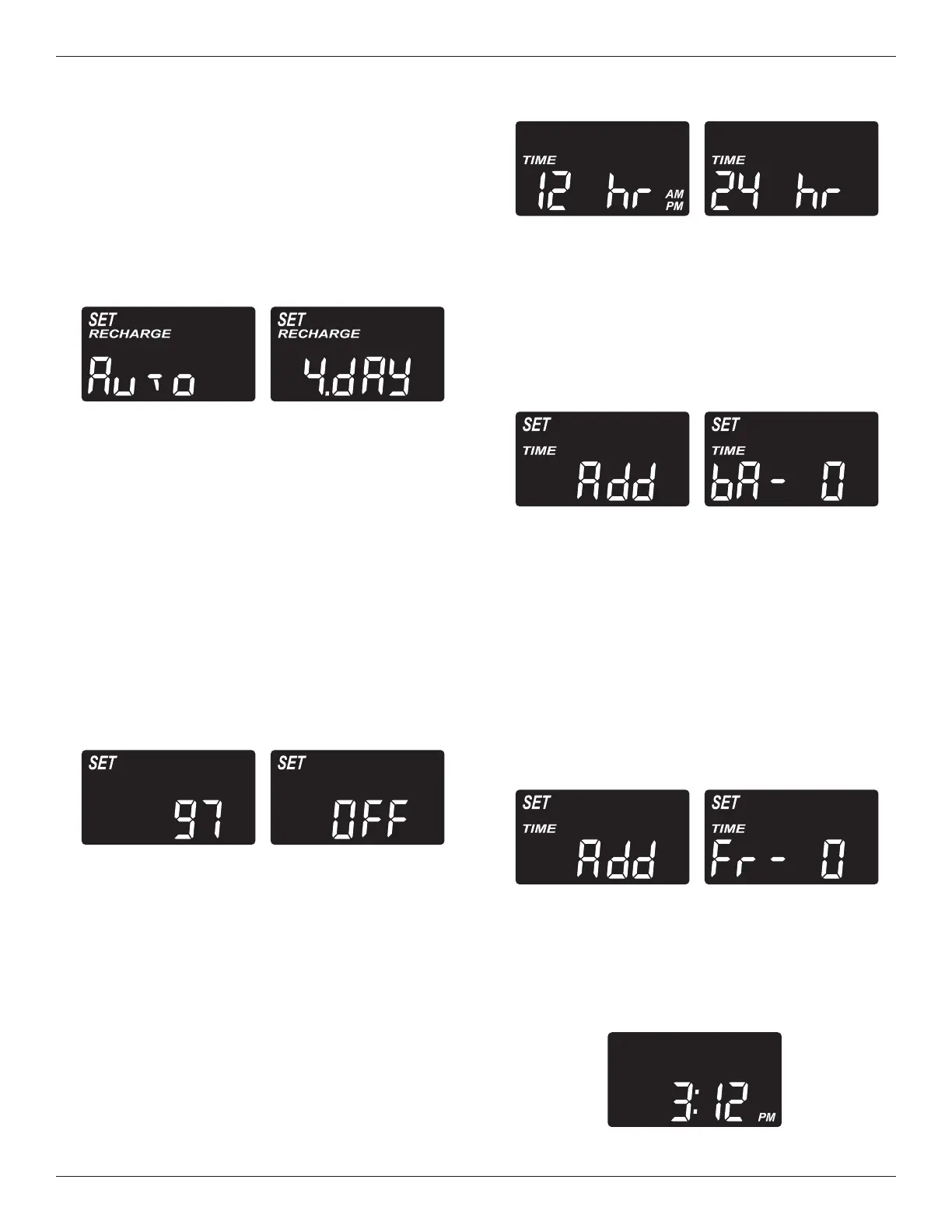
4. Press SELECT again to display the “Recharge
Days” screen.
continued from previous page
Maximum Days Between Regener -
ations: The electronic controller automatically
determines regeneration fre quency. This provides
the greatest operating efficiency and, under most
conditions this feature will be left in its default
mode. However, you can set this feature to force a
regeneration every set number of days. You may
want to do this if, for exam ple, your water supply
contains iron and you want the softener to regener-
ate at least once every few days to keep the resin
bed clean. Use the
p
UP or
q
DOWN buttons to
change the number of days (up to 15). If no
change is desired, continue to next step.
5. Press SELECT again to display the “97%” screen.
97% Feature: The 97% Feature can save salt
and water by regenerating when 97% of the soften-
er’s capacity has been used up. With this feature
ON, the regeneration can occur at any time (when-
ever the system has reached 97% of its capacity).
The default is OFF. If this feature is desired, turn it
on by pressing the
p
UP button.
6. Press SELECT again to display the “12 or 24 hr”
screen.
Backwash & Fast Rinse Times: If you
experience salty tasting water after regeneration,
you may need to increase the backwash and fast
rinse times. The cycle times during regeneration
are determined by the softener’s electronic con-
troller. However, you may increase the backwash
and fast rinse times, in 1 minute increments.
If you wish to increase the backwash time, use the
p
UP or
q
DOWN buttons to add up to 15 minutes.
Then press SELECT to display the fast rinse time
“Add” screen.
FIG. 49
12 or 24 Hour Clock: All time displays are
shown in 12 hour (AM/PM) time format at the
default setting. If 24 hour time format is de sired,
set to 24 hr by pressing the
p
UP button.
7. Press SELECT again to display the backwash time
“Add” screen.
FIG. 50
FIG. 48
If you wish to increase the fast rinse time, use the
p
UP or
q
DOWN buttons to add up to 15 minutes.
8. Press SELECT to return to the normal run (time of
day) screen.
FIG. 53
FIG. 51
FIG. 52


 To Next Page