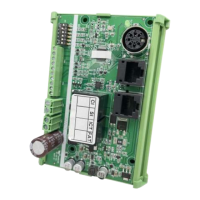
1. All actuators to be synchronized must be of the same model and specification, including dimensions.
2. Actuators without physical limit switches can be supported, but the setting switch on CI73 must be set correctly.
3. Retract all actuator to the end before installation.
4. CI73 itself has no distinction between master and slave in terms of specifications. The one that receives the
control signal from the control terminal first is the master control of the group.
5. Individuals in the synchronization group will not respond to new control signals until they finish responding to
the control of the current master and stop.
6. After the installation is complete, be sure to execute the ‘Stroke Learning’ function before starting the formal
operation.
7. As long as the actuator is not replaced or moved while the CI73 is powered off, there is no need to relearn the
stroke.
8. According to the specifications and quantity of actuators, prepare a 24 ~ 29VDC power supply with sufficient
power.
Precautions Before Installation
(1)
(2)
(3)
(4)
(5)
(6)
(7)
(8)
(9)
(10)
First, check the model number on each actuator label to confirm that the specification is correct. And according
to the specification, each one is correctly connected to a CI73 (please refer to section 3 Actuator terminals).
Use the DIP switch to set its unique ID in the closed area network. And set the parameters of the DIP switch
correctly according to the specifications of the actuator.
Select one of the CI73 as the Master control, and the rest as Followers. Connect the control wires to the Master
control.
All CI73 units to be synchronized are connected with communication cables. Do not install the actuators on the
mechanical frame yet. When ready, connect each CI73 to the power supply and perform the stroke learning
function from the control terminal or hand control. However, be careful to avoid the inner tubes of the actuators
from spinning by inserting pins or using a suitable and safe method.
When learning, it will automatically detect the hard limit position of the actuator at a lower speed, and at this
time the LED indicator will flash slowly (ON 1 second → OFF 1 second → ... Intermittent). After the learning is
completed, it will automatically take the shortest stroke among all connected actuators as its stroke reference.
According to the setting switch of CI73, if the actuator is equipped with physical limit switches, the above
reference position will be the software limit position learned.
If the actuator is not equipped with physical limit switches, after learning, it will automatically retract 1% ~ 2%
from both the front and back of the above reference position as the software limit position.
After the learning is completed, it can be operated normally, and all the actuators can be controlled to extend or
retreat synchronously from the control terminal or hand control. When the actuator is in action, the LED
indicator of CI73 controller will keep flashing rapidly (4 times/seconds).
When the actuator reaches the upper and lower limit positions, the LED indicator of CI73 controller will be on to
indicate that it is in place. When stationary in other positions, the LED indicator will turn off.
At this time, the actuators can be mechanically installed on the frame to complete the final installation steps.
Installation Steps / Operating Instructions
www.moteck.com
9


 To Next Page
 Loading...