Chapter 1 Getting Started 5
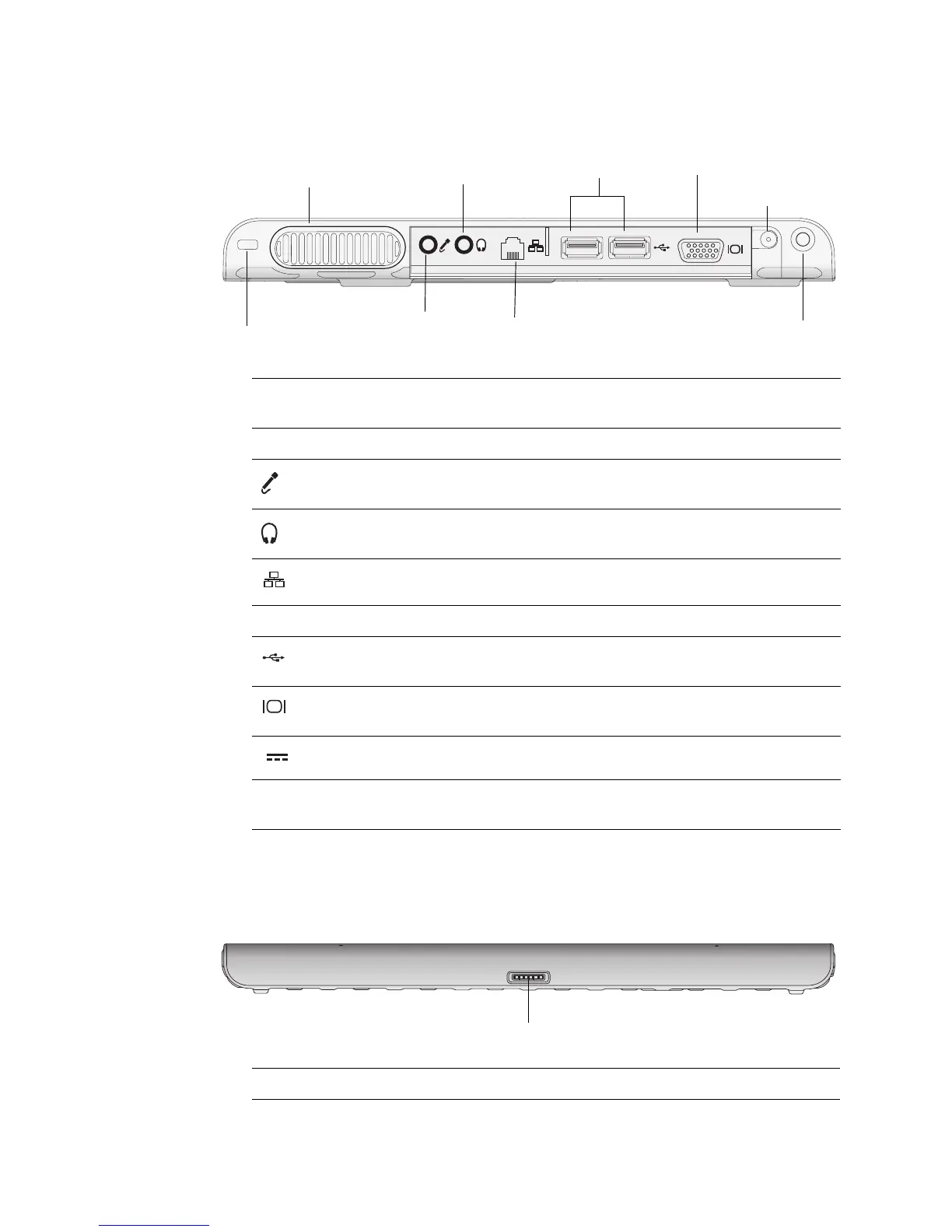
Security slot Connect a security cable to protect the Tablet PC from
theft.
Air vent Dissipates heat from the Tablet PC.
Audio in/
Microphone port
Connect a microphone or other audio source using a
3.5 mm jack.
Audio out/
Headphone port
Connect headphones, speakers, or audio equipment
using a 3.5 mm jack.
Ethernet port Connect to a 10/100/1000 Ethernet network.
Port covers Covers the two sets of ports.
USB 2.0 ports Connect USB devices such as a mouse, digital camera,
printer, or external storage device.
Video (VGA) port Connect an external monitor using the standard DB-15
VGA connector.
Power adapter port Connect the power adapter.
Shoulder strap
attach point
Attach point for the shoulder strap.
Mobile keyboard connector Interface for the Mobile keyboard.
Microphone port
Headphone port
USB ports
Shoulder strap attach point
Power adapter port
Security slot
Video port (VGA)
Air vent
Ethernet port
(Port covers removed)
Left
Mobile keyboard connector
Bottom



 To Next Page