24 People
People
conta cts like yo u’ve ne ver had be fore
Quick Start: People
Find it: Apps > People
ME
A
Set up my prole
297 contacts
Abe Baudo
Astrid Fanning
Anna Medina
Avery Durning
Allie Smyth
A
B
C
D
E
F
G
H
I
J
K
L
M
N
O
P
Q
R
S
T
U
V
W
X
Y
Z
GROUPS FAVORITESPEOPLE
B
Brian Foster
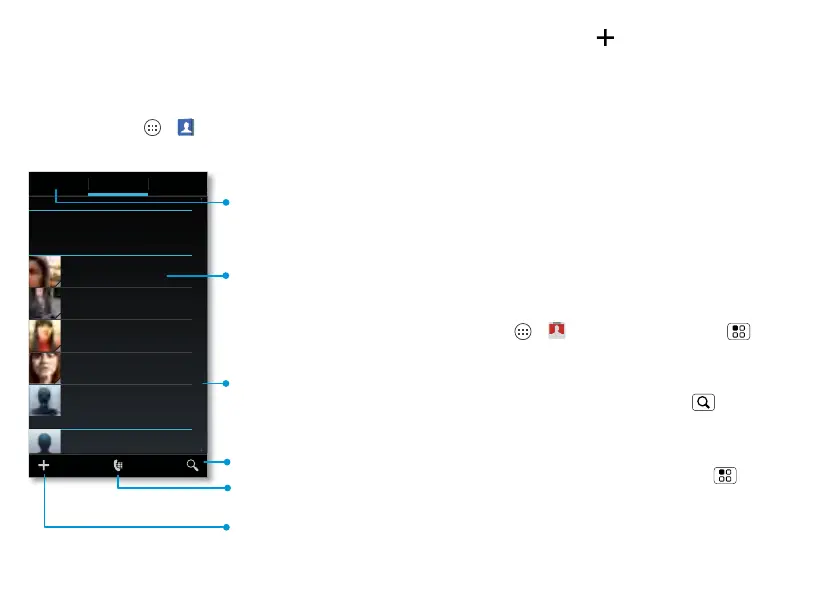
Create & view
groups of contacts.
Contacts List
Touch to view
contact information,
call, send a text
message, & more.
Search the list.
Touch a letter to
jump to contact
names that start
with that letter.
Go to the dialpad to
search for contacts.
Add contacts.
• Create: Touch below the People list.
• Call, text, or email: Touch and hold a
contact, then choose an option.
• Open or edit: Touch and hold a contact
to open it, then touch Edit.
Tips & tricks
• Groups: To filter the contacts by group
(All contacts, Facebook, and so on)
touch the filter name at the top.
• Contact pictures: To c hang e w hich
account provides the pictures for your
People, from the home screen touch
Apps > Accounts > Menu >
Picture source.
• Search contacts: From the home
screen, just touch Search and enter
a contact’s name.
• Send contacts: Touch and hold a
contact, then choose Menu > Share
to send a contact’s details in a



 To Next Page
 Loading...






