34 Text Entry
Text Entry
think keyboard, now think smaller
Quick Start: Text Entry
asdfgh j k l
qwe r t y u i op
1234567890
z
xcvbnm
.
?123
... ... ...
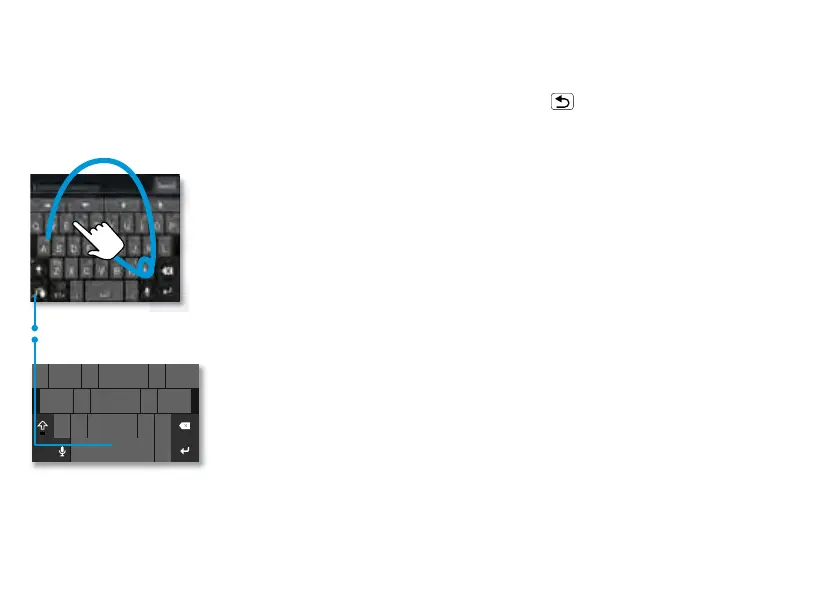
To switch keyboards, touch & hold.
Swype Keyboard:
To enter a word, just
trace a path through the
letters.
To capitalize, go above
the keypad.
For double letters, circle
the letter.
Motorola Keyboard:
Touch a key for each
letter, then touch
predicted words to
enter them.
a
e
n
a
e
n
When you touch a text box to enter text,
like in a message or search, you have
keyboard options (to close the keyboard,
touch Back ).
• Choose a keyboard: Touch and hold a
blank spot in a text box, then choose
Input Method > Swype or
Multi-touch keyboard.
Swype™ text entry: Drag your finger
over the letters of a word, in one
continuous motion.
Multi-touch keyboard text entry:
Enter letters by touching them one at a
time.
Tips & tricks
• Keyboard adaptation: Your
touchscreen keyboard changes,
depending on whether you’re entering
a text message, email, or other text.
• Copy & paste: Double-tap a word to
highlight it (if needed, drag the ends of



 To Next Page
 Loading...






