EasyManua.ls Logo

Motorola FX5000 - User Manual

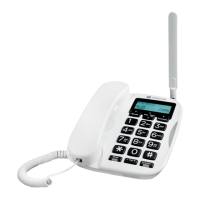
Motorola FX5000
23 pages
Print Icon
To Next Page IconTo Next Page
Loading...
APPLICANT: MOTOROLA, INC. FCC ID: IHDT6ZC1
EXHIBIT 8
INSTRUCTION MANUAL
A preliminary draft copy of the Users Manual follows:

Questions and Answers

  • A
    Anna JonesAug 1, 2025
    What to do if my Motorola FX5000 Telephone cannot make or receive calls?
    • P
      Patricia CervantesAug 1, 2025
      If your Motorola Telephone is unable to make or receive calls, ensure that the phone’s power supply is properly connected to an AC outlet and that the AC power in your home or office is switched on. Also, verify that you have active wireless service.
  • T
    Terri SmithAug 17, 2025
    Why does my Motorola FX5000 have static or intermittent voice during conversations?
    • J
      John DunnAug 17, 2025
      If you are experiencing static or intermittent voice issues during conversations on your Motorola Telephone, try relocating your phone to a different spot. Additionally, make sure the antenna is positioned vertically.

Summary

Instruction Manual

General Safety Information

Exposure to Radio Frequency Signals

Explains RF signal exposure and safety standards for wireless telephones.

Electronic Device Precautions

Advises on potential interference with pacemakers and other medical devices.

Hazardous Area Operations

Warns against using the phone in areas with explosive atmospheres or blasting.

Assembly

Installing the Handset

Step-by-step guide to connect the handset to the base using the coil cord.

Attaching the Antenna

Instructions on how to connect the antenna to the phone base.

Installing the Power Supply

Details on how to connect the power supply cord to the phone base.

Installation

Plugging into AC Power

Explains how to connect the phone's power adapter to an AC electrical outlet.

Controls and Indicators

LED Indicator

Explains the meaning of the LED light colors on the phone base.

Operating Your Telephone

How to Place a Call

Step-by-step guide on dialing a number and initiating a phone call.

Troubleshooting

Technical Specifications

Motorola FX5000 Specifications

General IconGeneral
BrandMotorola
ModelFX5000
CategoryTelephone
LanguageEnglish

Related product manuals