41
text entry
text entry
Some features let you enter text.
Change capitalization:
In a text entry screen, press
0
to change text case to all capital letters (
Á
), next
letter capitalized (
Ë
), or next letter lowercase (
Æ
).
Set word learning:
Your phone can learn the words
you enter, to improve text prediction and completion.
In a text entry screen, press
Options
>
Text Entry
>
Set Text Prediction
>
Learn My Words
. Your phone shows
Ç
when word learning is active. To hide your words from
other users, turn off
Learn My Words
and set
s
>
á Settings
>
Phone Settings
>
Text Entry
>
Dictionary Lock
>
On
.
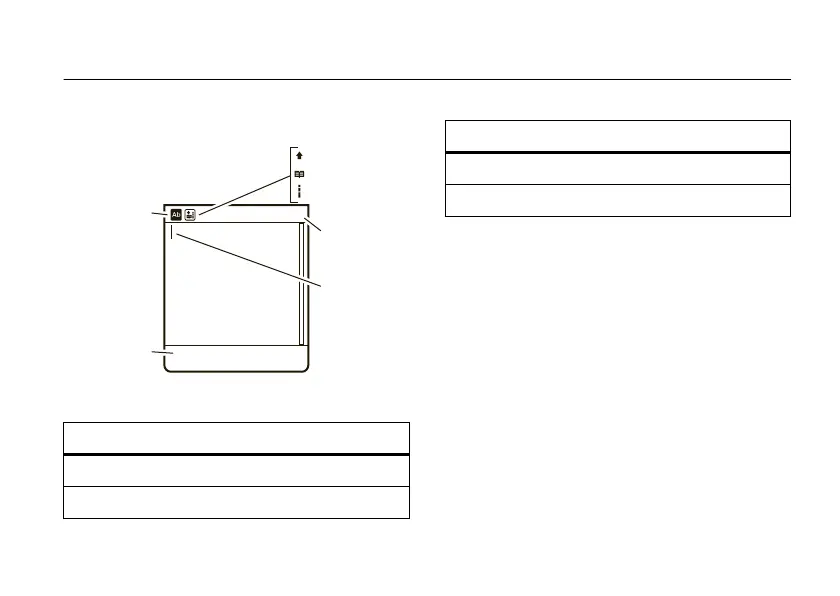
text entry modes
Ê
“word” mode (page 42)
É
“abc” mode (page 42)
Flashing
cursor
indicates
insertion
point.
Character
Counter
capitalization
word learning
word completion
Press
#
to
select a
text entry
mode.
Press
Options
to change
text entry
options.
SMS:0
Options Cancel
È
numeric mode (page 43)
Ã
symbol mode (page 43)
text entry modes


 To Next Page
 Loading...