8
Rotaon Adjustment: To adjust the rotaon, loosen the same bolt that controls the lt. Once loosened,
the TV plate will rotate clockwise or counterclockwise.
Ease of Moon: If your mount is difficult to collapse and extend from the wall, you can use the provided
Allen wrench to loosen the bolts in the joints of the arm. If you loosen the joints too much it may cause
your mount to sag.
Secon B: Concrete and Masonry Installaon:
1. Mark Installaon Points: Once you
have selected the locaon for your mount, use
the suppl ie d wall plate te mp late to ma rk the
exact locaon of where the two anchors and lag
bolts will be installed.
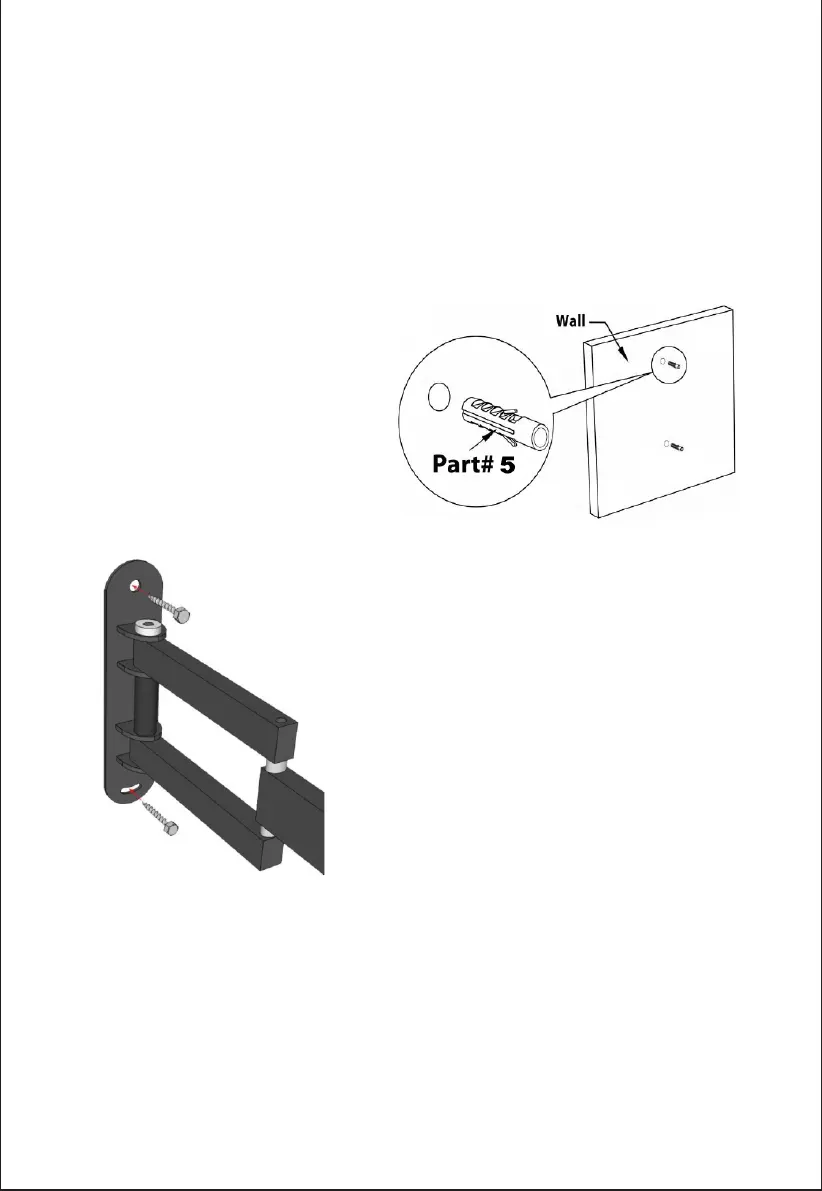
2. Pre-Drill Installaon Points: Pre-drill
the holes using a 10mm or 3/8" concrete drill bit
t o a d e p t h o f 2 " t h e n i n s e r t t h e s u p p l i e d
anchors (Part 6). See Figure to the right.
Drilling into Concrete: When drilling into concrete or masonry,
you have to use a special masonry drill bit. Using a standard drill
bit will not penetrate the concrete and it will just dull your drill
bit. If you do not have a masonry drill bit, you can purchase one at
th e loca l hard wa re sto re . It is no t recomm end e d to d r ill an d
mount into concrete block or mortar joints. The supplied plasc
anchors are rated for use up to 165LBS, but if you prefer, you can
go to yo ur local hardwa re store and purchase metal concrete
anchors.
3. Aaching the mount to your wall: Once the holes are
pre-drilled and both plasc anchors are inserted, fix the wall plate
with the two supplied lag bolts into the wall. See Figure to the
le.
ATTENTION:
This mount must be installed using the supplied hardware with the two lag bolts used for wood stud or
masonry installaon. The mount guarantees the mount only and is not responsible for any damage to
walls, TVs, furniture or fixtures.
At this point please connue with Step 4 in the wood stud installaon secon as the rest of the steps
apply to both.
Revision Date: 04/11/2016


 To Next Page