6
Step 3
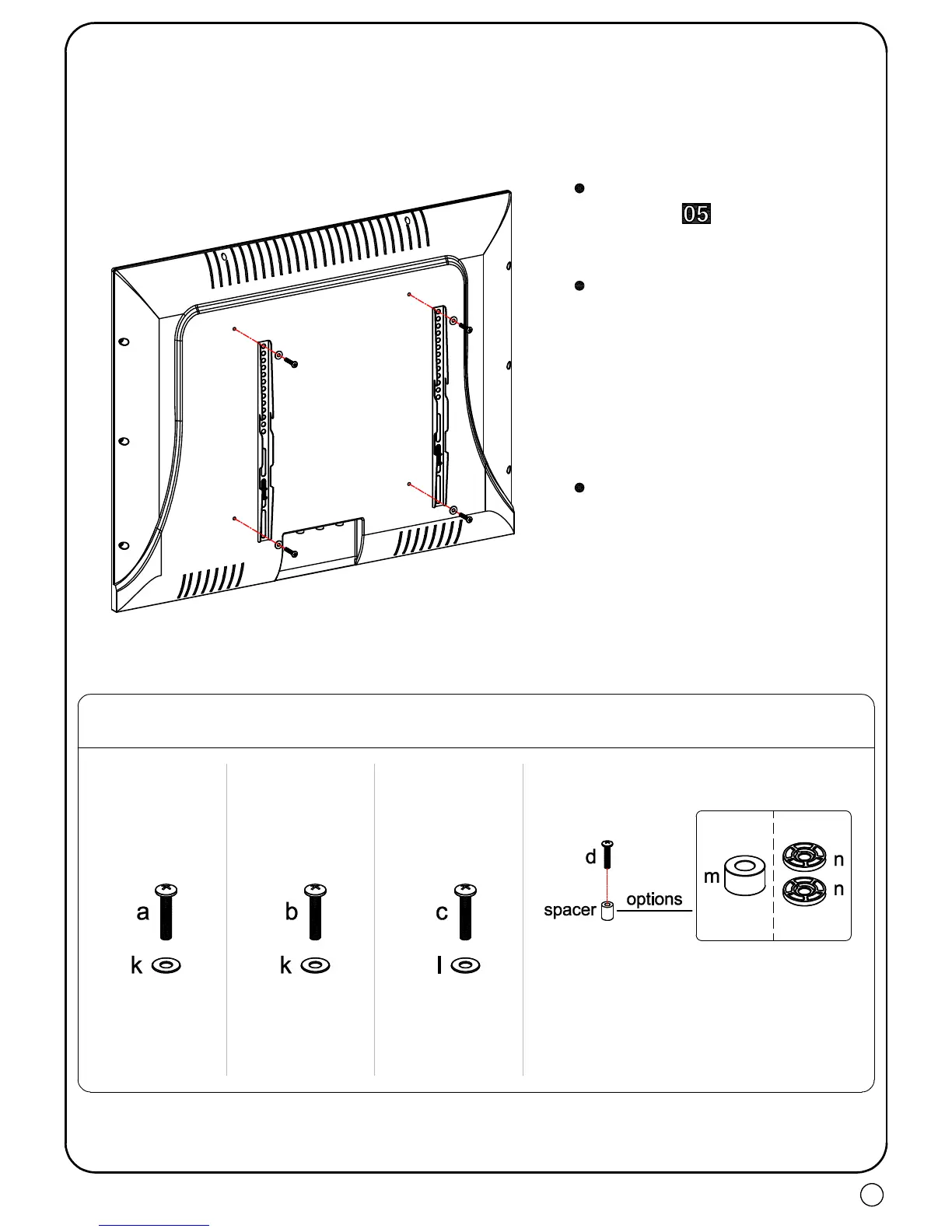
Attach brackets to the back of TV
①
For the TV with flat back, mount the brackets with bolt/washer/spacer
combination.
Carefully lay TV on a non-abrasive surface, or with a padding underneath it so as not to
damage the screen.
Tips:
Make sure the ends of TV
brackets with round
holes are facing upward.
Round hole is for upper
VESA hole, and long slot
hole for lower VESA hole.
Please try best to locate
brackets symmetrically (top
& bottom) at the back of TV
to avoid brackets stick out.
Attention: Screw in bolts a
bit, then pull upward
brackets to reduce the gap
between bolts and bolt
holes to make two brackets
parallel. Then fasten bolts.
Bolt/spacer/washer combination options
(only for reference)
Tips:You have to remove the inner
circle of 2.5mm washer (n) in order
to fit the M8 (d) bolt.



 To Next Page