26
OPERATION (cont.)
Empty the Drain Tank
During COOL mode, condensate water accumulates in the drain tank.
When the drain tank becomes full, the “TANK FULL” LED flashes and the LCD
displays “TANK FL” and the unit turns off automatically.
Note: If you want to empty the drain tank, while the unit is in operation, press the
COOL ON/OFF button to turn the unit off. If a program is running, you must first
stop the program by pressing the RUN/STOP button.
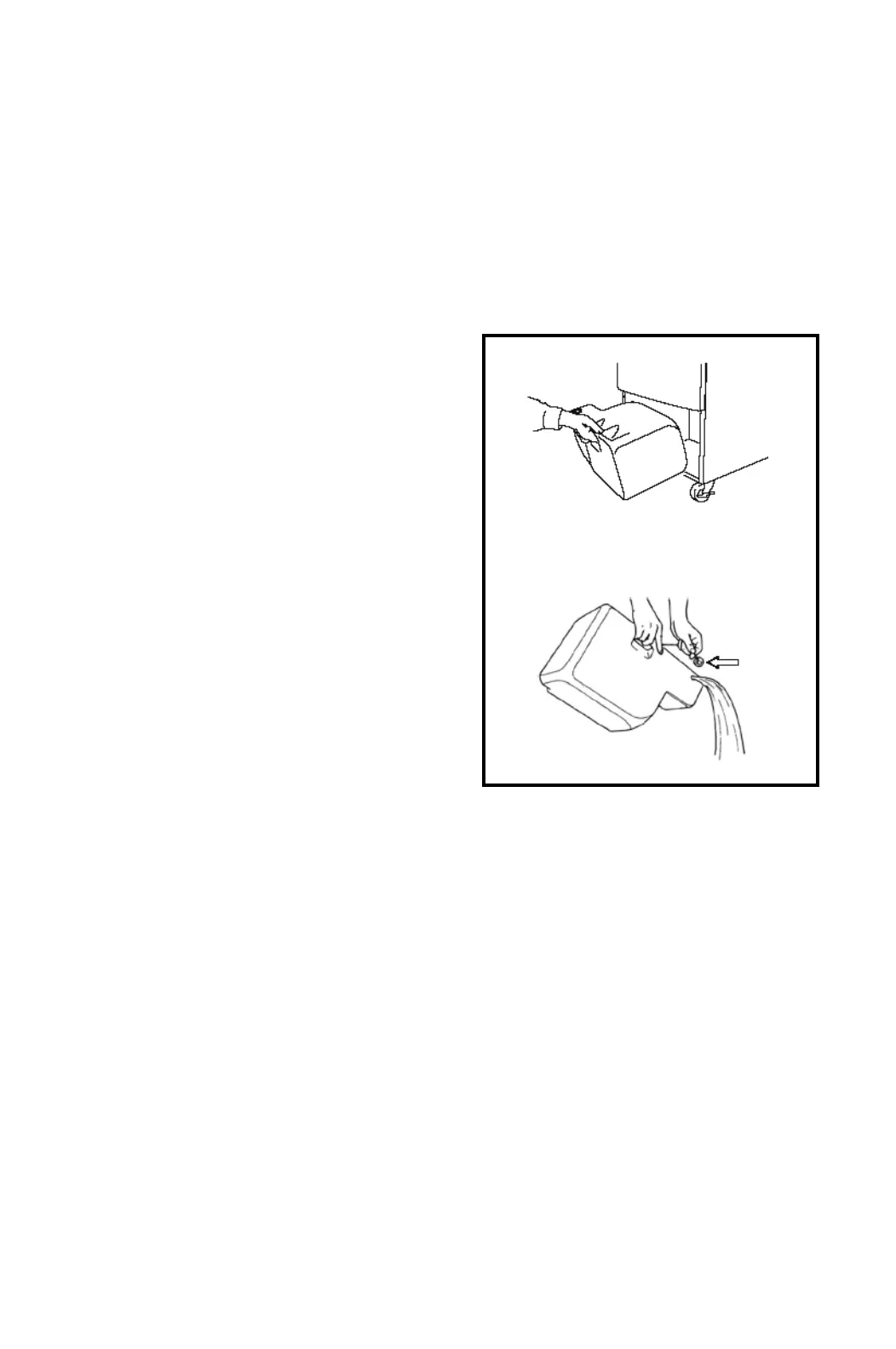
1. Pull the drain tank from the unit.
2. Remove the cap and empty the drain
tank.
3. Replace the cap and return the drain tank to the unit.
4. Press the COOL ON/OFF or FAN ON/OFF button to restart the unit.
5. If the LCD indicates “PROGRAM ON”, press the COOL ON/OFF button to
continue running the program. If the LCD indicates “PROGRAM ON” is
illuminated continuously, no further steps are necessary. If no program exists
or the program was deactivated, press the COOL ON/OFF button to restart the
unit.
CAP









 To Next Page