29
DAILY INSPECTION & MAINTENANCE
Empty the Drain Tank
To empty the drain tank, refer to instructions on page 26.
Clean the Air Filters
Clean the air filters once a week. If the unit is used in a dusty environment, more
frequent cleaning may be required.
A dirty air filter can reduce air output resulting in a decrease in cooling capacity.
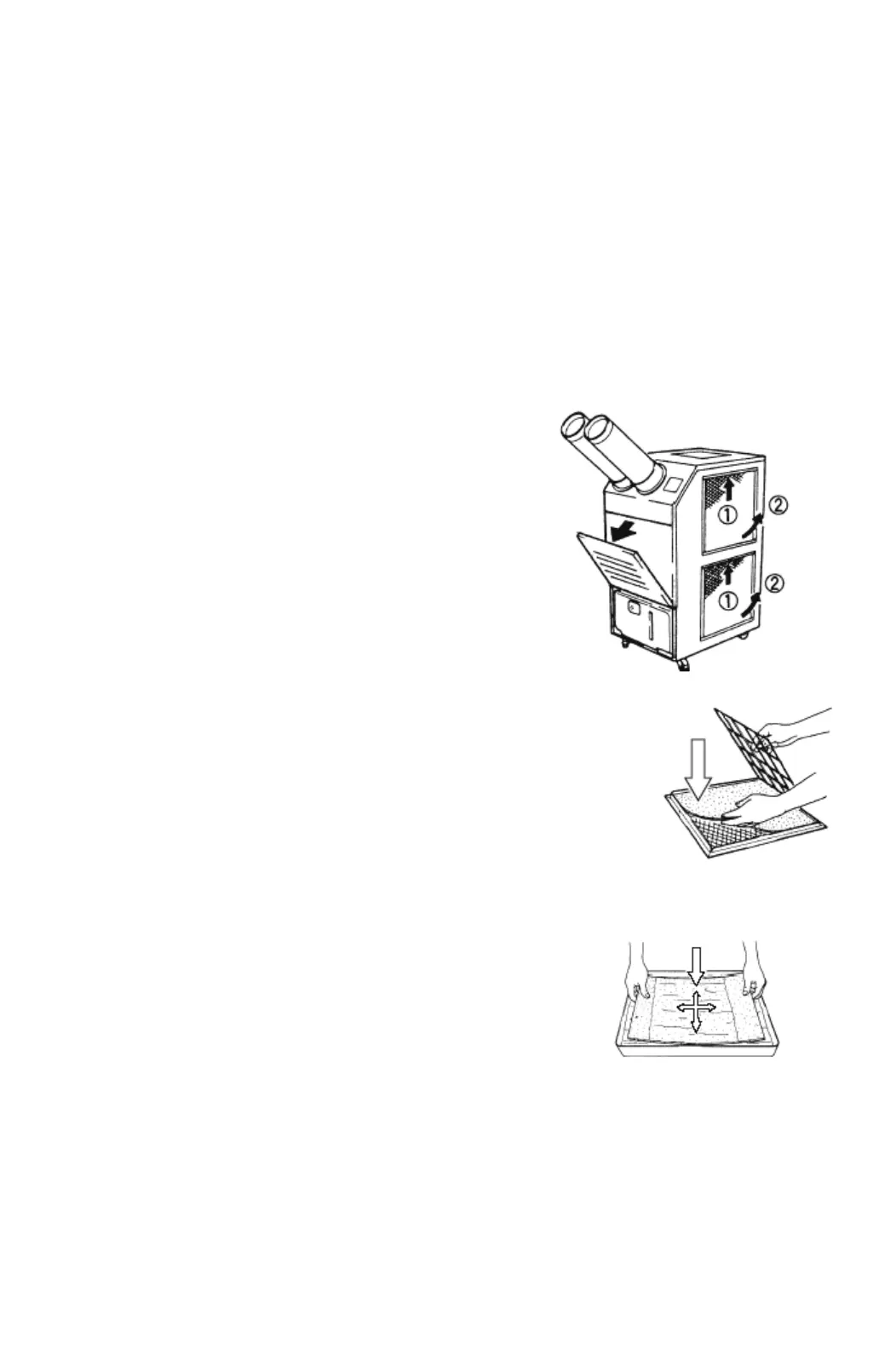
Filter Removal Method
1. Turn the unit off, by pressing the COOL ON/
OFF button.
2. Remove the air filters.
Note: To remove the side air filters, lift
upward, then pull outward from the bottom. To
remove the front panel air filter, pull out top
corners, then lift upward.
3. Remove the element from each filter.
Filter Element Cleaning Method
1. Remove dust from the element with a vacuum
cleaner, or rinse in cold or lukewarm water. If
the element is extremely dirty, wash with a
neutral detergent.
2. After the element has been cleaned, rinse
with clean running water, allow to dry, then
reinstall.
FILTER
FILTER








 To Next Page