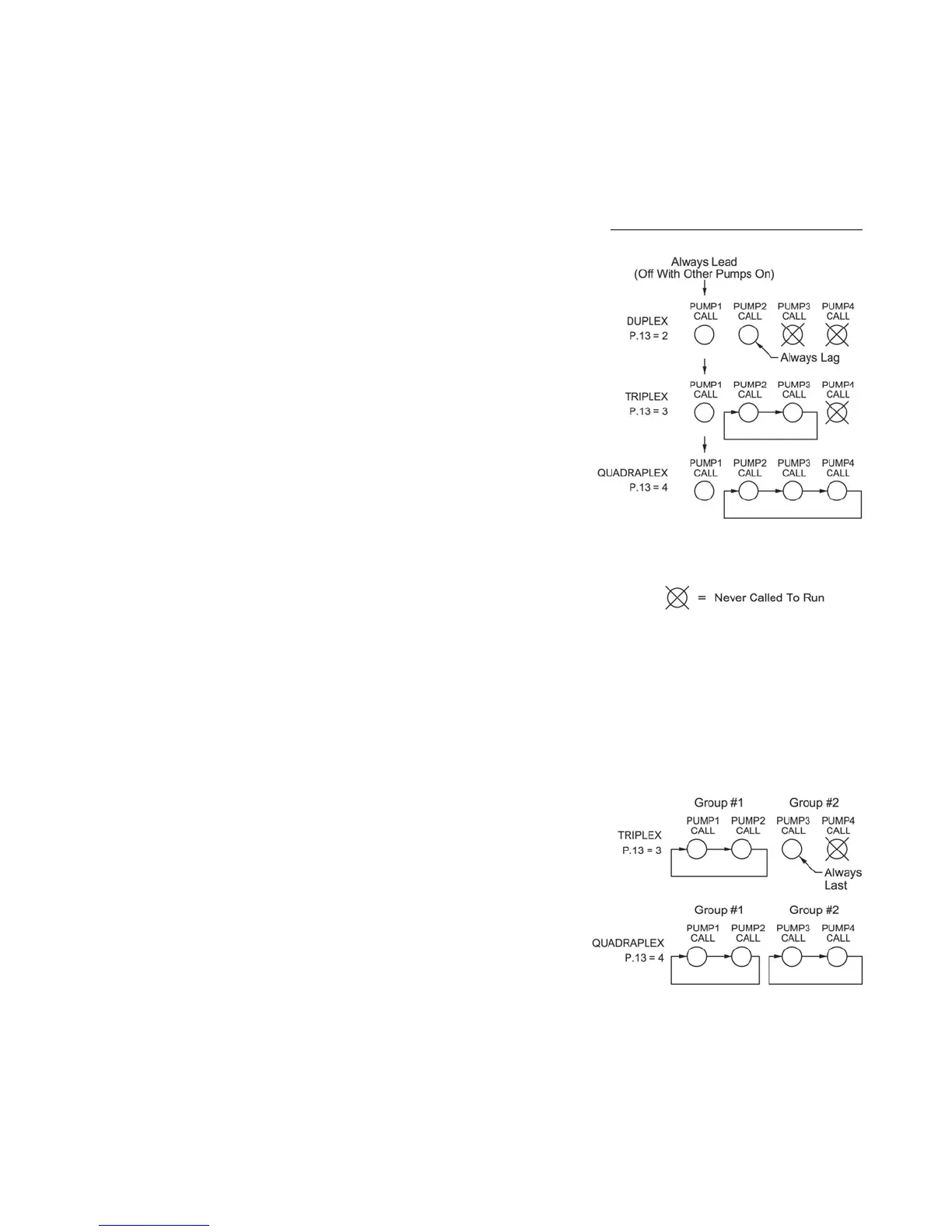
ALTERNATION SEQUENCE MODE
SPLIT ALTERNATION
Parameter P.16 = 3
12
Notes:
1. This sequence is used when it is required that pump 1 always be lead, and
when it must be turned off when another pump(s) comes on. When a pump
from the second group is required, pump 1 is first turned off, then after the
Lag Pump Delay, the other pump is turned on.
2. For Triplex and Quadraplex applications Parameter P.17 must be used to
select either First On Last Off or First On First Off.
3. Discrete Inputs programmed as Pump 1-4 Disable inputs may be used to
disable pumps.
4. For Triplex and Quadraplex applications Discrete Inputs programmed as
Call Pump 2-4 Last inputs may be used to assign pumps to standby status.
5. For Triplex and Quadraplex applications Discrete Inputs programmed as
Sequence Inputs 2-4 may be used to set the lead pump.
6. For Triplex and Quadraplex applications Parameter P.39 may be used to set
the lead pump.
7. If pump 1 is disabled, another pump will Not be called in its place. The 1
ST
Pump On/Off Level parameters are dedicated to pump 1 and will not call
another pump.
8. A Discrete Input programmed for External Alternation (Function 6) may be
used to force alternation. When this feature is used, Automatic Alternation
would normally be disabled by setting Parameter P.18 to Disabled.
9. If connected to a SCADA system, alternation may be initiated by momentar-
ily setting Coil 136, or by forcing the lag pump by writing to Register 40022
(Same as Parameter P.39).
10. Parameter P.51 may be used to select and setup Time Based Alternation.
Notes:
1. This sequence is used when it is required that pumps be alternated in two
separate groups.
2. Parameter P.17 must be used to select either First On Last Off or First On
First Off.
3. Discrete Inputs programmed as Pump 1-4 Disable inputs may be used to
disable pumps.
4. Discrete Inputs programmed as Call Pump 1-4 Last inputs may be used to
assign pumps to standby status.
5. Discrete Inputs programmed as Sequence Inputs 1-4 may be used to set the
lead pump.
6. Parameter P.39 may be used to set the lead pump of group #1.
7. If pumps from group 1 are disabled, then pumps in group #2 may be called
to take their place.
8. A Discrete Input programmed for External Alternation (Function 6) may be
used to force alternation of Group #1. When this feature is used, Automatic
Alternation would normally be disabled by setting Parameter P.18 to Dis-
abled.
9. If connected to a SCADA system, alternation of Group #1 may be initiated
by momentarily setting Coil 136, or by forcing the lead pump position by
writing to Register 40022 (Same as Parameter P.39).
10. Parameter P.51 may be used to select and setup Time Based Alternation
of Group #1.
PUMP 1 ALWAYS LEAD
Turns Off With Other Pumps On
Parameter P.16 = 4
Movement of Lead Pump Upon Alternation


 To Next Page
 Loading...