2
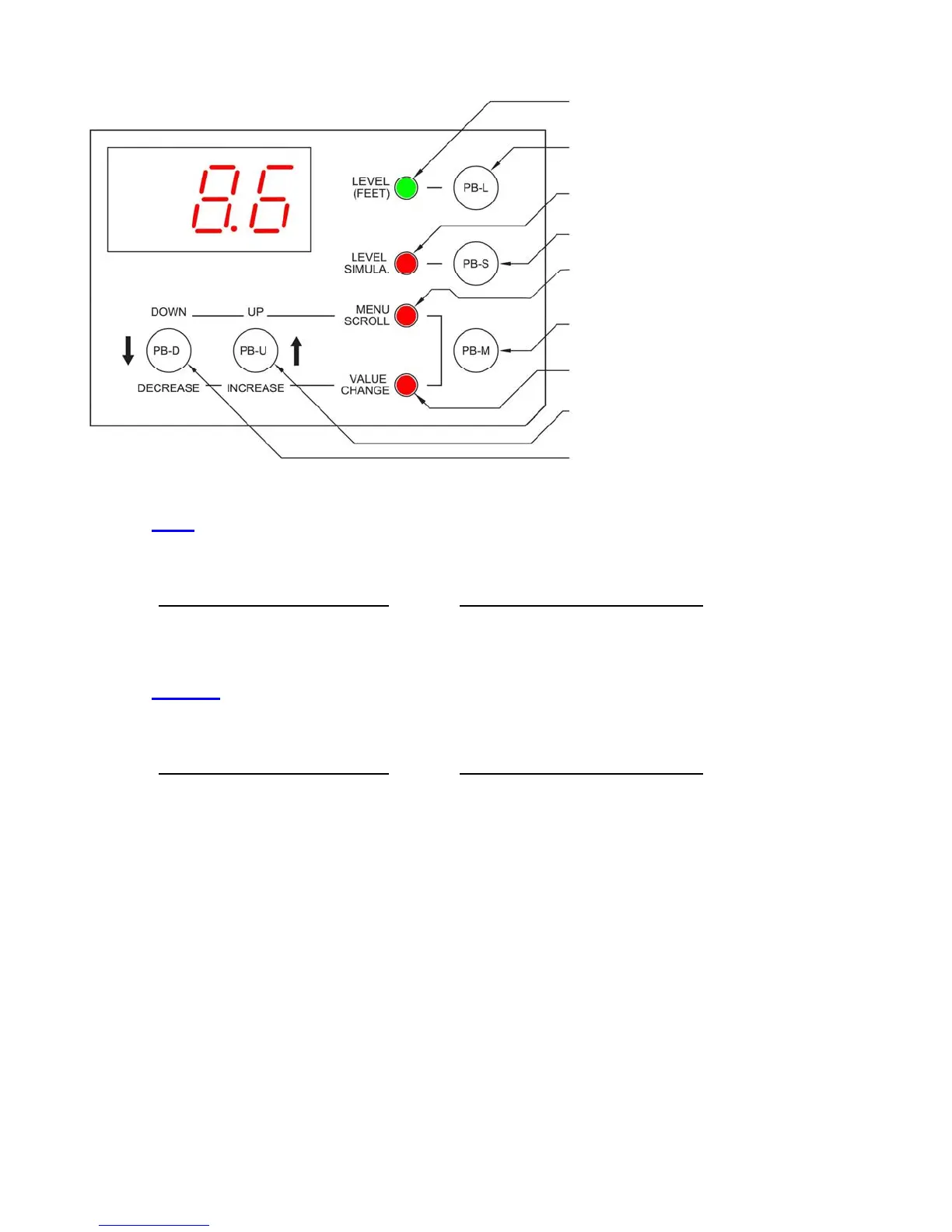
On when Display Shows the Wet Well Level
Press to Display Wet Well Level
On when in Level Simulation Mode
Press to Enter the Level Simulation Mode
On when in Menu Scroll Mode
Press to Change Function of the
Up/Down Push-Buttons
On when in Value Change Mode
Press to Scroll Up the Menu, or to
Increase Parameter Value
Press to Scroll Down the Menu, or to
Decrease Parameter Value
Parameters Shown on Front of Controller:
The value of the Parameter is displayed
whenever the indicator next to the Parame-
ter label is on.
Parameters Shown on Front of Controller:
Press push-button PB-M until the Value
Change indicator comes on.
Parameters in the System Setup Sub-Menu:
The value of a Parameter in the System Setup Sub-Menu may be
viewed by using the push-button PB-M to toggle from the Parameter
number (P.13, for example) to the Parameter value.
Parameters in the System Setup Sub-Menu:
Press push-button PB-M until the Value Change indicator comes
on. The current value of the Parameter will then be displayed.
OPERATOR INTERFACE FUNCTIONS
Note: There is a 4 second Delay on Changing Parameter Values.
How to View a Setup Parameter Value
1. Press push-button PB-M until the Menu Scroll Mode indicator comes on.
2. Press push-button PB-D and PB-U as needed to arrive at the Parameter you wish to view.
How to Change a Setup Parameter Value
1. Press push-button PB-M until the Menu Scroll mode indicator comes on.
2. Press push-button PB-D and PB-U as needed to arrive at the Parameter you wish to change.
4. Press and hold for 4 seconds, either push-button PB-D or PB-U, to change the Parameter to the desired new value.
(If the Parameter values will not change, they may be locked. See directions below to un-lock Parameters.)
5. Press push-button PB-M or PB-L to exit the Value Change mode.
How to Simulate Levels
1. Press push-button PB-S.
Note: The Simulation starts from the actual level displayed prior to entering the Level Simulation mode.
2. Press push-button PB-D or PB-U as needed to change the simulated level.
3. To end the level simulation press push-button PB-L.
Note: If you do not exit the Level Simulation mode, normal operation will resume automatically 60 seconds after the
last time the PB-U, PB-D, or PB-S push-buttons were pressed.
How to Enter the Security Code
1. Press the push-button PB-M until the Menu Scroll mode indicator comes on.
2. Press push-button PB-U until the display reads SEC.
3. Press push-button PB-M to change to the Value Change mode.
4. Press and hold for 4 seconds, either push-button PB-D or PB-U, to change the value displayed, to that of the correct
security code.
3.
3.


 To Next Page
 Loading...