DCA25SSIU4F 60 HZ GENERATOR• OPERATION MANUAL — REV. #4 (01/17/18) — PAGE 23
GENERATOR OUTPUTS/GAUGE READING
HOW TO READ THE AC AMMETER AND AC
VOLTAGE GAUGES
The AC ammeter and AC voltmeter gauges are controlled
by the AC ammeter and AC voltmeter change-over switches.
Both of these switches are located on the control panel and
DO NOT effect the generator output. They are provided to
help observe how much power is being supplied, produced
at the UVWO terminals lugs.
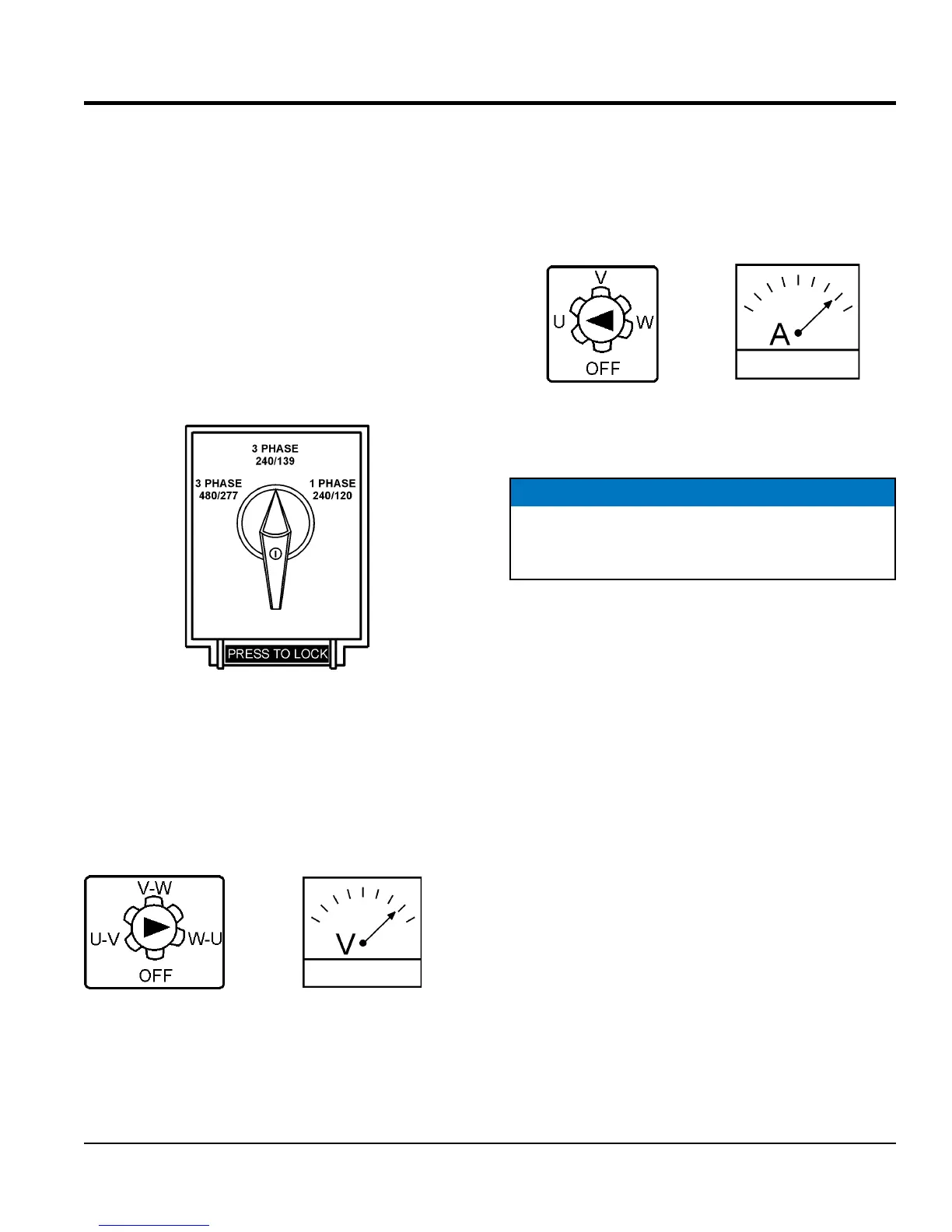
Before taking a reading from either gauge, set the Voltage
Selector Switch (Figure 13) to the position which produces
the required voltage (For example, for 3Ø 240V, choose the
center 3Ø 240/139V position on the voltage selector switch
Figure 13. Voltage Selector Switch-
240/3
Ø Position
AC Voltmeter Gauge Reading
Place the AC Voltmeter Change-Over Switch (Figure 14)
in the W-U position and observe the phase to phase voltage
reading between the W and U terminals as indicated on
the AC Voltmeter Gauge (Figure 15).
Figure 14. AC Voltmeter
Change-Over Switch
Figure 15. AC Voltmeter Gauge
(Volt reading on W-U Lug)
AC Ammeter Gauge Reading
Place the AC Ammeter Change-Over Switch (Figure 16)
in the U position and observe the current reading (load
drain) on the U terminal as indicated on the AC Ammeter
Gauge (Figure 17). This process can be repeated for
terminals V and W.
Figure 16. AC Ammeter
Change-Over Switch
Figure 17. AC Ammeter
(Amp reading on U Lug)
NOTICE
The ammeter gauge will only show a reading when
the Output Terminal Lugs are connected to a load
and in use.




 To Next Page