CHANGING THE INTERSECTOR IP ADDRESS (cont.)
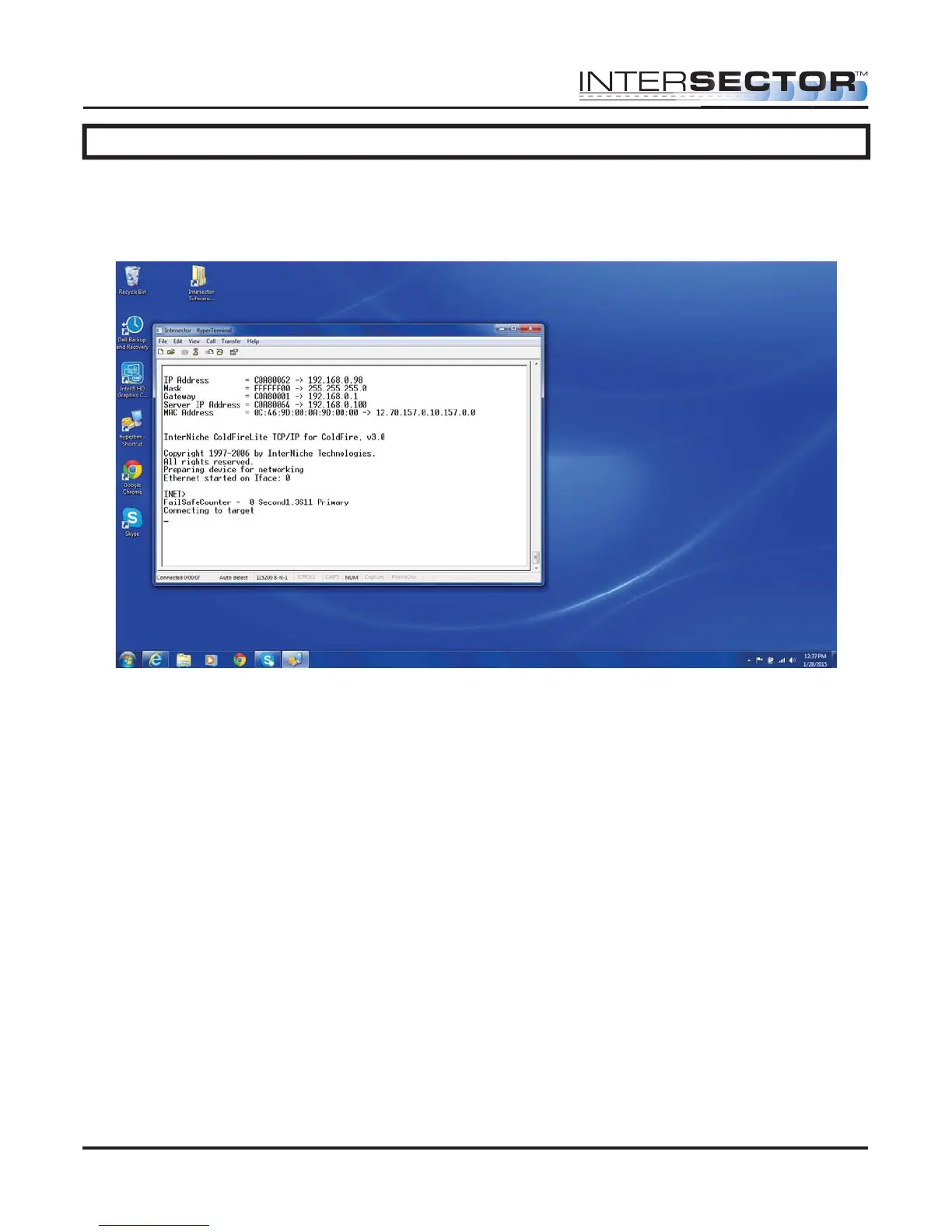
Once you have configured Hyperterminal you can connect to the TCIB by clicking the
reset button on the TCIB or powering the TCIB while Hyperterminal is running. If you
connect to the TCIB you can see this screen:
The bottom line from the Hyperterminal screen shows the TCIB software as version
1.3S. The screen also shows the IP address for the TCIB. Record this value for use in
the next section.
Checking or setting IP Address
To check or set IP addresses you need to use a software program called
IP_Address_Set.exe. This program is available by contacting MS Sedco direct. 00
There are several steps to changing the IP addresses on the INTERSECTOR, TCIB, and
laptop. The steps would be:
• Confirm IP addresses in each device. Record these values for later use.
• Set up the TCP/IP on your computer as shown on pages 11 and 12 of this manual.
• Connect to the TCIB via RS232 cable.
• Change TCIB IP address using the IP_Address_Set program.
• Connect to the INTERSECTOR via Ethernet cable.
• Use the IP_Address_Set program to change INTERSECTOR IP address
• Verify that changes match between INTERSECTOR and TCIB.
INTERSECTOR
Microwave Motion and
Presence Sensor Installation Instructions
MS Sedco INTERSECTOR Installation Instructions Page 26 INTERSECTOR-1.9Uv092717



 To Next Page