En-7
Installation Guide
English
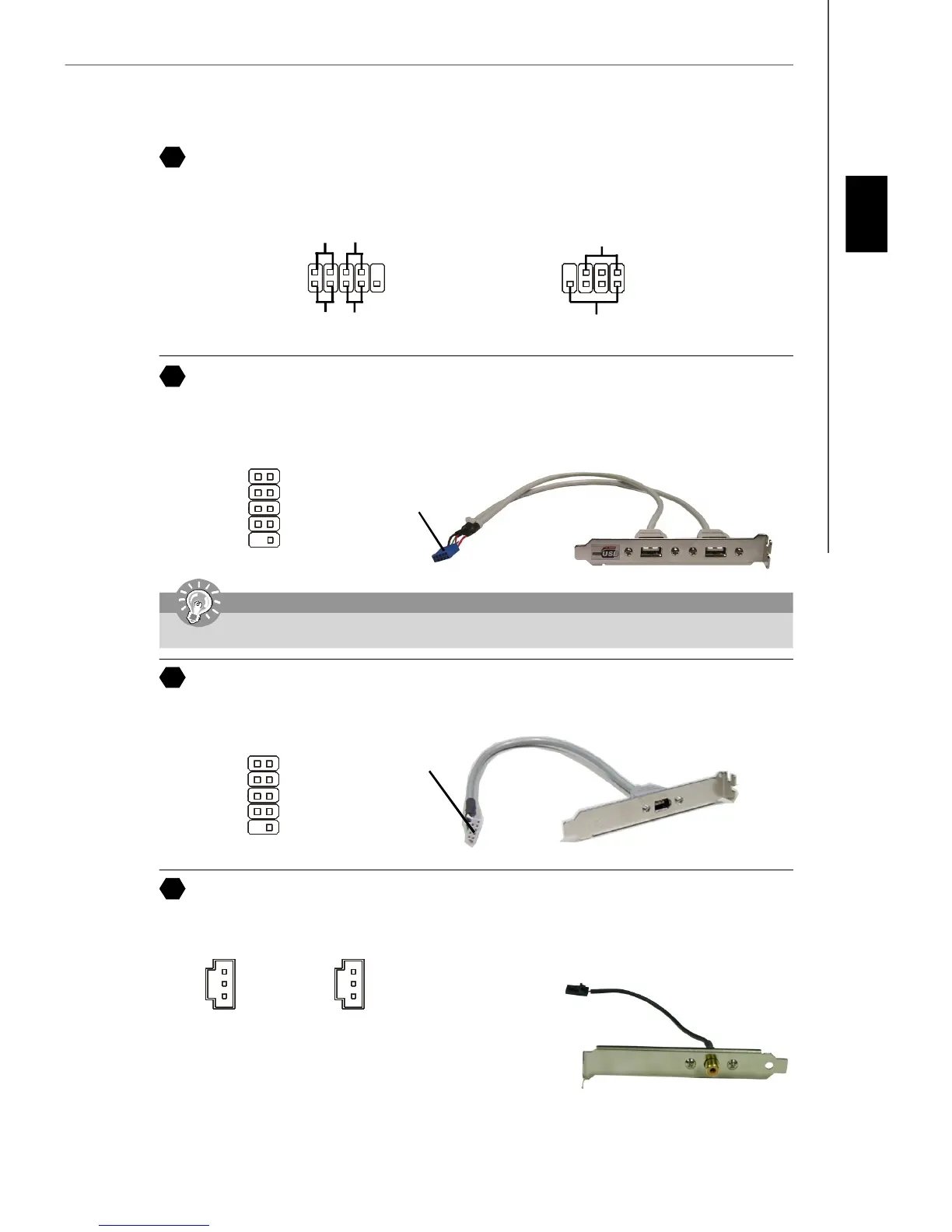
SPDIF-Out Connector/ SPDIF-In Connector
These two connectors are used to connect SPDIF (Sony & Philips Digital Interconnect Format) interface for digital audio
transmission.
Connected to SPDIF-out/
SPDIF-in connector
SPDIF Bracket (Optional)
Front Panel Connectors
These two front panel connectors are used for electrical connection to the front panel switches and LEDs. JFP1 is compliant
with Intel
®
Front Panel I/O Connectivity Design Guide.
1
2
9
10
HDD
LED
Reset
Switch
Power
LED
Power
Switch
JFP1
JFP2
7
8
Power LED
Speaker
1
2
Front USB 2.0 Connector (Yellow)
USB 2.0 technology increases data transfer rate up to a maximum throughput of 480Mbps, which is 40 times faster than
USB 1.1, and is ideal for connecting high-speed USB interface peripherals such as USB HDD, digital cameras, MP3
players, printers, modems and the like.
10
USBOC
1 2
VCC
USB0-
USB0+
GND
Key (no pin)
VCC
USB1-
USB1+
GND
9
IEEE 1394 Connectors (Green)
The 1394 pin header allows you to connect IEEE 1394 ports via an external IEEE1394 bracket.
1 2
9 10
TPA+
Ground
TPB+
Cable power
Key (no pin)
TPA-
Ground
TPB-
Cable power
Ground
Connected to 1394
connector (with fool-
proof design)
IEEE1394 Bracket
(Optional)
Connected to USB
connector
USB 2.0 Bracket
(Optional)
SPDIF_In
VCC
SPDIF_in
GND
SPDIF_Out
VCC
SPDIF_out
GND
8
9
10
11
Important
Note that the pins of VCC and GND must be connected correctly to avoid possible damage.


 To Next Page