En-10
MS-7235 Mainboard
Power Supply Attachment
Before inserting the power supply connector, always make sure that all components
are installed properly to ensure that no damage will be caused. All power connectors
on the mainbnoard have to connect to the ATX power supply and have to work to-
gether to ensure stable operation of the mainboard.
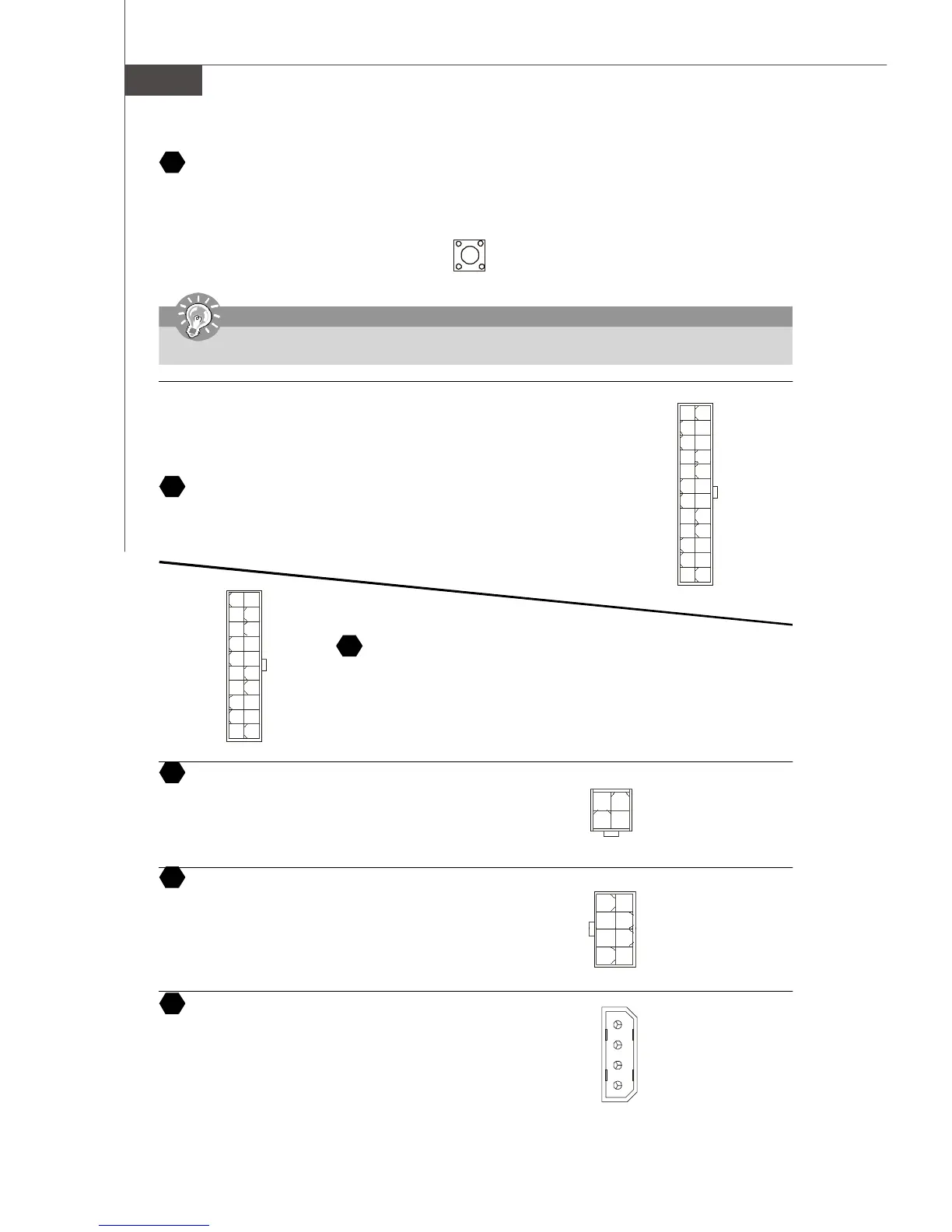
ATX 24-Pin Power Connector
This connector allows you to connect an ATX 24-pin power supply. To connect the ATX
24-pin power supply, make sure the plug of the power supply is inserted in the proper
orientation and the pins are aligned. Then push down the power supply firmly into the
connector.
ATX 12V Power Connector (2x2-Pin)
These 12V power connectors is used to provide power to the CPU.
ATX 12V Power Connector (2x4-Pin)
These 12V power connectors is used to provide power to the CPU.
ATX 12V Power Connector (1x4-Pin)
These 12V power connectors is used to provide power to the graphics card.
8 4
1
5
GND
GND
GND
GND
+12V
+12V
+12V
+12V
1
34
2
GND
12V
GND
12V
ATX 20-Pin Power Connector
This connector allows you to connect an ATX 20-pin power supply. To connect the ATX
20-pin power supply, make sure the plug of the power supply is inserted in the proper
orientation and the pins are aligned. Then push down the power supply firmly into the
connector.
1
1020
11
3.3V
3.3V
GND
5V
GND
5V
GND
PWR OK
5VSB
12V 5V
5V
-5V
GND
GND
GND
PS-ON
GND
-12V
3.3V
21
22
25
24
23
4
2
1
3
5V
GND
GND
12V
1
1224
13
+3.3V
+3.3V
GND
+5V
GND
+5V
GND
PWR OK
5VSB
+12V
+12V
+3.3V
GND
+5V
+5V
+5V
NC
GND
GND
GND
PS-ON#
GND
-12V
+3.3V
Clear CMOS Button
The CMOS RAM onboard has a power supply from external battery to keep the data of system configuration. With the CMOS
RAM, the system can automatically boot OS every time it is turned on. If you want to clear the system configuration, use the
Clear CMOS Button to clear data. Press the button in the middle of the connector top side to clear the data.
20
Important
Make sure that you power off the system before clearing CMOS data.


 To Next Page