En-9
Installation Guide
English
D-Bracket™ 2 Connector
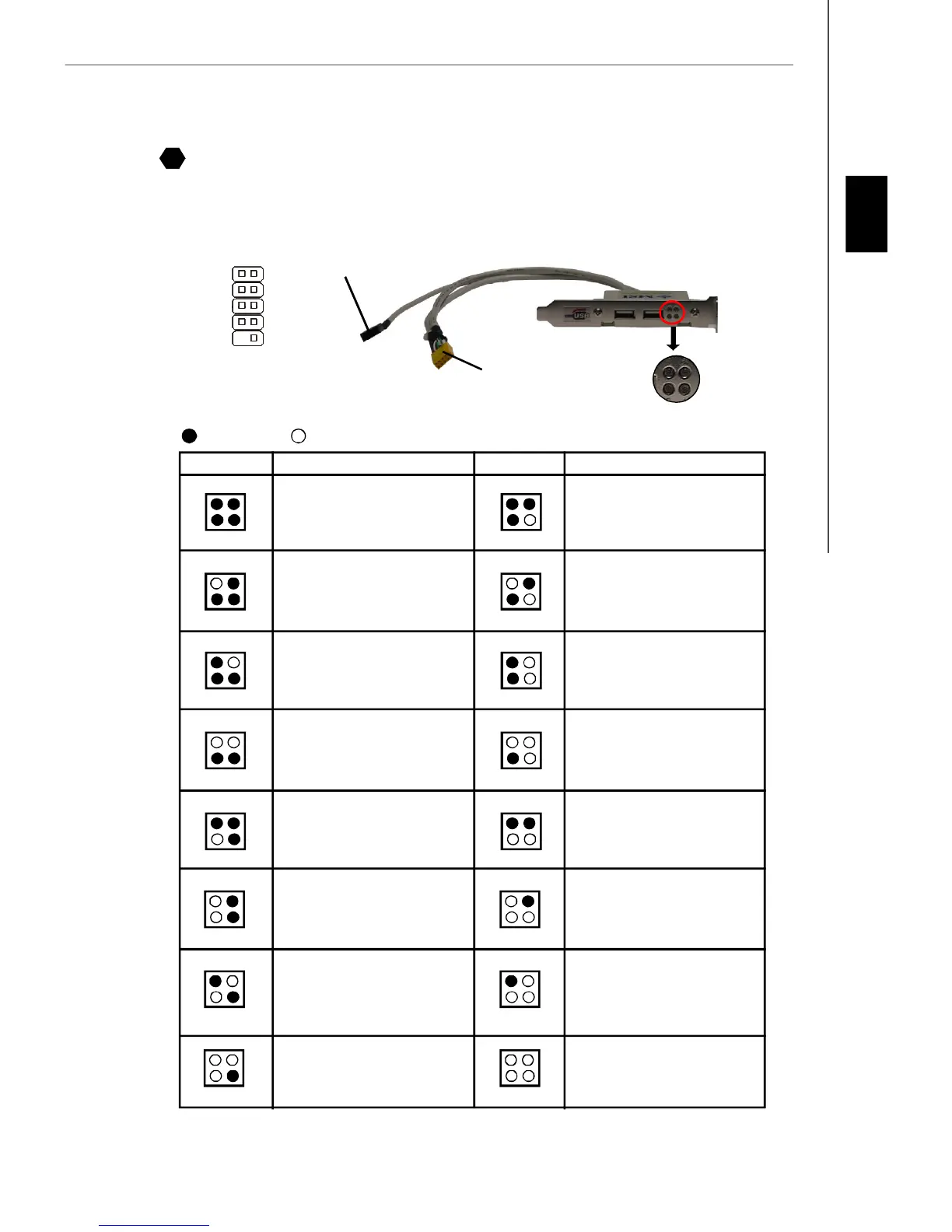
The connector is for you to connect D-Bracket™ 2. D-Bracket™ 2 is a external USB Bracket that support both USB1.1 &
2.0 spec. It integrates four LEDs and allows users to identify system problem through 16 various combinations of LED
signals. The 4 LEDs can debug all problems that fail the system, such as VGA, RAM or other failures. This special feature
is very useful for the overclocking users. These users can use the feature to detect if there are any problems or failures.
Connected to the USB pinheader
in YELLOW color
Connected to D-Bracket™
2 Connector
LEDs
1
9
2
10
DBG1
DBG1
DBG3
DBG4
Key
DBR1
DBR2
DBR3
DBR4
NC
D-Bracket™ 2
(Optional)
1 2
3 4
BIOS Sign On
This will start showing information
about logo, processor brand name,
etc...
Testing Base and Extended Memory
Testing base memory from 240K to
640K and extended memory above
1MB using various patterns.
Assign Resources to all ISA.
Initializing Hard Drive Controller
This will initialize IDE drive and
controller.
Initializing Floppy Drive Controller
This will initialize Floppy Drive and
controller.
Boot Attempt
This will set low stack and boot via
INT 19h.
Operating System Booting
System Power ON
The D-LED will hang here if the
processor is damaged or not in-
stalled properly.
Initializing Keyboard Controller.
Testing VGA BIOS
This will start writing VGA sign-on
message to the screen.
Processor Initialization
This will show information regarding
the processor (like brand name, sys-
tem bus, etc...)
Testing RTC (Real Time Clock)
Description
Red
Green
LEDs signal
1 2
3 4
1 2
3 4
1 2
3 4
1 2
3 4
1 2
3 4
1 2
3 4
1 2
3 4
1 2
3 4
DescriptionLEDs signal
1 2
3 4
1 2
3 4
1 2
3 4
1 2
3 4
1 2
3 4
1 2
3 4
1 2
3 4
1 2
3 4
Early Chipset Initialization
Memory Detection Test
Testing onboard memory size. The
D-LED will hang if the memory mod-
ule is damaged or not installed
properly.
Decompressing BIOS image to RAM
for fast booting.
Initializing Video Interface
This will start detecting CPU clock,
checking type of video onboard. Then,
detect and initialize the video adapter.
19


 To Next Page