2-11
Hardware Setup
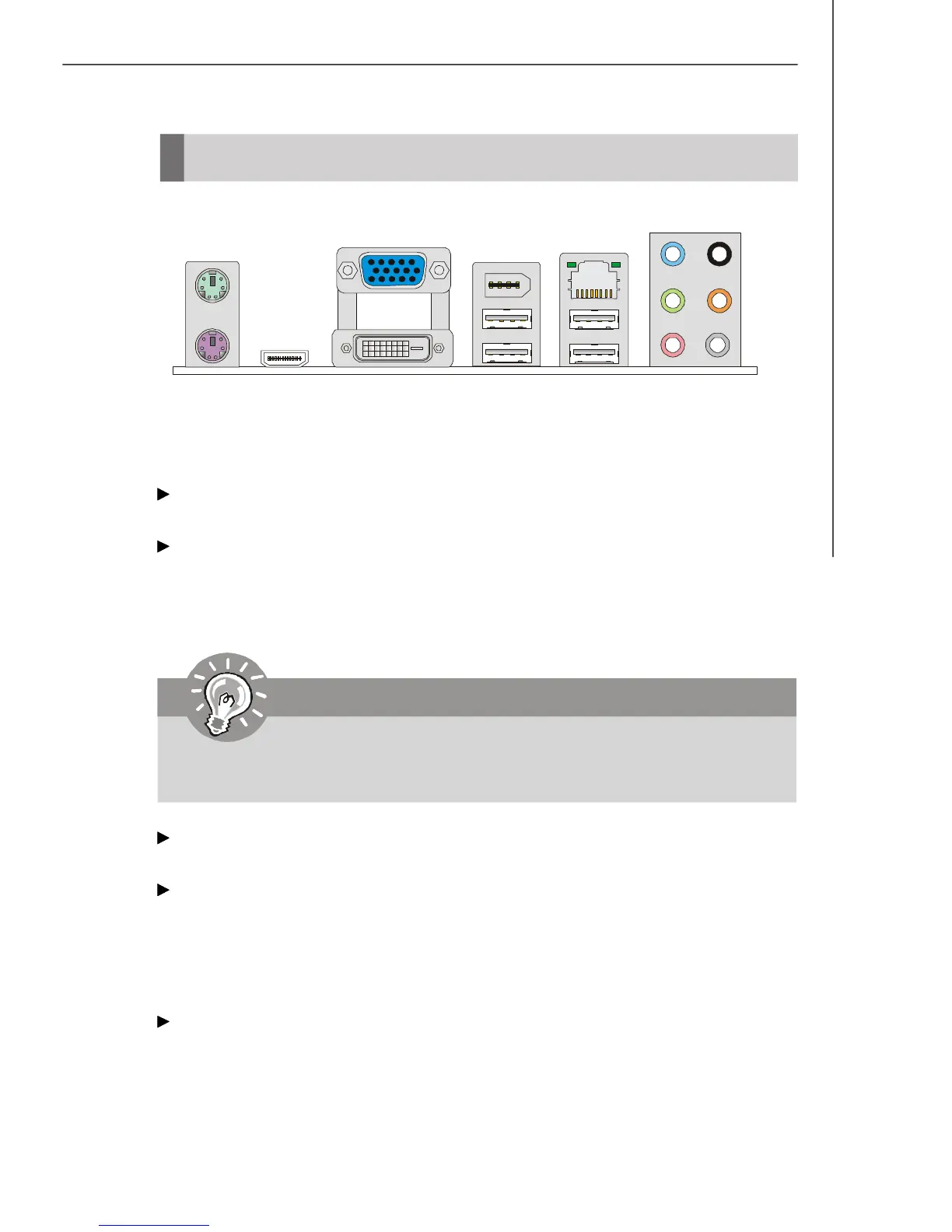
Back Panel
Mouse/Keyboard
The standard PS/2
®
mouse/keyboard DIN connector is for a PS/2
®
mouse/keyboard.
HDMI Port
The High-Definition Multimedia Interface (HDMI) is an all-digital audio/video interface
capable of transmitting uncompressed streams. HDMI supports all TV format, includ-
ing standard, enhanced, or high-definition video, plus multi-channel digital audio on a
single cable.
VGA Port
The DB15-pin female connector is provided for monitor.
DVI-D Port
The DVI-D (Digital Visual Interface-Digital) connector allows you to connect a LCD
monitor. It provides a high-speed digital interconnection between the computer and
its display device. To connect an LCD monitor, simply plug your monitor cable into the
DVI-D connector, and make sure that the other end of the cable is properly connected
to your monitor (refer to your monitor manual for more information.)
1394 Port (optional)
The IEEE1394 port on the back panel provides connection to IEEE1394 devices.
Keyboard
USB Port
Line-In
Mouse
(optional)
1394 Port
RS-Out
CS-Out
SS-Out
Line-Out
Mic
LAN
USB Port
HDMI Port
DVI-D Port
VGA Port
Important
To use the HDMI-out function, please make sure that the HDMI port has be
connected before you power-on the system.



 To Next Page