2-11
Hardware Setup MS-99A1
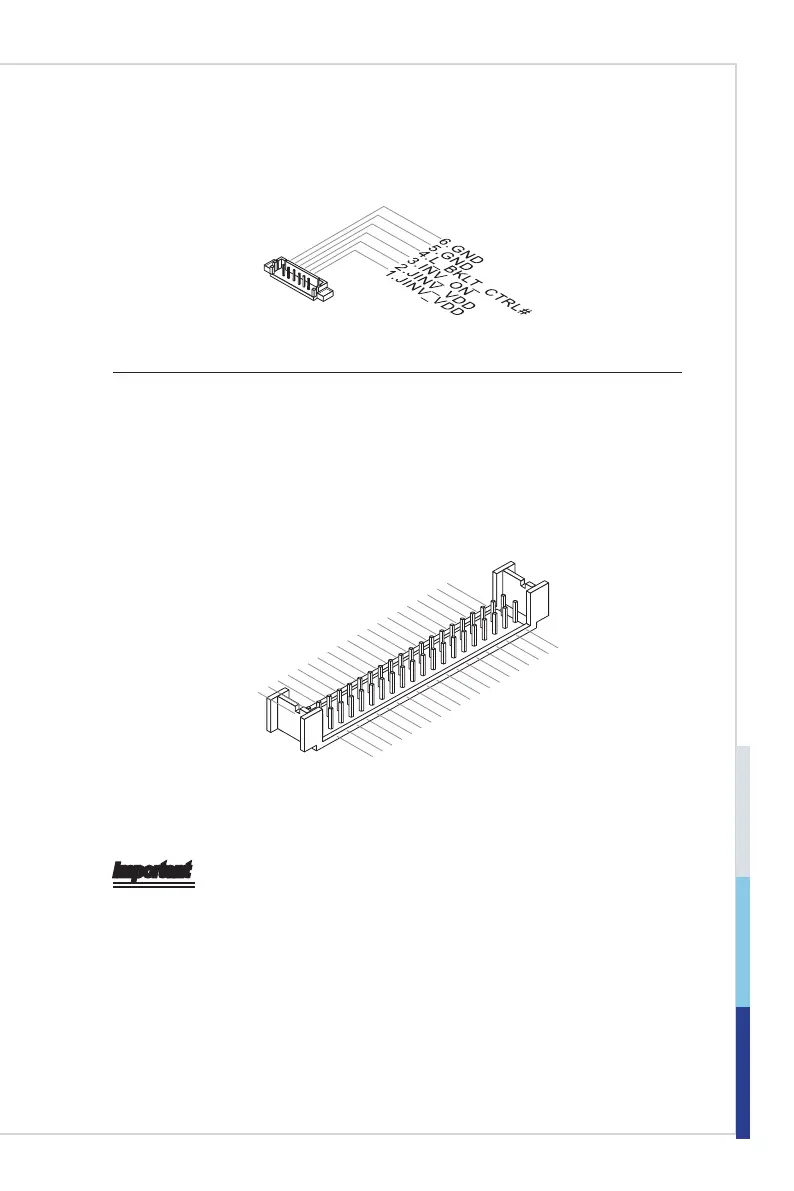
LVDS Inverter Connector: JINVDD1
The connector is provided for LCD backlight options.
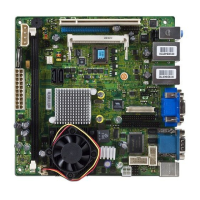
LVDS Connector: JLVDS1
The LVDS (Low Voltage Differential Signal) connector provides a digital interface
typically used with at panels. After connecting an LVDS interface at panel to
the JLVDS1, be sure to check the panel datasheet and set the LVDS jumper to
proper power voltage.
39.LVDSB_CLK
27.LVDSB_DATA#1
25.LVDSB_DATA1
23.GND
21.LVDSA_DATA#3
19.LVDSA_DATA3
17.GND
15.LVDSA_DATA#1
13.LVDSA_DATA1
11.LVDS_BLON
9.L_B KLT_CTRL#
7.LVDS_DDC_CLK
5.LCD _VDD
3.LCD _VDD
1.+12 V
LVDSA_CLK#
28.LVDSB_DATA#0
26.
LVDSB_DATA0
24.GND
22.LVDSA_DATA#2
20.LVDSA_DATA2
18.GND
16.LVDSA_DATA#0
14.LVDSA_DATA0
12.LVDS_DETECT# _C
10.LVDS_VDD_EN
LVDS_DDC_DATA
6.LCD _VDD
4.+12 V
2.+12 V
37.LVDSB_CLK
35.GND
33.LVDSB_DATA#3
31.LVDSB_DATA3
29.GND
38.LVDSA_CLK
36.GND
34.LVDSB_DATA#2
32.LVDSB_DATA2
30.GND
Important
Pin 12 is a detect pin� When using a customized LVDS cable, pin 12 should be a
signal ground with a low impedance� Otherwise, LVDS will not function�



 To Next Page