EasyManua.ls Logo

MTD 145-660A - TOOLS NEEDED

MTD 145-660A
34 pages
Print Icon
To Next Page IconTo Next Page
To Previous Page IconTo Previous Page
Loading...
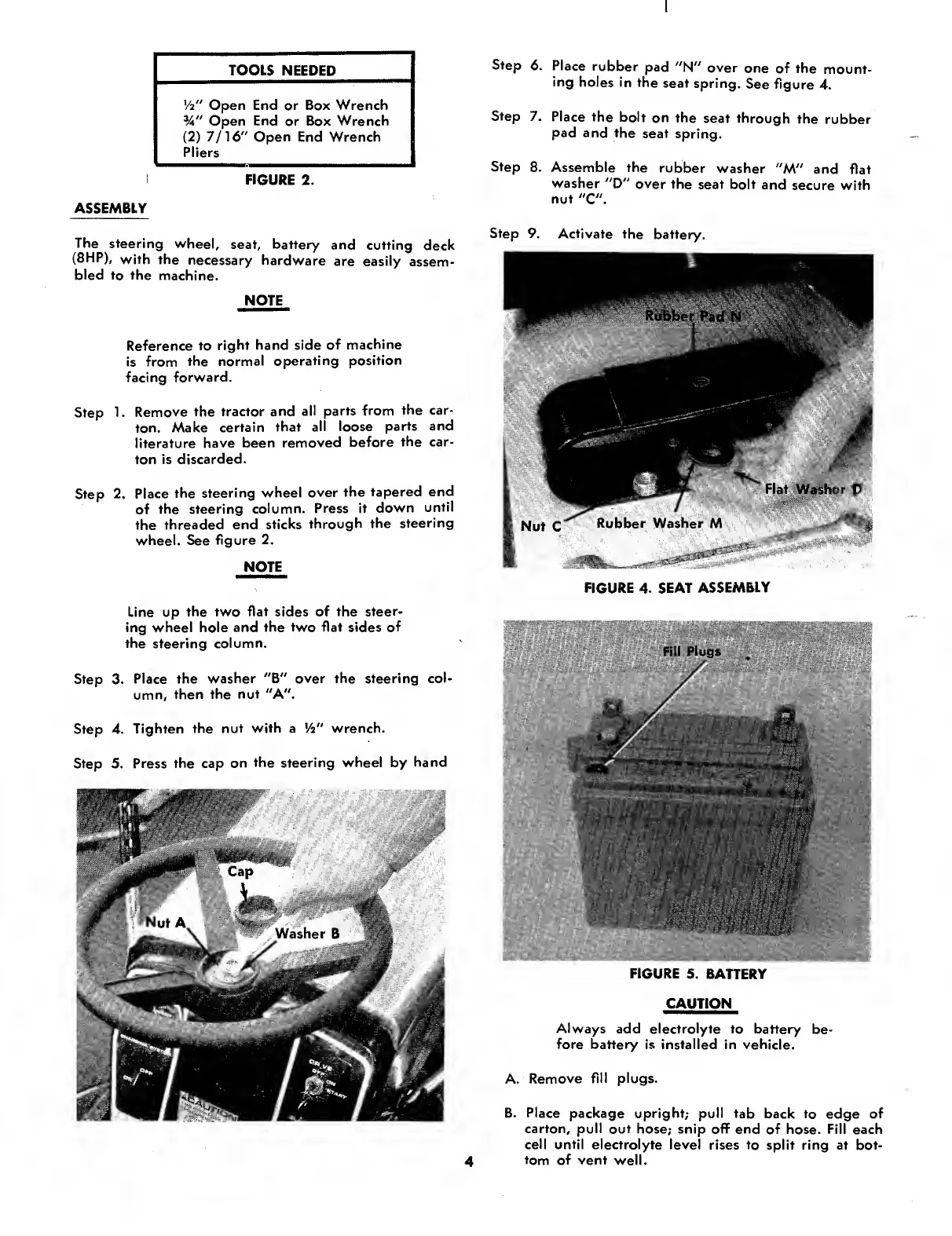
Step
6.
Place
rubber
pad
"N"
over
one
of
the
mount¬
ing
holes
in
the
seat
spring.
See
figure
4.
Step
7.
Place
the
bolt
on
the
seat
through
the
rubber
pad
and
the
seat
spring.
Step
8.
Assemble
the
rubber
washer
"M"
and
flat
washer
"D"
over
the
seat
bolt
and
secure
with
nut
"C".
Step
9.
Activate
the
battery.
FIGURE
4.
SEAT
ASSEMBLY
FIGURE
5.
BATTERY
CAUTION
Always
add
electrolyte
to
battery
be¬
fore
battery
is
installed
in
vehicle.
A.
Remove
fill
plugs.
B.
Place
package
upright;
pull
tab
back
to
edge
of
carton,
pull
out
hose;
snip
off
end
of
hose.
Fill
each
cell
until
electrolyte
level
rises
to
split
ring
at
bot¬
tom
of
vent
well.
ASSEMBLY
The
steering
wheel,
seat,
battery
and
cutting
deck
(8HP),
with
the
necessary
hardware
are
easily
assem¬
bled
to
the
machine.
NOTE
Reference
to
right
hand
side
of
machine
is
from
the
normal
operating
position
facing
forward.
Step
1.
Remove
the
tractor
and
all
parts
from
the
car¬
ton.
Make
certain
that
ali
loose
parts
and
literature
have
been
removed
before
the
car¬
ton
is
discarded.
Step
2.
Place
the
steering
wheel
over
the
tapered
end
of
the
steering
column.
Press
it
down
until
the
threaded
end
sticks
through
the
steering
wheel.
See
figure
2.
NOTE
Line
up
the
two
flat
sides
of
the
steer¬
ing
wheel
hole
and
the
two
flat
sides
of
the
steering
column.
Step
3.
Place
the
washer
"B"
over
the
steering
col¬
umn,
then
the
nut
"A".
Step
4.
Tighten
the
nut
with
a
Vi"
wrench.
Step
5.
Press
the
cap
on
the
steering
wheel
by
hand
TOOLS
NEEDED
Vi"
Open
End
or
Box
Wrench
%"
Open
End
or
Box
Wrench
(2)
7/16"
Open
End
Wrench
Pliers
FIGURE
2.
4

Other manuals for MTD 145-660A

Related product manuals